
See Apollo enrichment in Lumo
In a demo we show how to connect the key, set the monthly cap and enrich an organization. Pricing depends on users and modules.
You have a name and an email address. Apollo often knows the job title, the industry and the headcount too. Lumo uses your own Apollo account to fill in the empty fields only, within a monthly credit cap that you set.
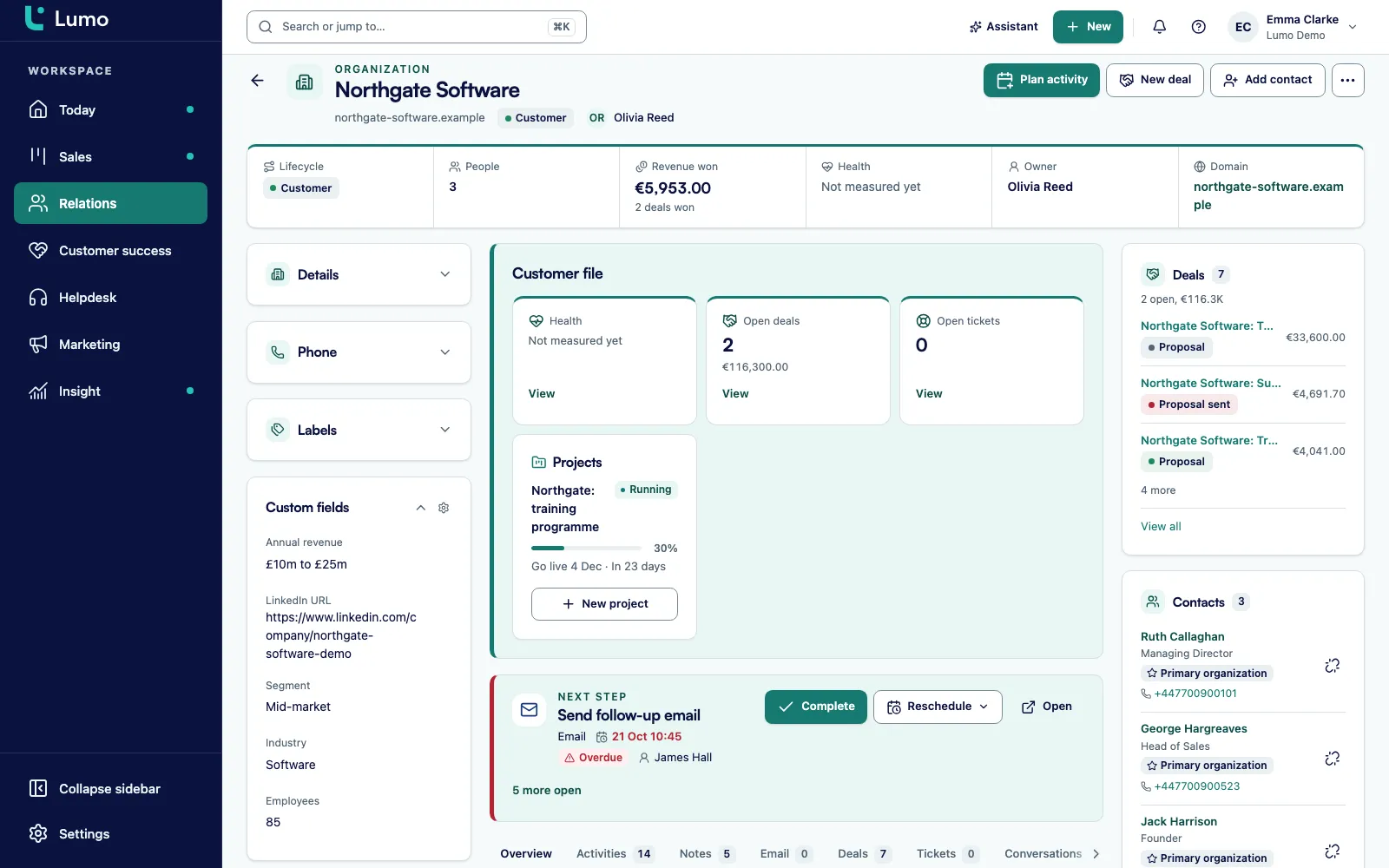
A demo request comes in through the form on your website. A name, an email address, maybe a company. That is it. The account executive who picks it up opens LinkedIn first, looks up the job title, checks how big the company is and what it does. A few minutes per lead. With ten leads a day that is an hour, every day, and most of what they find never makes it into the CRM.
So the fields stay empty. The organization has no industry, no headcount, no city. The person has no job title. It sounds minor, but everything downstream depends on it. A campaign segment for "manufacturers with more than 50 employees" returns nothing, because nobody ever filled in those fields. A sales manager who wants to see which industries stall in the pipeline gets a report where the largest group is called "unknown".
The usual fix is a separate tool. Export a list, run it through an enrichment service, import the result back. That works once. Then the two lists drift apart, the import overwrites a job title a colleague had just corrected by hand, and nobody can tell where any value came from.
Lumo does it differently. You connect your own Apollo account with an API key. Lumo asks Apollo for a person by email address or LinkedIn URL, and for an organization by domain. Whatever comes back only goes into fields that are still empty. Anything already there stays. The rest of the response is stored separately in an enrichment profile, so you can read it without it overwriting your own data.
Every enrichment costs credits in your Apollo account, so you set a monthly cap. The default is 100 credits. When the cap is reached, Lumo stops enriching until next month or until you raise it. You know in advance what you are spending, and enrichment becomes a routine part of your contact management instead of a clean up project that happens once a year.
From API key to an enriched organization in five steps. An admin sets it up once, then the whole team can enrich.
An admin turns on the enrichment feature in Settings. While it is off, the screens are hidden, the API returns a 404 and the related MCP tools disappear.
Go to Settings, Enrichment. In Apollo you find the key under Settings, Integrations, API keys. Paste it and click Test key. Lumo only saves the key once the test passes.
Turn on what you need: enrich people, enrich organizations and, if you want, enrich recognized website visitors automatically. Set the maximum number of credits per month, 100 by default. Finish with Connect.
You request enrichment for a person or an organization, or through the API. A person is looked up by email address or LinkedIn URL, an organization by domain. Empty fields are filled, everything else goes to the enrichment profile.
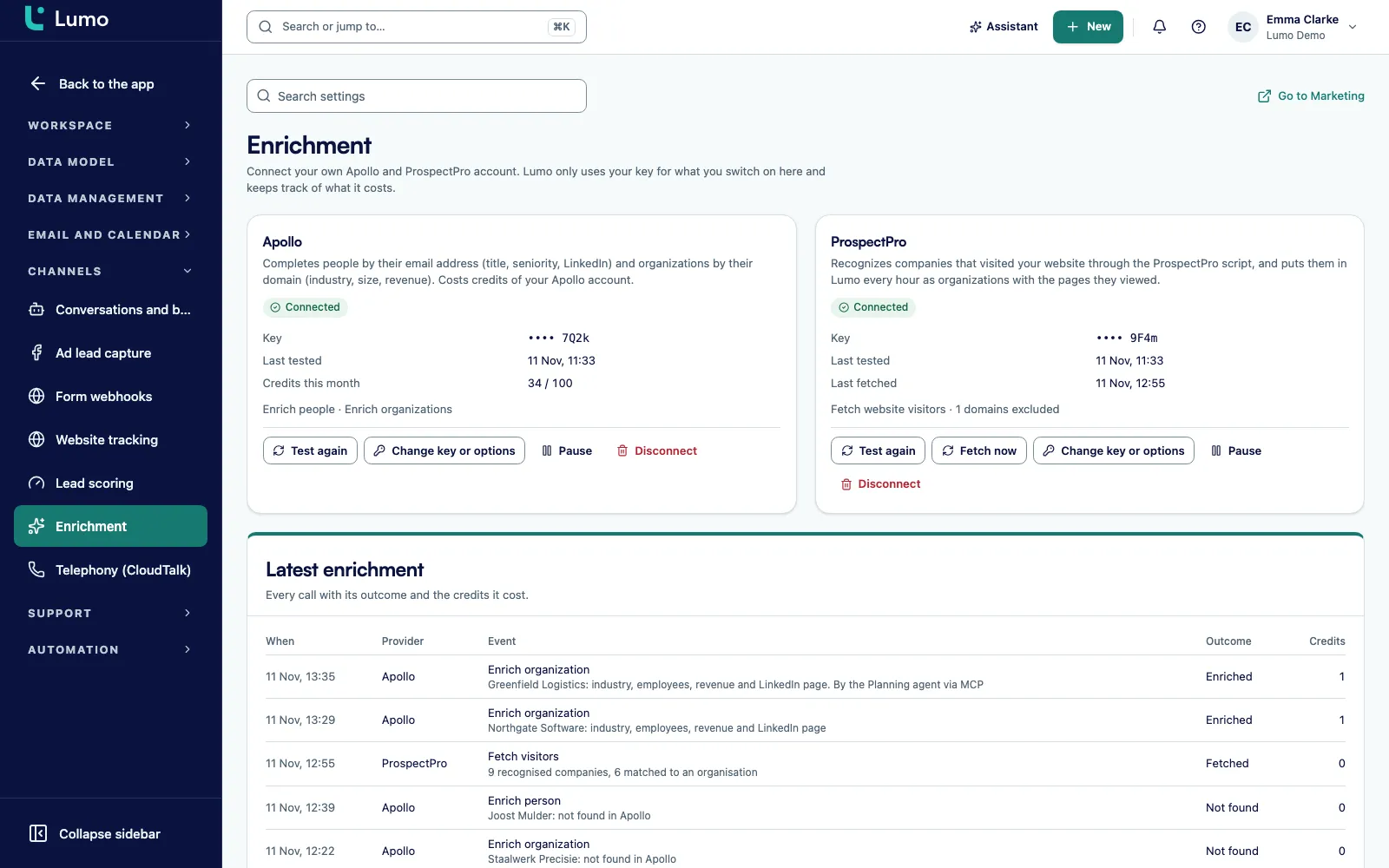
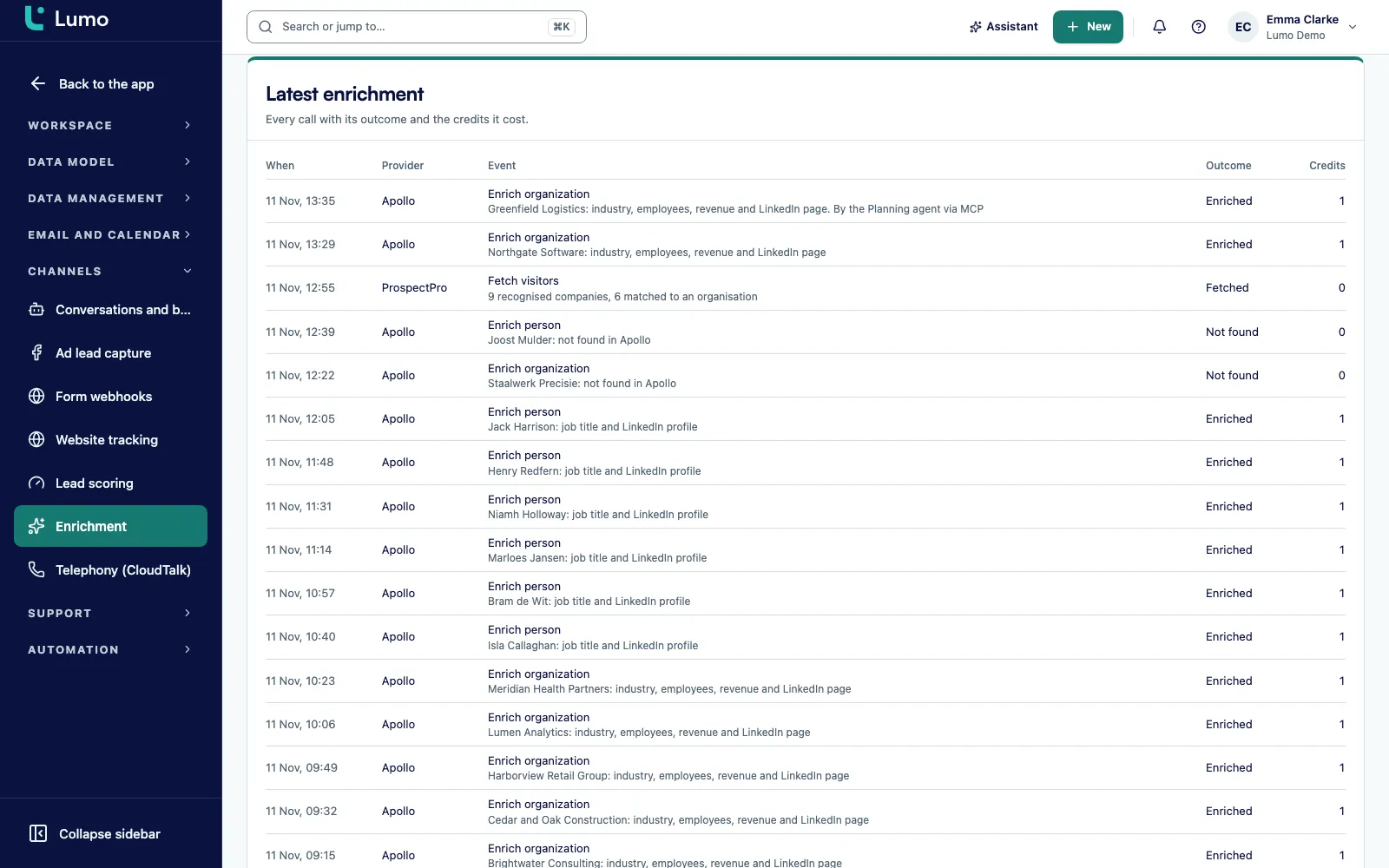
The Latest enrichment log shows the provider, the outcome and the credits for every call, and a counter shows the credits used this month. The connection shows Connected, Not working, Paused or Not connected, and you can pause and resume at any time.
The biggest risk with enrichment is losing good data. A rep has just corrected a contact's job title because she moved from procurement to operations director. A week later a bulk import runs and the old title is back. From that moment nobody trusts the CRM.
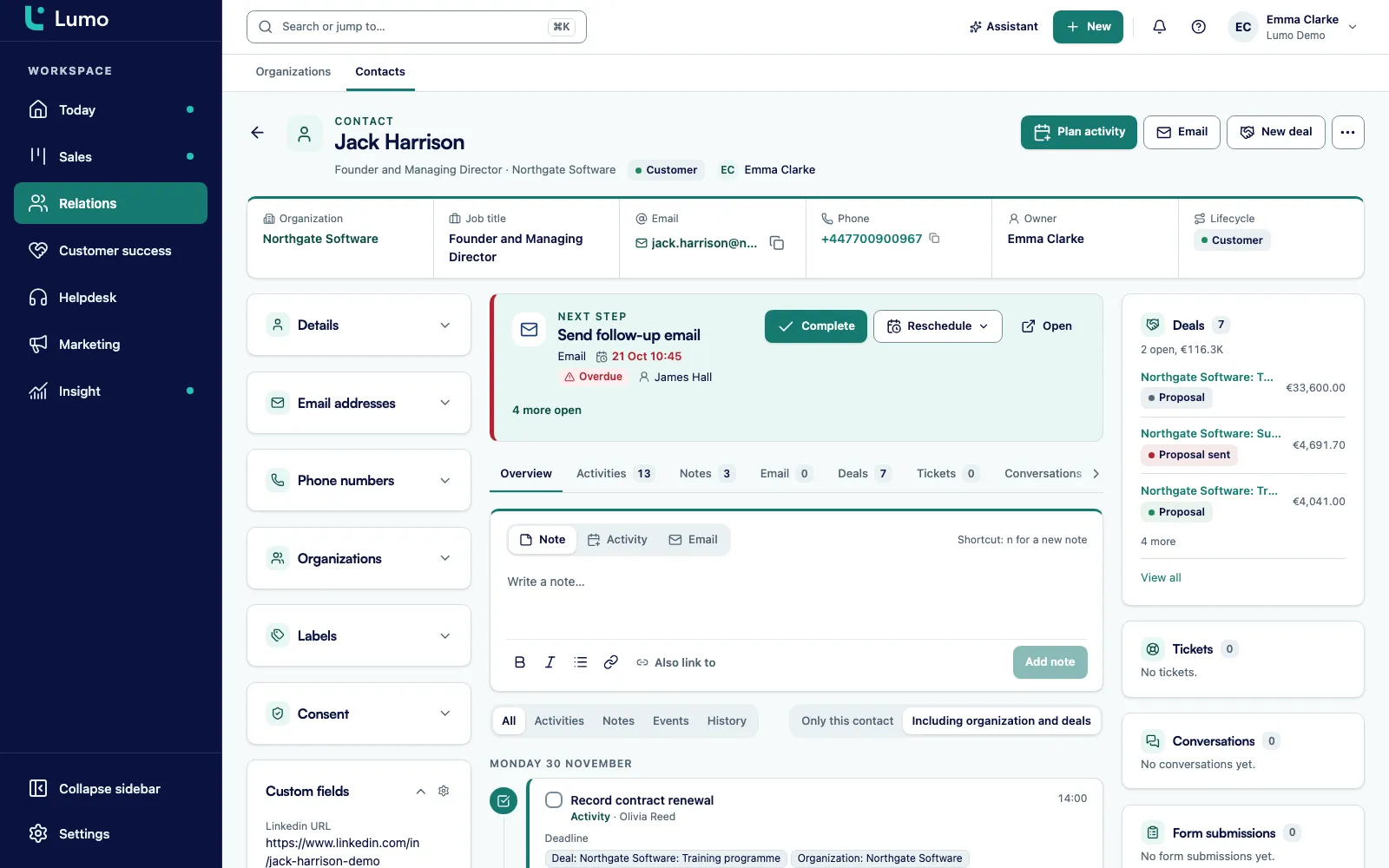
That is why Lumo only fills fields that are empty. For a person that means the job title and the LinkedIn URL. Lumo also links the person to an organization, or creates that organization if it does not exist yet. For an organization it means industry, number of employees, revenue, city and LinkedIn. If a field already has a value, the value stays.
The rest of what Apollo returns is not thrown away. It is stored in the enrichment profile of that person or organization. You can read it there, and an agent can fetch it. The extra context is at hand without cluttering your own fields. If you want to merge duplicates before you start, use duplicate management first. Every enrichment then lands on the right record.
Apollo charges in credits, and those come out of your own Apollo plan. Lumo has no shared Apollo key. Without your key, not a single request goes to Apollo. That is deliberate: you keep control of the account, the plan and the spend.
On the connection screen you set the maximum number of credits per month. The default is 100. You can go as low as 0 or as high as 100000. Once the cap is reached, Lumo stops enriching and shows a message that the monthly credit limit has been reached. A scheduled job can never burn through your monthly budget overnight.
If your Apollo account itself runs dry, Lumo spots that too and tells you to upgrade your plan in Apollo. The connection always has one of four statuses, so you see at a glance where things stand: Connected, Not working, Paused or Not connected. From the same screen an admin can test the key again, change the key or the options, pause, resume or disconnect.
Enrichment also works with website visitor tracking. Lumo recognizes companies that visit your site and links them to organizations in the CRM. A recognized organization often has little more than a domain. That is exactly where Apollo helps, because organizations are matched on domain.
Turn on automatic enrichment of recognized visitors and Lumo enriches at most ten recognized organizations every hour. Nobody clicks anything, so this costs credits without anyone asking. That is why the option is separate from the other two, and why it counts toward the same monthly cap. A sensible start is to leave it off and switch it on once you know how many visitors arrive each week.
Every enrichment, manual or automatic, shows up in Latest enrichment. Each row tells you the provider, what happened and how many credits it cost. A row is either enriched, not found, skipped or failed. A person with no email address and no LinkedIn URL is skipped and costs 0 credits. You can see exactly where your credits go.
You connect with your own API key. Lumo has no shared key, so nothing goes to Apollo without yours.
Test key runs before the key is saved. A key that fails the test never gets stored.
The key is encrypted with AES-256-GCM. Only an owner or admin manages it. Members can enrich but never see the key.
A person by email address or LinkedIn URL, an organization by domain. Without one of those there is nothing to look up.
100 credits a month by default, adjustable from 0 to 100000. Above the cap, enrichment pauses until next month.
Anything that does not fit an empty field is kept on the profile of the person or organization, readable through the API and MCP.
Latest enrichment shows provider, outcome and credits, including the lookups that found nothing or were skipped.
Pausing stops all enrichment and sets the status to Paused. Resuming switches it back on.
Lumo is a RevOps CRM with Marketing, Sales and Customer Success and Support under one roof. Enrichment helps each role in a different way.
Open a new lead and the job title and company size are already there. No research tab before the first call.
With industry and headcount on every organization, pipeline reports show where deals stall instead of one large group called unknown.
Segments by industry or company size only work when those fields are filled. Recognized website visitors get context on their own.
For existing customers you see the LinkedIn page and city of the organization without anyone looking it up.
You set the cap, decide which options are on and read the log to see where credits go. More on Lumo for RevOps and leadership.
The cost sits in your own Apollo plan, with a hard monthly limit. No surprises at the end of the month.
Imagine a logistics services company with eight account managers. For this example we will call it Sample Freight. It has 600 organizations in Lumo. Most have a name and a domain, few have an industry, and almost none have a headcount. Marketing wants to run a campaign for companies between 100 and 500 employees, but there is no way to build that segment.
The operations lead switches on the enrichment feature on a Monday. She copies the API key from Apollo under Settings, Integrations, API keys and pastes it into Lumo. Test key passes. She enables enrichment for organizations and people, leaves automatic enrichment of website visitors off for now, keeps the monthly cap at the default of 100 credits and clicks Connect.
She does not enrich everything at once. She starts with organizations that have an open deal, because that is where sales benefits most. The results come in on the Latest enrichment log. Most rows are enriched. A few say not found, where the domain turned out to be a generic mail provider. Some of the people are skipped, because they had neither an email address nor a LinkedIn URL. Those cost nothing.
By Wednesday Lumo reports that the monthly credit limit has been reached. Nothing else runs and nobody gets a surprise invoice. She checks the counter with the managing director, they agree on a higher cap for the rest of the month, and the organizations without a deal follow.
The next week she turns on automatic enrichment for recognized visitors. Every hour at most ten companies that visited the website get enriched, and sales uses lead scoring to see which of them are warm. The campaign for companies between 100 and 500 employees can now be built. This is an illustration, not a customer story: the numbers are made up to show how the parts fit together.
Lumo is built for people and AI agents working on the same data. Anything your team does on screen, an agent can do through the MCP server or the REST API. Enrichment is no exception.
With a key that has the marketing:write scope, an agent can enrich a person with enrich_person and an organization with enrich_organization. With marketing:read it can read the enrichment profile with get_enrichment_profiles, the log with list_enrichment_log and the connections with list_enrichment_connections. Every tool is also a REST endpoint under /api/v1/tools, for example /api/v1/tools/enrich_person.
Managing the connection itself takes more. connect_enrichment_provider, update_enrichment_connection, test_enrichment_connection and disconnect_enrichment_provider only work with the workspace:admin scope. A regular agent key cannot change or remove your Apollo key. The monthly cap applies to agents just as it does to people, because they go through the same functions.
One thing to know: the AI assistant inside the app has no enrichment tools. Enrichment by an agent runs through MCP or the API. How to connect an agent is covered on API and integrations and in the integrations overview.
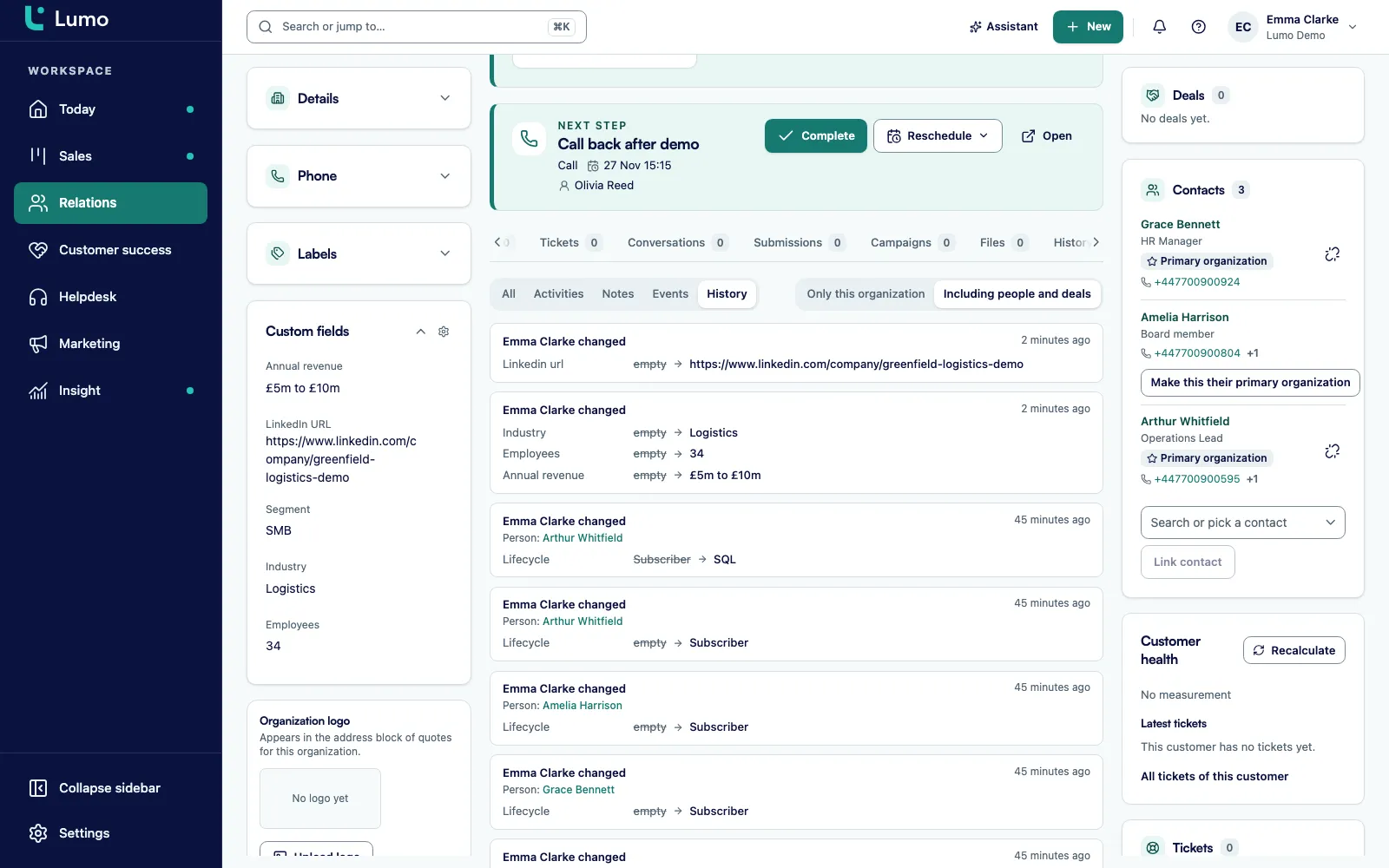
Enrichment does not live on its own. The fields Apollo fills are ordinary fields on people and organizations in your contact management. You see them on the record and in lists, next to what your team types in.
With website visitor tracking, Lumo recognizes companies on your site, and enrichment fills them in when you allow it. Lead scoring then helps you decide who gets attention first. A person with a LinkedIn URL can be followed up through LinkedIn outreach.
Next to Apollo you can connect ProspectPro on the same screen, which brings in companies that visited your website. The Marketing overview has a setup block with the step Connect Apollo or ProspectPro, marked done or to do, so you can see straight away whether it has been set up.
Lumo only uses Apollo to enrich people and organizations that are already in Lumo. There is no import of Apollo lists, saved searches or sequences, and Lumo does not prospect for new people through Apollo. Lumo also never asks Apollo for email addresses or phone numbers, so enrichment does not fill those fields.
What to do instead: find prospects in Apollo itself and add them to Lumo, or let them come in through web forms and LinkedIn. Phone numbers are recorded on the person. And because existing values are never overwritten, enrichment is not a data clean up tool. Outdated fields you correct yourself, or clear them so a new enrichment can fill them again. Apart from Apollo, ProspectPro is the only other provider.
Yes. You connect your own account with an API key. Lumo has no shared Apollo key, so without yours no request goes to Apollo. Credits come out of your Apollo plan.
No. Lumo only enriches people and organizations that already exist in Lumo. Contact lists, saved searches and sequences from Apollo are not imported.
No. Lumo never asks Apollo for them. A person gets a job title, a LinkedIn URL and an organization. An organization gets industry, headcount, revenue, city and LinkedIn.
No. Only empty fields are filled. Whatever was there stays. The rest of the response goes to the enrichment profile.
At most what you set. The default is 100, and you can choose anything from 0 to 100000. When the cap is reached, enrichment stops and you see a message. The credits for each call are listed in the Latest enrichment log.
There is nothing to look up. The call is marked as skipped and costs 0 credits.
Only an owner or admin manages the key, which is stored encrypted. Members can enrich but never see the key. Viewers cannot enrich.
Yes, through MCP or the REST API with enrich_person and enrich_organization under the marketing:write scope. Managing the connection requires workspace:admin. The in app AI assistant has no enrichment tools.
Your Lumo data is hosted in London, in the United Kingdom. Lookups go to the Apollo API directly, using your key.
In a demo we show how to connect the key, set the monthly cap and enrich an organization. Pricing depends on users and modules.