See your follow up in Lumo
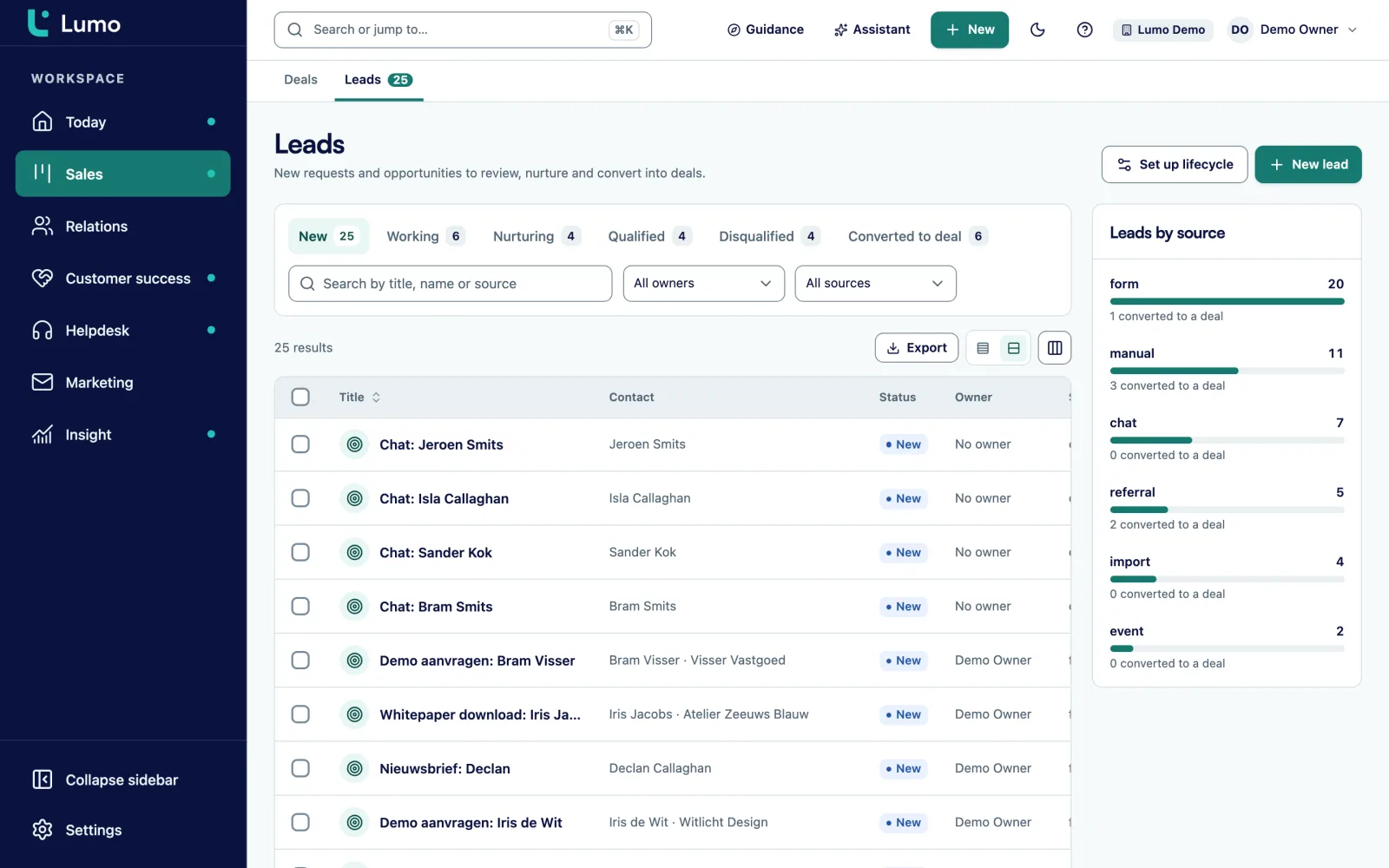
In a demo we show how a lead from your form comes in, gets an owner and a task and appears on the Today page. Or request a trial workspace.
Most leads are not lost to a competitor. They are lost to silence. This guide gives you a follow up cadence per day, sample messages to start from, qualification questions and a way to automate lead follow up without it feeling like spam.
A familiar week. On Monday a request comes in through the website form from a company that fits your target market exactly. The email goes to info@, someone forwards it to sales, and the rep who gets it is on site for two days. On Thursday he calls. Voicemail. He sends an email. No reply. Next week is busy, and after that it is forgotten.
Three weeks later it turns out the company went with a supplier who called back the same afternoon. Not because they were better, but because they were there.
This rarely goes wrong on intent. It goes wrong on three things. There is no fixed owner the moment a lead comes in. There is no agreement on how fast and how often you follow up. And there is no place where you see which leads have not been contacted yet.
Following up fast helps, because someone who just filled in a form is thinking about the topic right then. A day later they are busy with something else. But fast is not enough. If you call once and stop, you miss most people. They are in meetings, on holiday or simply busy. The difference is consistency: a fixed number of attempts, spread over a few weeks, across different channels.
That takes a follow up cadence. A fixed schedule that says when you do what, so it does not depend on how busy the rep is that week. Below is a cadence you can copy, the messages that go with it and the agreements to make with your team.
This guide covers inbound leads: people who reached out through a form, chat, an event or an ad. For the next step, when a lead becomes a deal, read the guide on B2B pipeline stages.
Forms, chat, events, ads, phone: every lead goes into your CRM as a lead, with a source. No more leads in a shared inbox or a spreadsheet. A lead that is not in the CRM cannot be followed up.
Agree who gets which leads: by region, by product, in rotation or by availability. A lead without an owner is a lead nobody owns. Automate the assignment where you can.
For example: every inbound lead gets a first attempt within four working hours. Choose a time your team can actually meet, and measure it. An agreement nobody keeps is worse than none.
A fixed schedule of attempts over two to three weeks, alternating calls and emails. Every attempt is a scheduled activity in the CRM, so the rep does not have to remember the next step.
Once you reach someone, ask the same four or five questions. They tell you whether it becomes a deal, a lead for later or not a fit. Write the answers on the lead.
Every lead ends somewhere: converted to a deal, nurturing for later, or disqualified with a reason. No leads open for months. Go through the list of open leads older than three weeks every week.
A cadence for an inbound B2B lead with eight attempts in fifteen working days. Day 1 is the day the lead comes in. As soon as you reach someone, stop the cadence and start qualifying.
| Topic | What you do | Purpose |
|---|---|---|
| Day 1, within four working hours | Call. No answer: short voicemail with your name and that you are sending an email. | Reach them while the topic is still on their mind. |
| Day 1, right after | Email referring to their question, two times to talk and your direct number. | A written trail and an easy way to reply. |
| Day 2 | Call at a different time of day than day 1. | Many people are reachable at a fixed time of day. |
| Day 4 | Email with one useful piece of information that fits their question, such as an explanation or example. | Show that you read their question. |
| Day 6 | Call. No voicemail if there is no answer. | Another chance without pushing too hard. |
| Day 8 | A LinkedIn connection request or message, if that is normal in your market. | A different channel for people who do not read email. |
| Day 11 | Call and a short email: "I tried you a few times. Is this still on your list?" | Make an easy yes or no possible. |
| Day 15 | Closing email: you stop calling, the door is open, and how they reach you. | Close it properly. Often the email people do reply to. |
| After that | Status nurturing or disqualified, with a reason. For nurturing, a task in three months. | No open leads without a next step. |
An example. Adjust days and channels to your market. For a warm lead, for example someone who asked for a quote, you can move faster.
Short messages work best. They show you read the question and make it easy to reply. These are examples to build on. Rewrite them in your own words.
Subject: Your question about [topic]
"Hi [first name], you got in touch through our website this morning about [short summary of the question]. I just tried to call you. Would Tuesday at ten or Wednesday at three work for a fifteen minute call? You can also call me directly on [number]. Best, [name]"
Subject: About [topic]
"Hi [first name], since you asked about [topic], here is something to start with: [one paragraph or link that actually answers it]. If useful, I can walk you through it for your situation in fifteen minutes. Just let me know what suits you."
Subject: Still relevant?
"Hi [first name], I have tried to reach you a few times. Is your question about [topic] still relevant? A short yes or no is fine."
Subject: I will stop calling
"Hi [first name], I have not heard back, so I assume this is not a priority right now. I will not call again. If it comes back on your list, feel free to email or call me on [number]. Good luck with [something from their question]."
Note: these are one to one emails to someone who reached out first. That is different from a campaign to a list. Marketing email has different rules around consent. For that, read the guide on B2B email marketing and GDPR.
Ask them in normal conversation, not as a questionnaire. Write the answers on the lead.
You can measure the effect of a cadence without guessing. A made up example shows how.
A team gets 80 inbound leads in a month. Without a fixed cadence, a rep makes on average one and a half attempts per lead. Of the 80 leads, 26 are reached and 9 become a deal.
The team introduces a cadence of eight attempts. After a month the average is five attempts per lead, because some leads reply earlier. Of the 80 leads, 41 are now reached and 14 become a deal.
The numbers are invented, but the method is real. Count in your own CRM per month:
Do that for a month before and a month after introducing the cadence. Then you see what it does in your market. Also look at which attempt people respond to. If almost nobody replies after attempt six, you can shorten the cadence. The guide on sales KPIs shows how to put these numbers in a report.
Automation sounds like automatic email. Usually it is not, and that is a good thing. An automated email pretending to be personal is easy to spot. What you do automate is the work around it, so the rep only has to have the conversation.
That way it stays personal and still does not get forgotten. Use templates as a starting point for your emails, but adjust them per person. Two sentences about their situation make the difference.
If requests land in info@ and stay there, nobody knows who picks them up. Let forms and chat go straight into your CRM.
You will not reach most people on the first try. Agree on a fixed number of attempts and stick to it, also when it is busy.
A newsletter sign up is not a sales request. Keep source and status apart, so reps spend their time on people who asked to be contacted.
A lead that sits on "working" for months muddies your numbers. Every lead gets an end status with a reason.
A lead that is not qualified yet does not belong in the pipeline. Convert it once you have answers to your qualification questions. Otherwise the first stage fills up with deals that never move.
In Lumo a lead has a status: New, Working, Nurturing, Qualified, Disqualified or Converted to deal. A lead has a source and a source detail, and converts to a deal exactly once. Leads come in through forms, chat and Facebook lead ads, or you create them by hand.
With automations you create a task as soon as a lead comes in, or when a lead has been stale for a number of days. The Today page brings the day's tasks, leads that need follow up and stalled deals together. You send email from your own Gmail with a template as a start. More on lead management and activities.
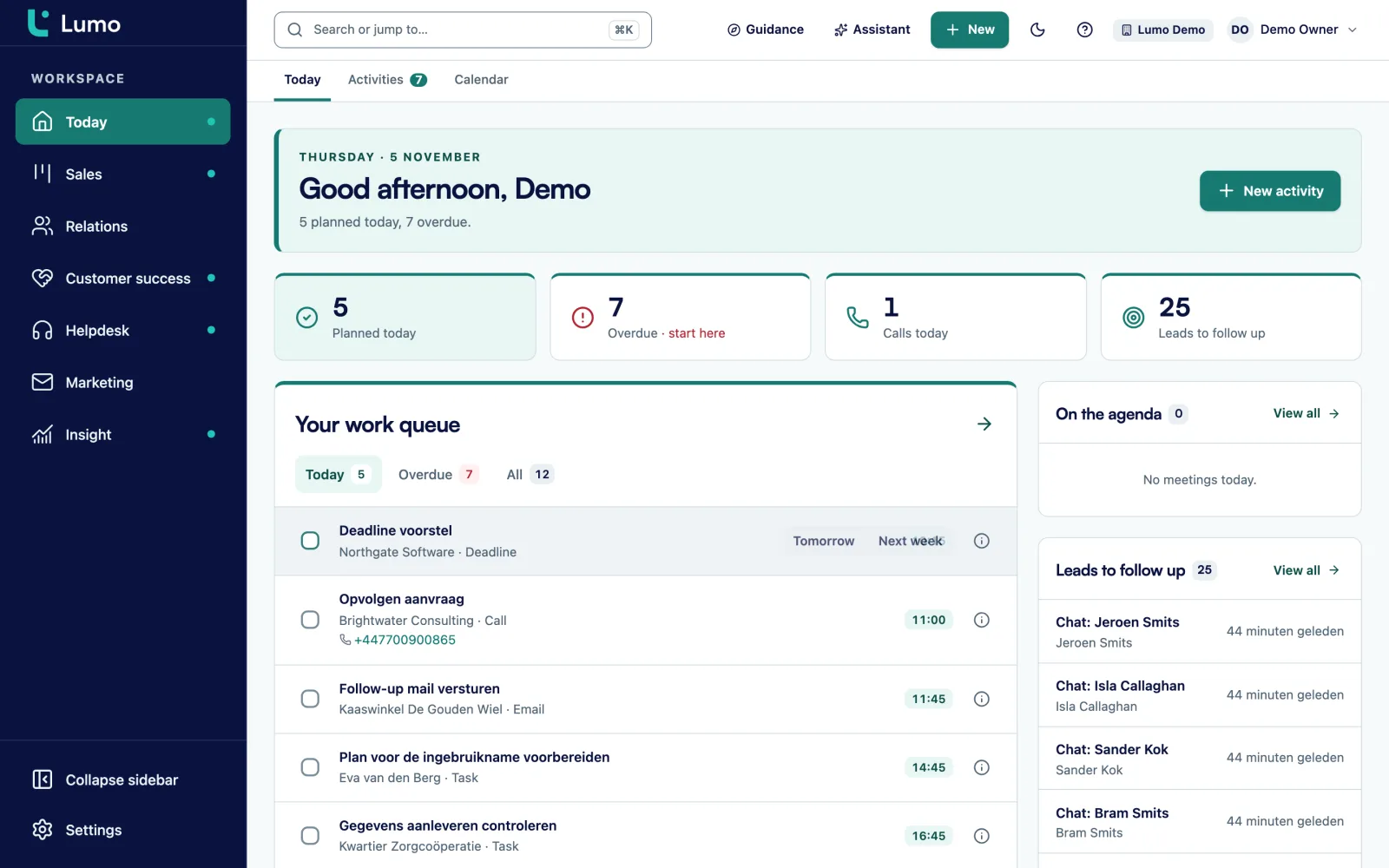
Automations in Lumo deliberately do not send email. They create tasks, notes and field changes, and the rep sends the message. A lead score in Lumo is a number you fill in by hand. There is no automatic scoring. Calls go through standard phone links, there is no built in telephony. Log the call as an activity afterwards.
As fast as your team can do consistently. Many B2B teams agree on a first attempt within four working hours. Pick a time you actually meet and measure it in your CRM.
A cadence of six to eight attempts over two to three weeks is common, alternating calls and emails. After a few months, check in your own numbers which attempt people still respond to and adjust.
A fixed schedule that says on which day you make which attempt, through which channel. That way follow up does not depend on how busy the rep is that week. The template in this guide gives an example per day.
Automate the work around it: capturing leads, assigning them, scheduling the first task and reminding when a lead goes stale. Keep the first conversation and the substantive emails personal.
When you have answers to your qualification questions and there is a concrete opportunity with a value and an expected close date. Converting earlier fills your pipeline with deals that do not move.
Close the cadence properly with a final email, and set the lead to nurturing or disqualified with a reason. For nurturing, schedule a task a few months out.
A contact is a person in your CRM. A lead is an opportunity that still needs qualifying, often linked to a contact. One person can have several leads over time.
A one to one reply to someone who reached out about their question is different from marketing email. Newsletters and campaigns generally need consent. This is not legal advice, see the guide on email marketing and GDPR.
In a demo we show how a lead from your form comes in, gets an owner and a task and appears on the Today page. Or request a trial workspace.