Plan your implementation with us
In a demo we show how an implementation with Lumo runs, with your number of users and your data. Or request a trial workspace and see for yourself.
Rolling out a CRM is not an IT project. It is a change project with software in it. This guide gives you an implementation plan per week, the roles you need, a runbook for the data migration and a checklist for go live day.
A CRM implementation rarely runs late because of technology. The software is usually ready within a day. What runs late is everything around it: decisions about stages and fields nobody wants to make, data that turns out messier than expected, and a team that keeps working in the old spreadsheet on go live day.
A familiar story. Leadership signs in January. In February every department sends a wish list. In March it turns out sales and marketing define a lead differently. In April the data is moved, complete with duplicate organisations and three year old deals. Go live is in May. By June half the team is back in spreadsheets because the CRM "does not work".
Each of those steps could have been avoided. Not with more time, but with a different order. Process first, then configuration. Clean first, then migrate. A small part live first, then the rest. And above all, one owner who decides when the group cannot agree.
At Sales Surge we have delivered more than 150 CRM implementations. The pattern that works is always the same: a short design, delivery in phases, and training on the team's own data rather than a demo environment. Below, that pattern is written out as a plan you can follow yourself.
Still choosing a tool? Read how to choose a CRM first. This guide assumes the choice has been made.
For a team of up to fifty users these are roles, not full time jobs. One person can hold two.
Decides when the group disagrees. Usually the sales manager or someone in RevOps. Without an owner every project runs late.
Keeps the plan, books the sessions and chases open points. Expect two to four hours a week.
Two or three people from the team who think along, test and later help colleagues. Pick people colleagues trust, not only the enthusiasts.
Knows where current data lives and decides what comes across. Often someone in sales support or finance.
For links with your website, accounting tool or other systems. Internal, or through an implementation partner.
Decides which numbers leadership wants to see. That decides which fields become required.
A plan for a sales team of ten to thirty users starting with pipeline and email. Add weeks for more modules or integrations.
| Topic | What happens | Done when |
|---|---|---|
| Week 1: discovery | Interviews per role, current process mapped, pain points and goals written down. | There is a one page process map and a list of ten pain points. |
| Week 2: design | Pipelines, stages with exit criteria, fields, roles, reports and the first automations. | The owner has signed off on the design. |
| Week 3: data clean up | Merge duplicates, close old deals, clean fields, decide what comes across. | There is a clean export and a list of what stays behind. |
| Week 4: configure | Create stages, fields, roles and users. Connect email and calendar. | Every key user can sign in and sees their own email on a test deal. |
| Week 5: dry run and test | Dry run import, spot checks, key users run through their scenarios. | Twenty spot checks are correct and open points are fixed or accepted. |
| Week 6: training and go live | Final import, training on own data, old system set to read only. | Everyone has updated a deal and scheduled an activity in the new CRM. |
| Weeks 7 and 8: aftercare | Daily question hour, weekly check on usage and data quality, small fixes. | The sales meeting runs on the dashboard from the CRM. |
| Phase 2 (month 3) | Switch on the next module: quotes, campaigns, forms or helpdesk. | A small plan of its own with the same steps. |
An example schedule. Your own timeline depends on the number of users, the state of your data and the number of integrations.
Spend thirty minutes per role. Ask what people do every day, what they miss and where they do work twice. Map the current process from lead to invoice. Write pain points down word for word, with the name of who said it. That list is your yardstick. After go live those points should be gone.
Decide which pipelines exist, which stages with which exit criteria, which fields are required and why, which roles see what, and which reports leadership wants. Every field needs a reason. A field no report uses gets left out. Our guide on B2B pipeline stages helps with the stages.
Export everything and look at it critically. Merge duplicate organisations and people. Close deals that have not moved in months as lost. Choose what comes across: usually all contacts, all open deals and won deals from the last two years. See also the guide on CRM data quality.
Turn the design into the system. Start with users and roles, then pipelines and stages, then fields. Connect email and calendar per user and check that email with a known contact lands in the right place. Then build the two or three automations that save the most manual work.
Run a test import and check samples: twenty random organisations, ten open deals, five people with a lot of history. Let key users run their own scenarios. Fix anything that is wrong now, or accept it on purpose.
Train in groups of four to six, on real data, in one hour sessions. Have everyone update a real deal during training. Set the old system to read only on go live day. Two working systems side by side is the fastest way back to the old one.
Hold a daily question hour for two weeks. Check usage weekly: who signs in, which deals have no next step, which fields stay empty. Fix small things fast. Larger wishes go on a list for phase 2. Also read how to increase CRM adoption.
A made up example to make the plan concrete. A technical wholesaler with twelve account managers, two inside sales staff and a sales manager. Customer data sits in an old CRM, quotes in Word and the forecast in a spreadsheet the sales manager updates every Monday.
Week 1. The project lead interviews four account managers, inside sales, the sales manager and finance. The main pain points: quotes are not followed up, nobody knows which customers have not been visited in six months, and the Monday forecast takes the sales manager two hours.
Week 2. The design gets two pipelines: new customers, and growth with existing customers. Six stages per pipeline with exit criteria. Twelve required fields instead of the forty in the old CRM. One report with the weighted pipeline per account manager per month.
Week 3. The data owner finds 1,800 organisations, and a first check suggests about 300 are duplicates. After merging, around 1,500 remain. Of 420 open deals, 260 are over a year old with no activity. They are closed as lost with the reason "no response".
Weeks 4 and 5. Configuration and dry run. The spot check shows contacts at twenty organisations attached to the wrong branch. That is fixed at the source and the dry run runs again.
Week 6. Three one hour training sessions with four account managers each. Everyone updates their own top five deals during the session. The old CRM goes read only.
Weeks 7 and 8. The daily question hour draws six people in week one and two in week two. The sales manager runs the Monday meeting from the dashboard.
Every number in this example is invented. What matters is the order and the decisions per week.
Work through these points in weeks 3 to 6, so only data you trust ends up in the new CRM.
Putting everything live at once feels efficient, but it means everything can go wrong at once. Start with the pipeline, email and calendar. Add quotes, campaigns or service when the team is ready. Each phase gets its own small plan.
If the old system still works, the team keeps working in it. Set it to read only on go live day and say so out loud in the training.
Every required field is a barrier to updating a deal. Only make a field required if a report actually uses it. Twelve well filled fields are worth more than forty half empty ones.
People learn from their own customers. Train on real data with their own deals. A demo with a made up company is forgotten within a week.
Go live is where it starts. Someone has to check usage and data quality every week and decide on requests. Without an owner the CRM fills up with fields and exceptions.
Outsourcing a CRM implementation can save a lot of time. But a partner cannot choose your process for you. Keep the owner and key users involved in every decision, even when someone else builds it.
If you do not know how things went before go live, you cannot show what improved after. In week 1, write down three things you can count. For example how many open deals have no next step, how long the Monday forecast takes, and how many quotes went without follow up last month. Count the same three things again after eight weeks. That makes the conversation with leadership a lot easier.
Lumo is the CRM built by Sales Surge. The approach in this guide is the one we use ourselves: a short design, delivery in phases and training on your own data.
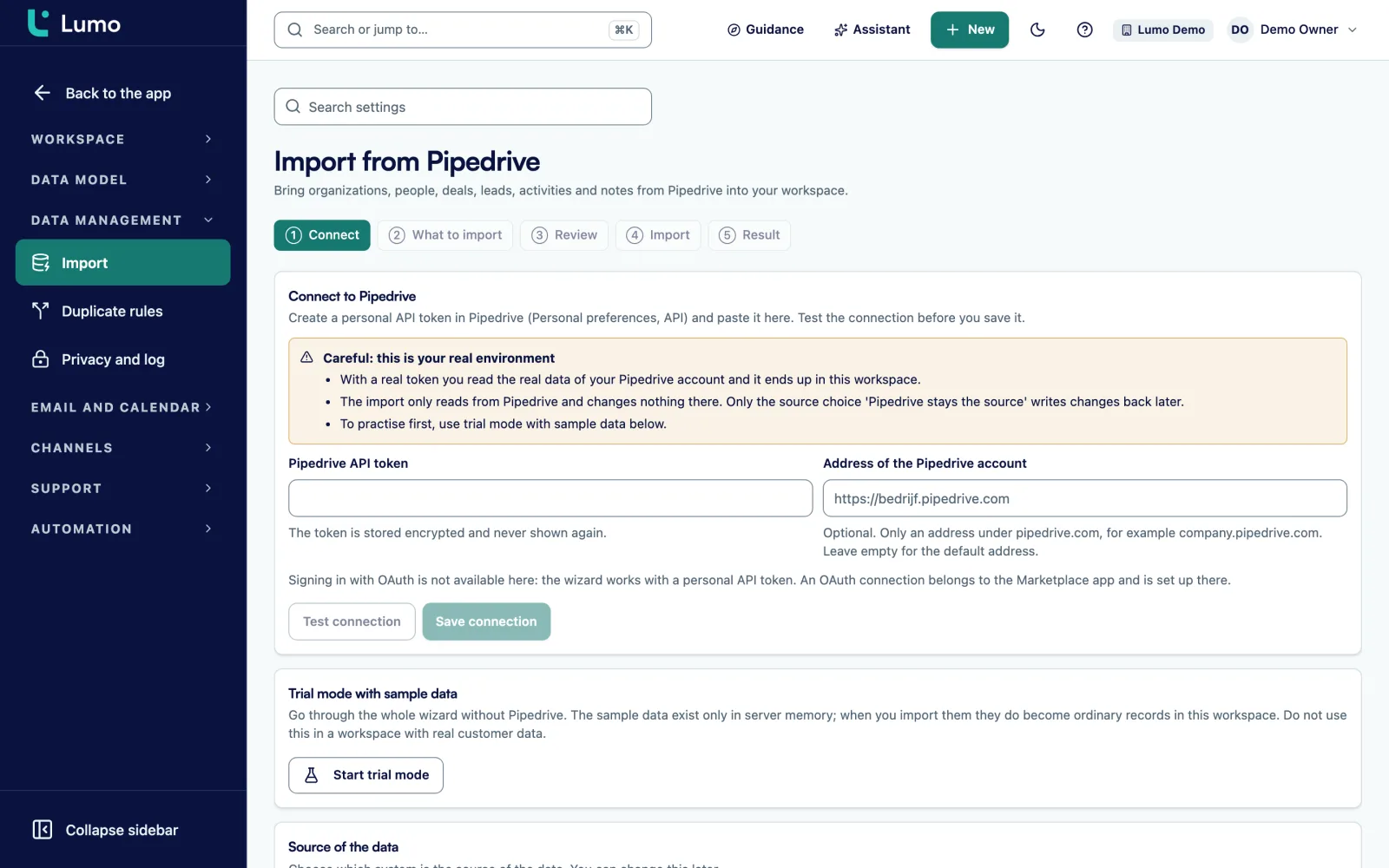
In Lumo you switch modules on per workspace. So you can start with deals, leads, email and calendar and add quotes, campaigns or the helpdesk later. If your data comes from Pipedrive, the import wizard runs a dry run and a review step first. If it comes from spreadsheets or another tool, we move it with you, because CSV import is not available yet. Read more about implementation and onboarding, our migration service or switching from Pipedrive.
The import wizard works for Pipedrive today. From other CRMs or spreadsheets we move your data with you. Email and calendar sync with Gmail and Google Calendar today. If your team uses Outlook, log email through the personal BCC address or by hand until the integration arrives. Include that in your plan for week 4.
For a sales team of ten to thirty users starting with pipeline and email, six to eight weeks including aftercare is a realistic plan. More modules, more integrations or messy data make it longer. Plan further modules as separate phases.
Discovery, design, data clean up, configuration and integration, dry run and testing, training and go live, and aftercare. New modules follow in small phases of their own with the same steps.
Yes, and it often saves a lot of time. A partner handles configuration, migration and training. What you cannot outsource are the decisions about your process. Keep your own owner and key users involved.
Usually all contacts, all open deals and won deals from the last two years. Old lost deals and low value activities often stay behind, or you keep them in an export. Decide per data type and write it down.
In groups of four to six, in one hour sessions, on their own data. Have everyone update a real deal and schedule an activity during the session. Then hold a daily question hour for two weeks.
Launching everything at once, keeping the old system running, too many required fields and training on a demo environment. And a project with no owner to make decisions.
Set it to read only on go live day. People can still look things up, but nobody works in it. Two systems you can work in almost always leads back to the old one.
After eight weeks, look at the pain points from discovery. Are they gone? Does the sales meeting run on the dashboard? Does every open deal have a next step? That says more than the number of logins.
In a demo we show how an implementation with Lumo runs, with your number of users and your data. Or request a trial workspace and see for yourself.