See the assistant on sample data
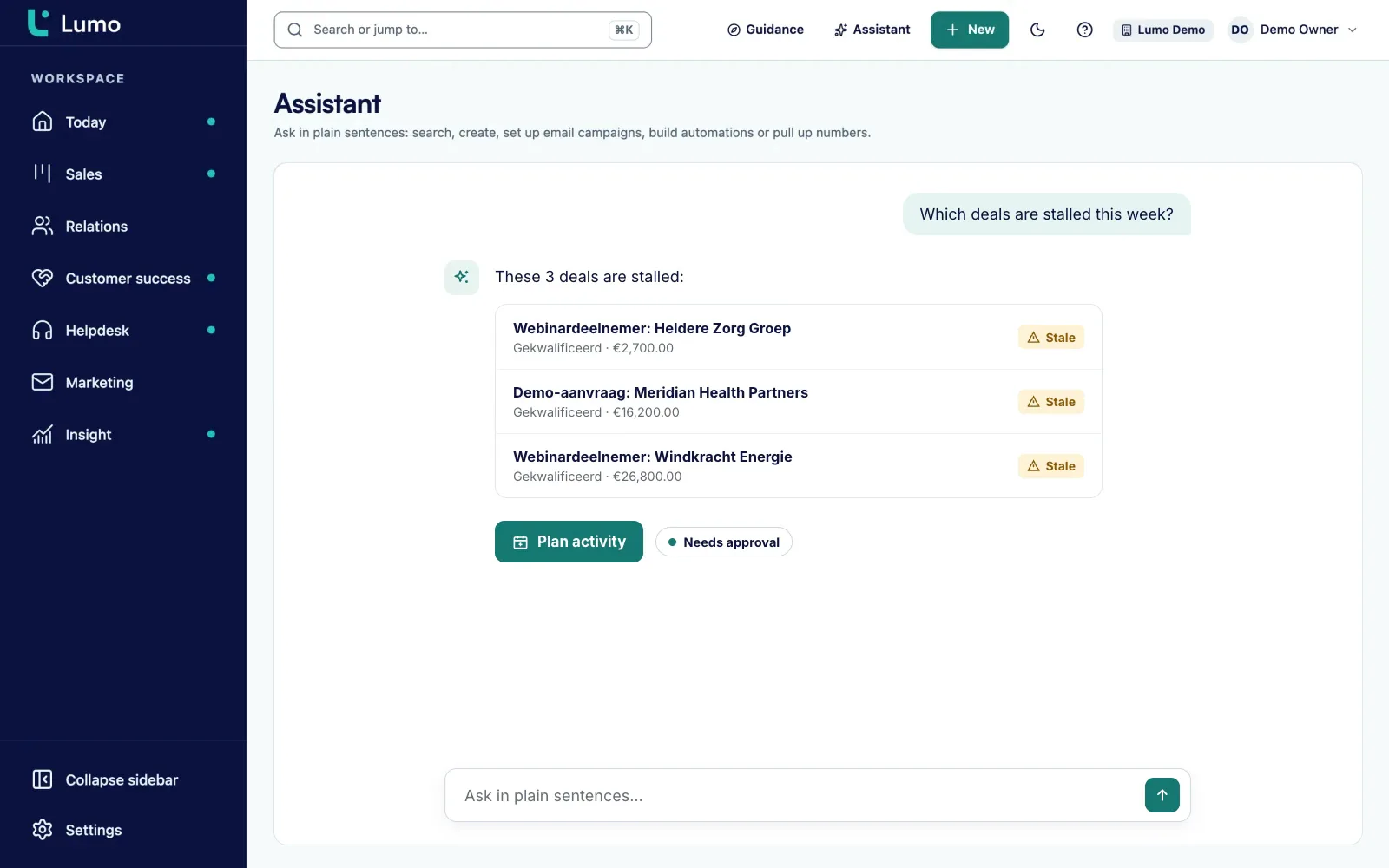
In the demo we ask the assistant questions in a workspace with sample data and show where it asks for approval.
Nearly every CRM has an AI button now. What that button does varies a lot. This guide explains how an AI assistant in a CRM works, where it saves time, where it goes wrong and what to agree on before you switch it on.
An AI assistant in a CRM is almost always a language model with tools. The model itself knows nothing about your customers. It was trained on a lot of text and is good at reading, summarizing and writing. What makes it useful inside a CRM are the tools: small, fixed functions the model is allowed to call. Find an organization. Fetch the open deals for this person. Draft an activity.
Ask "which deals in the proposal stage have had no activity for two weeks?" and roughly this happens:
That covers three kinds of work. Read: look up data and explain it. Draft: prepare an email, a segment, a report or an automation without changing anything. Act: actually save, send or switch something on. That split is the core of this guide. When reading, the worst outcome is a wrong answer. When acting, an email can go to two thousand people.
Worth knowing: the model does not remember your data between conversations unless the vendor builds it that way. It fetches what it needs every time. That is good for freshness, because it reads the current state. It is also why an assistant is only as good as the data in your CRM. If a deal has sat in the wrong stage for three months, the assistant will report that wrong stage back to you, neatly and with confidence.
So an AI assistant is not a separate brain that takes over your sales. It is another way to operate your CRM: one sentence instead of ten clicks. That saves time on work you can describe precisely. It helps little with work that needs judgement.
It sometimes makes things up. A language model writes what sounds likely. Most of the time that matches the data it just fetched. Sometimes it fills a gap with something that is not there: a job title, a date, an amount. This is called hallucination. Better tools make it rarer, but never zero. Any number from an assistant that you pass on to a customer or to your board, check in the record first.
It only knows what is in the CRM. Yesterday's phone call that nobody logged does not exist for the assistant. Neither does the meeting a colleague put in a private calendar. Ask "how are things with this customer?" and you get a summary of what was recorded, not of what happened.
It has no judgement. An assistant can list the ten deals that have been quiet the longest. It does not know that deal number three is quiet because the buyer is on holiday and that this is fine. It does not know that this buyer prefers a call to an email. Prioritizing, negotiating and deciding whether a lead fits remain human work.
It cannot count what was never defined. "How are we doing this quarter?" is not a question an assistant can answer unless you agreed what doing well means. "What is the win rate this quarter, won divided by won plus lost?" is. The more precise the question, the more reliable the answer. The guide on sales KPIs shows how to write those definitions.
It does not fix bad data. Duplicate organizations, empty fields and outdated stages flow straight into every answer. An assistant on a messy CRM gives messy answers, only faster. If in doubt, start with data quality.
For each use below you get what it delivers, what can go wrong and which safeguard to build in. The level in brackets is read, draft or act.
Decide for each use which level it sits on. The rule: the further it reaches outside, the more human control.
Search, summarize, count. Nothing changes. Safeguard: the assistant only sees what the user may see, and you check important numbers.
Emails, segments, reports and automations are prepared but not saved or sent. Safeguard: a person reads and edits the draft.
Update fields, create activities, mark a deal won. Safeguard: the assistant shows what will change and asks for approval. Everything goes into a log.
Send an email or campaign, switch on an automation. Safeguard: explicit approval for every action, never one approval for a whole batch.
The assistant may never do more than the person using it. A viewer who cannot edit anything cannot edit anything through the chat either.
Every call is recorded with who, what and when. A cap on messages keeps a mistake in a loop from happening a thousand times.
These are practical questions, not legal advice. What your GDPR or other privacy duties are exactly is something to discuss with your own privacy adviser or data protection officer.
An example plan for a team of ten to twenty people. Shift the weeks if your team moves at a different pace.
Check the basics: stages, owners, lost reasons, duplicate organizations. List the uses you want to try and the level each one sits on. Agree who may switch the assistant on and who reviews the log.
Let a rep, a manager and someone from service only search and summarize. They note which answers were right and which were not. That short list is worth a lot for the rest of the team.
The same group has the assistant prepare emails, reports and segments. Every draft is read before it is used. Write down the prompts that work and put them in a shared document.
A thirty minute session with the best examples from weeks 2 and 3. Acting inside the CRM is allowed, with approval. Sending outside is not yet.
Read the log. What was used a lot, what caused mistakes? Decide per use whether it stays, at which level, and whether campaigns may go through the assistant. Write it into your team agreements.
A good question to an assistant is precise about three things: which records, which period and what you want back. Below are templates to copy. Fill in the parts in brackets.
Preparing a call. "Summarize the deal [name]: stage, value, last three activities and open tasks. Only use what is in the CRM and say so if something is missing."
Following up. "Write a short follow-up email to [person] after our call on [date]. Use the last note. Make no promises on price or delivery time. At most 120 words, tone: businesslike and friendly."
Monday start. "Show my open deals in the stage [stage] with no activity in the last [number] days, sorted by value, with the owner."
Report. "Create a report: number of won deals per month this calendar year, split by pipeline. Use the date the deal was won."
Segment. "Build a segment of people at organizations in the [industry] industry who gave marketing consent and received no campaign in the last [number] months. Show the count first."
Clean-up. "Show organizations without an owner and people without an email address created in the last [number] months. Change nothing."
Note the last sentence of the clean-up template. "Change nothing" and "show the count first" are small phrases that keep a read question a read question. And ask for sources: "name the record for every number" makes checking much faster.
Do not measure an assistant by the number of messages. That only shows people open it. Pick two or three questions you can answer before and after the rollout:
Write down the starting point before you begin. Without a baseline every review becomes a feeling.
Approving on autopilot. Someone who clicks approve twenty times a day stops reading at some point. Keep the actions that need approval limited to the ones that matter.
Treating the assistant as the source of truth. A chat answer is a summary of the CRM, not a replacement. If a number goes into a board report, it comes from the report.
Sensitive data on a free model. Some free plans with model providers may use your input for training. Pick a plan or key where that does not happen before you work with real customer data.
Expecting AI to score your leads. An assistant that reads does not produce a reliable score by itself. A score you want to steer on needs agreed criteria.
Lumo has an AI assistant with 52 tools: 21 to read, 23 to draft and 8 that commit a change. It searches, creates and updates people, organizations, deals, leads, activities and notes, builds segments and templates, prepares campaigns, creates reports and dashboards from a sentence and builds automations with a dry run.
The assistant is off per workspace until an owner or admin switches it on. It runs with the user’s own role and permissions. Actions that cannot be undone or that reach outside only run after a click on Akkoord, the approve button. There is a limit of 40 messages per 10 minutes per user, and every tool call is logged.
By default it runs on Google Gemini Flash. You can switch to Groq, OpenRouter or Mistral. Lumo’s own data is stored in London, in the United Kingdom. Read more on the security page.
Free plans with a model provider may use input for training. So choose a key or plan that fits your data before you switch the assistant on. Lumo does not score leads automatically: the score is a number you fill in yourself, on criteria your team agrees. And the live chat on your website is not an AI chatbot. It is a chat channel with fixed texts that a person answers.
It looks up data, summarizes it, prepares drafts such as emails, segments and reports, and if you allow it, takes actions such as updating a field. It does this through fixed tools in the CRM.
No. An assistant takes over lookups and first drafts. Prioritizing, negotiating and deciding stay with people, because they need judgement and context that are not in the CRM.
As reliable as the data and the question. A language model can also make things up. Always check numbers you pass on in the record or report itself.
That depends on which model runs, where it processes data, whether input is used for training and whether the assistant runs with your permissions. Ask your vendor and discuss the legal side with your privacy adviser.
For outward actions such as sending an email or a campaign, yes. Also for actions you cannot undo. Reading and drafting do not need it.
Some systems do. A score is only useful when the criteria are right and your team understands them. Start with a simple score on agreed criteria before you automate anything.
With clean basic data and a few pilot users who only read. Then add drafts, and only when that goes well, actions. A five week plan is above.
Google Gemini Flash by default. An admin can switch to Groq, OpenRouter or Mistral.
No. It is off per workspace until an owner or admin switches it on.
In the demo we ask the assistant questions in a workspace with sample data and show where it asks for approval.