See how Lumo works for an Outlook team
In the demo we show Lumo with the BCC address in Outlook and your own pipeline next to it. Then you know exactly what works today.
Dynamics 365 Sales is Microsoft's CRM, closely woven into Outlook, Teams and the Power Platform. Lumo is a CRM for B2B teams that want sales, service and marketing in one product. If you work in Microsoft 365, you are welcome. Here is what works today and what is planned.
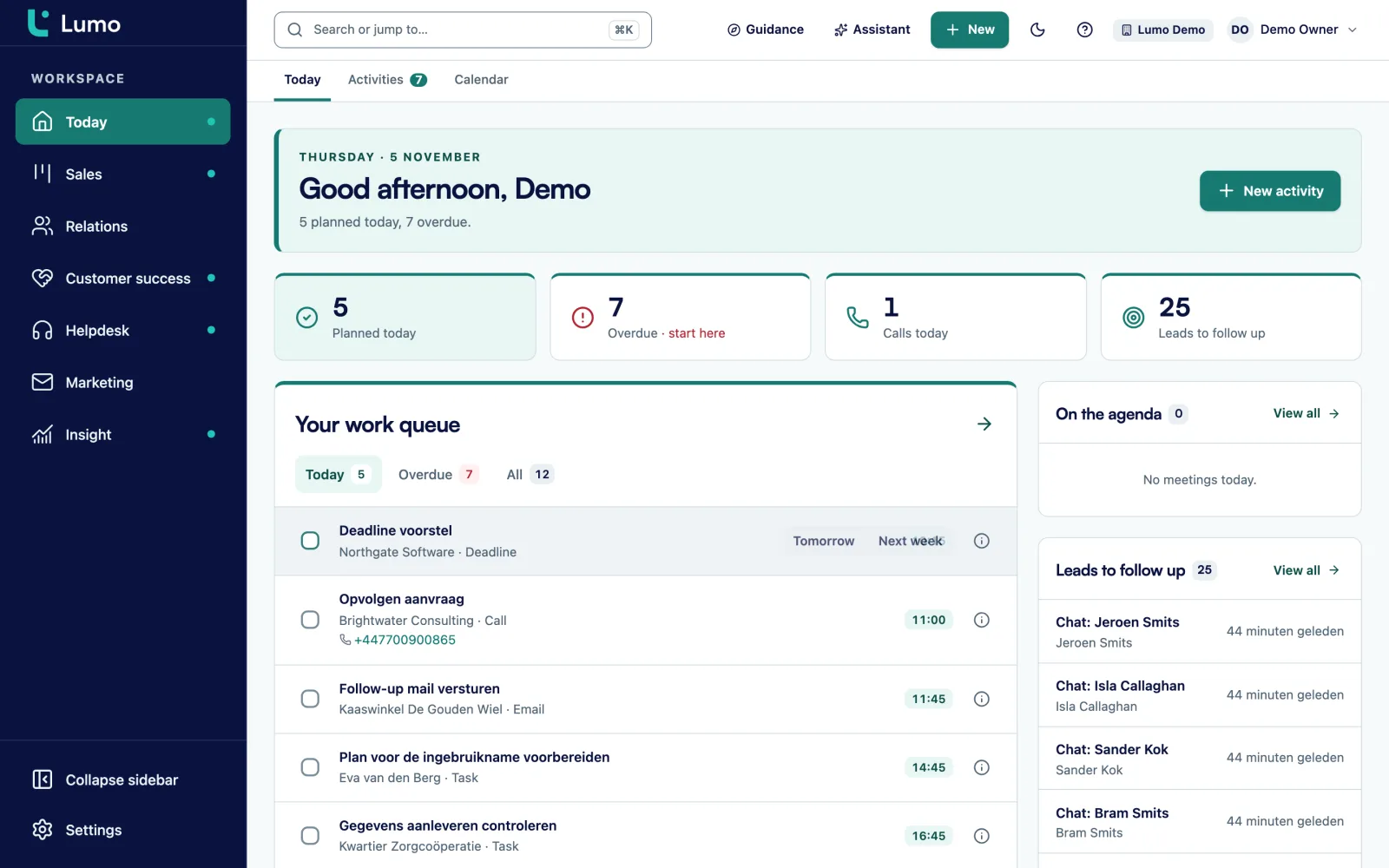
Dynamics 365 Sales is part of a large Microsoft family. There are separate parts for sales, customer service, marketing and ERP, and they share a data platform. With Power Automate you build processes, with Power BI you analyse, and with Power Apps you create your own screens. In Outlook and Teams you see CRM data next to your mail and your conversations. For an organization that runs fully on Microsoft, that is a logical and strong route.
That strength asks something in return. A Dynamics implementation usually runs through a Microsoft partner, and the configuration is so broad that someone often needs to look after the platform. For a B2B team of ten to a hundred people that mainly wants to sell, serve customers and send campaigns, that is sometimes more platform than needed.
Lumo is a product. You configure it in settings, without code: pipelines with win probability, custom fields, roles, data-quality rules and automations. The helpdesk, campaigns, forms, live chat and quotes share the same database. You switch fourteen modules on or off per workspace.
And your mail client? Gmail and Google Calendar sync today. The Outlook and Microsoft 365 integration for mail and calendar is planned. What already works today for Outlook users: the personal BCC address, which works with any mail client, logging mail by hand, and every other part of Lumo, which does not depend on your mail client. Sales Surge has done more than 150 CRM implementations, including for teams on Microsoft 365. Below we go through the themes.
Qualitative differences, no prices. Microsoft changes Dynamics often, so always check the details yourself.
| Topic | Dynamics 365 Sales | Lumo |
|---|---|---|
| Ecosystem | Microsoft 365: Outlook, Teams, Excel and SharePoint | One product for sales, service and marketing, independent of your mail client |
| Deeply integrated with Outlook | Gmail today, Outlook and Microsoft 365 planned, BCC address already works with Outlook | |
| Calendar | Calendar in Outlook | Google Calendar today, Microsoft 365 calendar planned, activities and calendar inside Lumo |
| Pipeline | Opportunities with extensive sales processes | Deal board with win probability, weighted value and stall warnings |
| Quotes and signing | Quotes in the product, signing through other products | Quote built from deal products, signed with an emailed code, with an audit log |
| Service | Separate Dynamics part for customer service | Tickets with SLA targets, customer portal, knowledge base and live chat in the same product |
| Marketing | Separate Dynamics part for marketing | Campaigns, segments, forms and consent built in |
| Automation | Through Power Automate and the Power Platform | Built-in rules with triggers, conditions and actions |
| Reporting | In the product and through Power BI | Report builder with nine chart types and drill-down to records |
| AI | Copilot across the Microsoft products | AI assistant that is off by default and asks for approval before outward actions |
| Sign-in | With your Microsoft account | Own login with two-factor authentication, no SSO |
| Family | Separate parts for sales, service, marketing and ERP | Sales, service and marketing in one product, no ERP |
| Setup | Highly configurable, usually through a Microsoft partner | Settings without code, or setup by Sales Surge |
| Mobile | Mobile app | Web app, no mobile app |
Compared on the basis of public information, November 2026. Check the Microsoft website for current details.
Dynamics has opportunities with extensive sales processes you can configure step by step. Lumo keeps it to a deal board you understand in a few minutes. Every stage has a win probability and a limit in days after which a deal is marked as stalled. You see count, value and weighted value per stage, and every stage change is stored with its duration. If you want to enforce a step, you switch on a rule that blocks the save when a required field is empty. The Today screen puts tasks, leads, stalled deals and tickets close to breaching in one place.
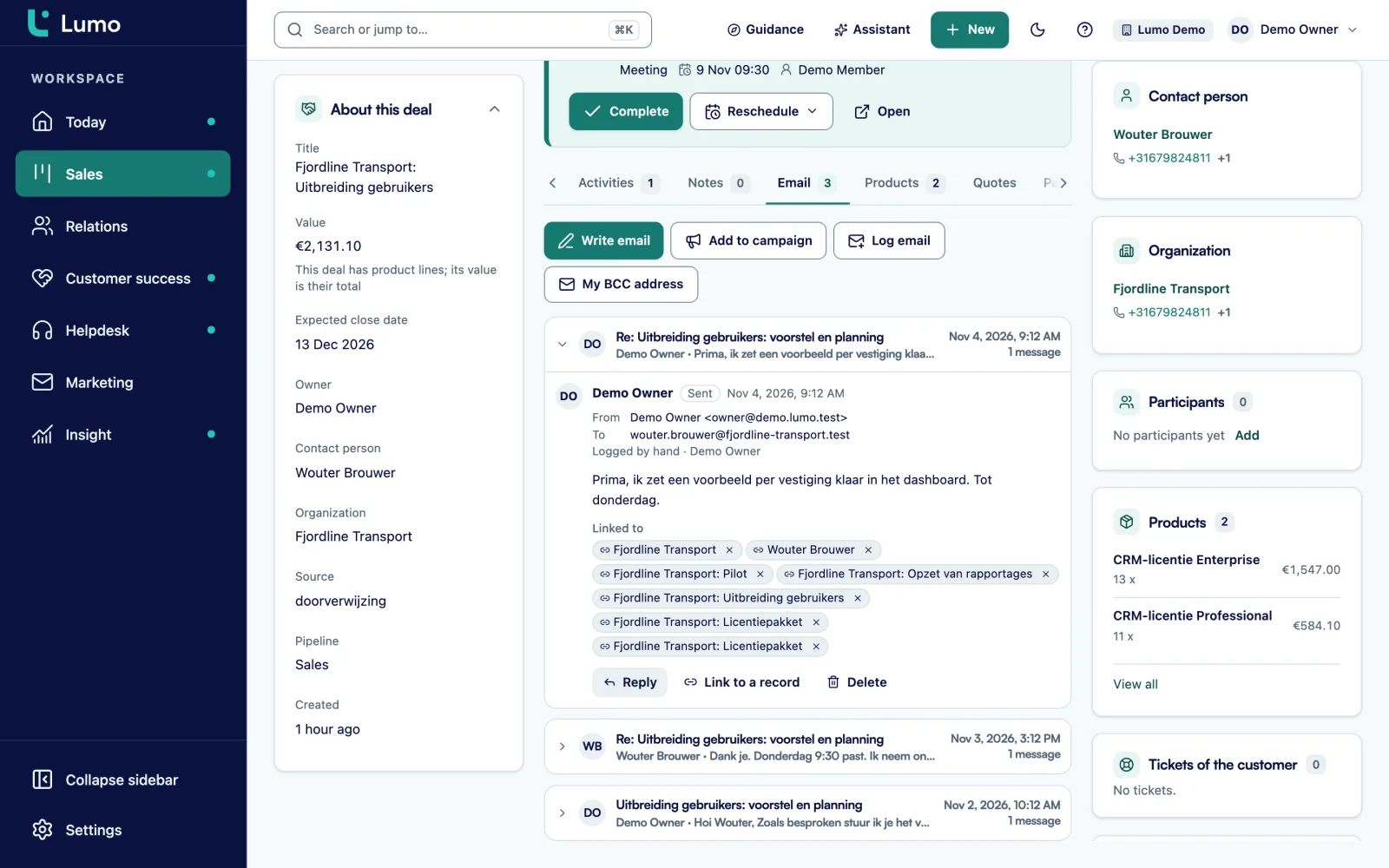
Dynamics lives in Outlook. Lumo syncs with Gmail and Google Calendar today, and the Outlook and Microsoft 365 integration for mail and calendar is planned. Until then, this is how you work. Every user has a personal BCC address. Put it in Bcc on a mail from Outlook, or forward a mail to it, and it lands on the right person, organization and deal, without becoming a ticket. You can also log mail by hand. You plan activities such as calls, meetings and tasks in Lumo's own calendar, with a list and a calendar view where you can drag.
In Lumo you create the quote on the deal. Lines come from the deal products with quantity, price, discount and billing frequency. The customer signs with a typed name and a six-digit code sent by email. The signed PDF gets an evidence page with time, IP address, device and a SHA-256 hash, and every step sits in a hash-chained audit log. What you should know: quote documents are in Dutch, and it is not a qualified electronic signature.
You do not have to wait for the Outlook and Microsoft 365 integration to start with Lumo. The personal BCC address works with any mail client. You find it in Lumo under My BCC address. When you email a customer from Outlook, put the address in Bcc. When an important mail comes in, forward it to that address.
Lumo attaches the mail to the known person, their organization and the deal. The conversation then sits on the timeline where your colleagues see it. The rest of Lumo is completely independent of your mail client: the pipeline, quotes, helpdesk, campaigns and reports work exactly the same for an Outlook user.
In the Microsoft family, customer service is a separate part. In Lumo the helpdesk is part of the same product. Tickets move through New, Open, Pending, On hold, Solved and Closed. There are SLA targets per priority with business hours, holidays and a warning at 75 percent. Customers sign in to the portal with a passwordless link, and the knowledge base has Dutch and English articles. Every organization gets a health score from 0 to 100.
Marketing is a separate part at Microsoft too. In Lumo email campaigns and web forms are part of the product. You send to segments from your filters, consent is checked again at the moment of sending, and an unsubscribe applies to the whole workspace. Campaigns go out through our sending service from a sender domain you verify with a DNS record, so they do not depend on your own mailbox.
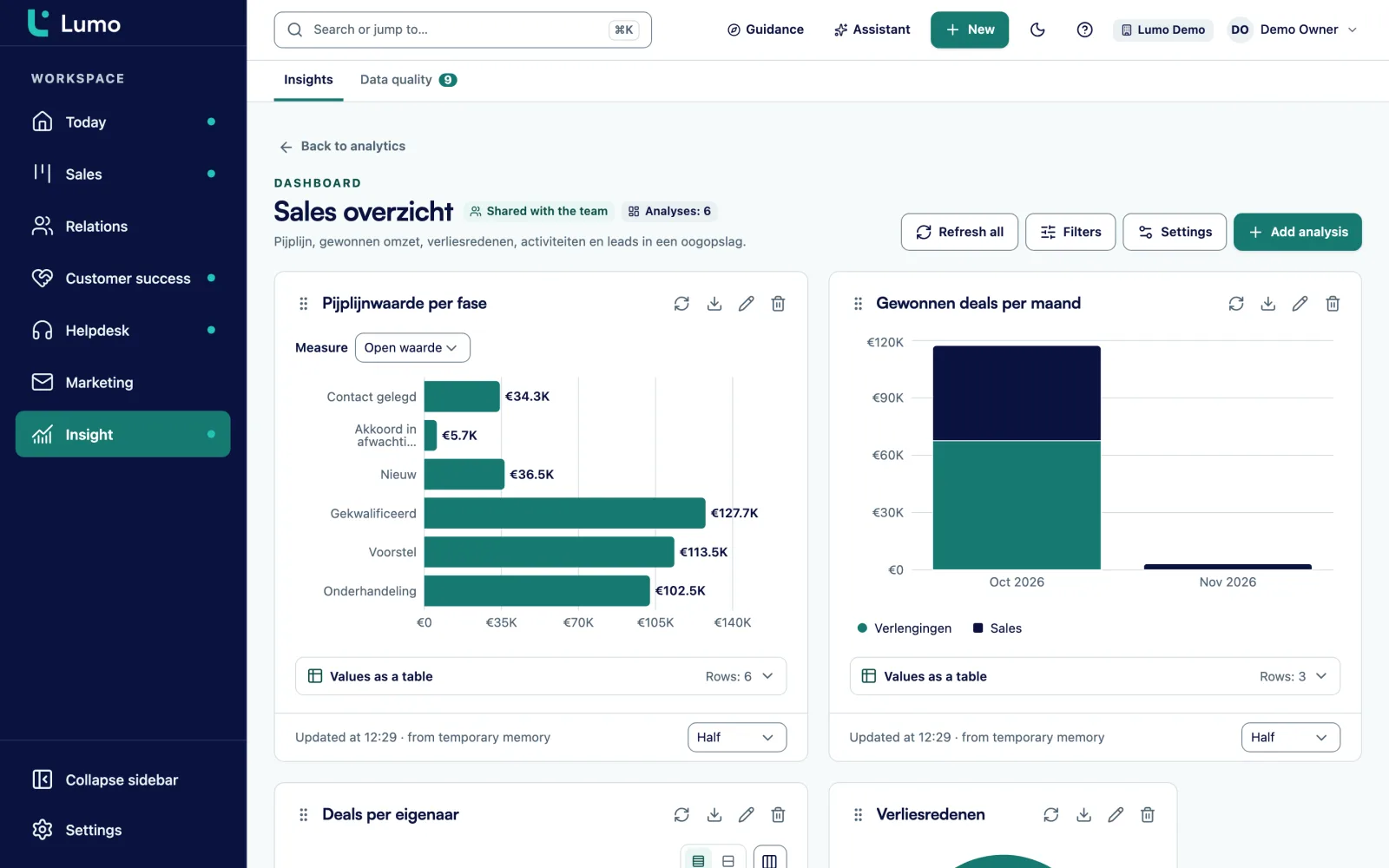
Dynamics automates through Power Automate and reports through Power BI. Lumo has both built in. Automations react to triggers such as deal won or lead stale, check conditions, and create an activity, note, field update, owner or label. They deliberately do not send email, and you can dry-run them first. The report builder has nine chart types, goal lines, periods including fiscal year, drill-down and CSV export. If you still want to analyse in Power BI, you pull data through the REST API or a CSV export.
You build a Lumo report in three choices: the source, the measure and the breakdown. You see a preview straight away. The measure can be a count, a sum, a ratio or a percentage, so you build lead-to-deal conversion per source without formulas.
Dashboards are private or shared with the team, and have filters. Exchange rates keep multi-currency reports correct. Click a number and you see the records behind it. You can also ask the AI assistant for a report in plain language. What you should know: reports that combine tickets and campaigns with deals are still on the backlog.
Microsoft builds Copilot across all its products. The Lumo AI assistant works inside Lumo. It searches, creates and updates records, and builds segments, campaigns, automations and reports. Anything outward-facing or irreversible waits for your approval. It runs with your role, is off per workspace until an admin switches it on, and runs on Google Gemini by default.
In Dynamics you sign in with your Microsoft account. Lumo has its own login with two-factor authentication through an authenticator app, which you can make mandatory for admins, and a list of sessions you can sign out remotely. There are four roles, every table is separated per workspace, and the audit log is append-only. For GDPR you export or erase everything about a person. Data is hosted in London. Signing in with Microsoft or other SSO is not available. Read more about security and privacy.
There is no automatic import from Dynamics. Sales Surge moves your accounts, contacts and opportunities by hand to organizations, persons and deals, and sets up pipelines, fields and roles. Read how we approach implementation and onboarding.
Dynamics 365 is genuinely strong on a few points, and we are happy to say so.
If you need ERP and CRM together, or build many of your own processes in the Power Platform, that is where Dynamics shines.
If three or more of these sound familiar, a demo is worth your time.
There is no automatic import from Dynamics. Sales Surge handles the switch by hand.
We look at which Dynamics parts, fields and processes you use, and which Power Automate flows depend on them.
Pipelines, stages with win probability, custom fields, roles, rules, automations and the modules you switch on.
Accounts, contacts and opportunities move by hand to organizations, persons and deals. We check samples together.
Every user gets their BCC address for Outlook. As soon as the Outlook and Microsoft 365 integration is there, we switch it on.
Training, in-product tours and checklists, and rules that guard data quality from day one.
Mail and calendar sync with Google today. The Outlook and Microsoft 365 integration is planned, without a date. Until then you log mail with the BCC address or by hand, and plan activities in Lumo's own calendar. Sign-in uses its own login with two-factor authentication. Data is hosted in London. In the demo we show what that looks like for an Outlook team.
For B2B teams that want sales, service and marketing in one product without platform administration, yes. If you need ERP and CRM together, Dynamics is strong there.
Yes. The personal BCC address works with Outlook, you can log mail by hand, and every other part of Lumo is independent of your mail client. The Outlook and Microsoft 365 integration is planned. Email
It is planned. We do not give a date until it is ready.
No. Lumo has its own login with two-factor authentication, which you can make mandatory for admins.
Yes, but not through an automatic import. Sales Surge moves your data by hand. Implementation
Yes, through the REST API or a CSV export of lists and reports. API and integrations
We do not quote other vendors' prices. Lumo pricing depends on the number of users and the modules you switch on. About pricing
In London, in the United Kingdom. Every workspace is separated and there is a daily backup.
In the demo we show Lumo with the BCC address in Outlook and your own pipeline next to it. Then you know exactly what works today.