Show us how a proposal leaves your agency today
In the demo we rebuild your pipeline from intro call to retainer and show how a proposal comes back signed.
An agency sells trust, and that trust lives in people. Lumo keeps the inquiry, the pitch, the proposal, the retainer and the client requests on the same client, so the agency knows what is going on when the account director is on holiday.

A marketing, communications or digital agency has three kinds of work in its pipeline. New clients who arrive through the network, the website or a pitch invitation. Existing clients who want a new project. And retainers that get renegotiated every year. Most revenue usually comes from the second and third group. Most attention goes to the first.
The sales cycle is short when a client already knows you, and long when you pitch against three other agencies. There is an intro call, a brief you need to sharpen, sometimes a paid pitch, a proposal with scope and hours, and a negotiation where the scope moves twice more. After the signature a project manager takes over, while the account director keeps talking about the next project.
You will know this one. A client emails the account director about a new campaign. She is in a pitch for another client that week and answers four days later. In the meantime the client's marketing manager has called someone on the strategy team about an extra channel. Nobody puts the two conversations side by side. Three weeks later it turns out the client asked another agency to handle that channel.
The issue is not that people are careless. The issue is that what the agency knows about a client lives in inboxes, loose documents and the heads of a few senior people. An agency of twenty or fifty people can absorb that for a while. But every time someone leaves, a piece of client history leaves with them.
Lumo puts that history on the organization. Mail with known contacts lands on the timeline. The pipeline shows which pitch and which proposal are open. The proposal itself goes out as a quote with e-signature. And requests after kick-off arrive in the helpdesk instead of in someone's personal inbox.
Screen and status names are the ones used in the app.
A form on your site, a chat or a manual entry opens a lead with status New and a source, such as network, website or pitch list.
The new business manager sets the lead to Working and after the first call to Qualified or Disqualified. With Convert to deal it lands on the deal board.
The brief sits on the deal as a file. The pitch date is a meeting in the calendar that syncs with Google Calendar. The Next step shows on the deal card.
The quote copies the product lines, carries the client's logo and goes out through your Gmail with a signing link. The client signs with a six digit code sent by email.
You mark the deal Won. An automation creates a task for the project manager and adds the Client label to the organization.
A starting point you adjust. Each stage gets a win probability and a number of days after which the deal counts as stale.
Exit criterion: a budget has been named, you know who decides and the request fits what you do. Rots after 14 days.
Exit criterion: the brief is on the deal as a file, with goal, audience, timing and budget range.
Exit criterion: the pitch is done and the client has said when they decide. A paid pitch goes into a custom Pitch fee field on the deal.
Exit criterion: the quote went out with scope, hours and retainer as separate lines. Rots after 10 days.
Exit criterion: the scope is fixed. If the scope changes, you void the old quote and send a new one.
Won after the signature. Lost with a reason such as Price, Other agency or No budget, so every quarter you see where it goes wrong.
In an agency the proposal is often where a deal goes quiet. It goes out as a PDF by email, the client never prints it, and two weeks later nobody knows which version was the last one.
In Lumo you create the quote on the deal. The lines are a snapshot of the products on the deal, with quantity, price, discount and VAT. You add a valid-until date, an introduction and terms. The PDF carries your logo and the client's. You send it through your own Gmail, with a link to the signing page.
The client gets a six digit verification code by email, types their name and ticks agree. They can also decline. The signed PDF gets an evidence page with time, IP address, device and a SHA-256 hash, goes to the client, and a note lands on the deal. Every step sits in an audit log chained with hashes.
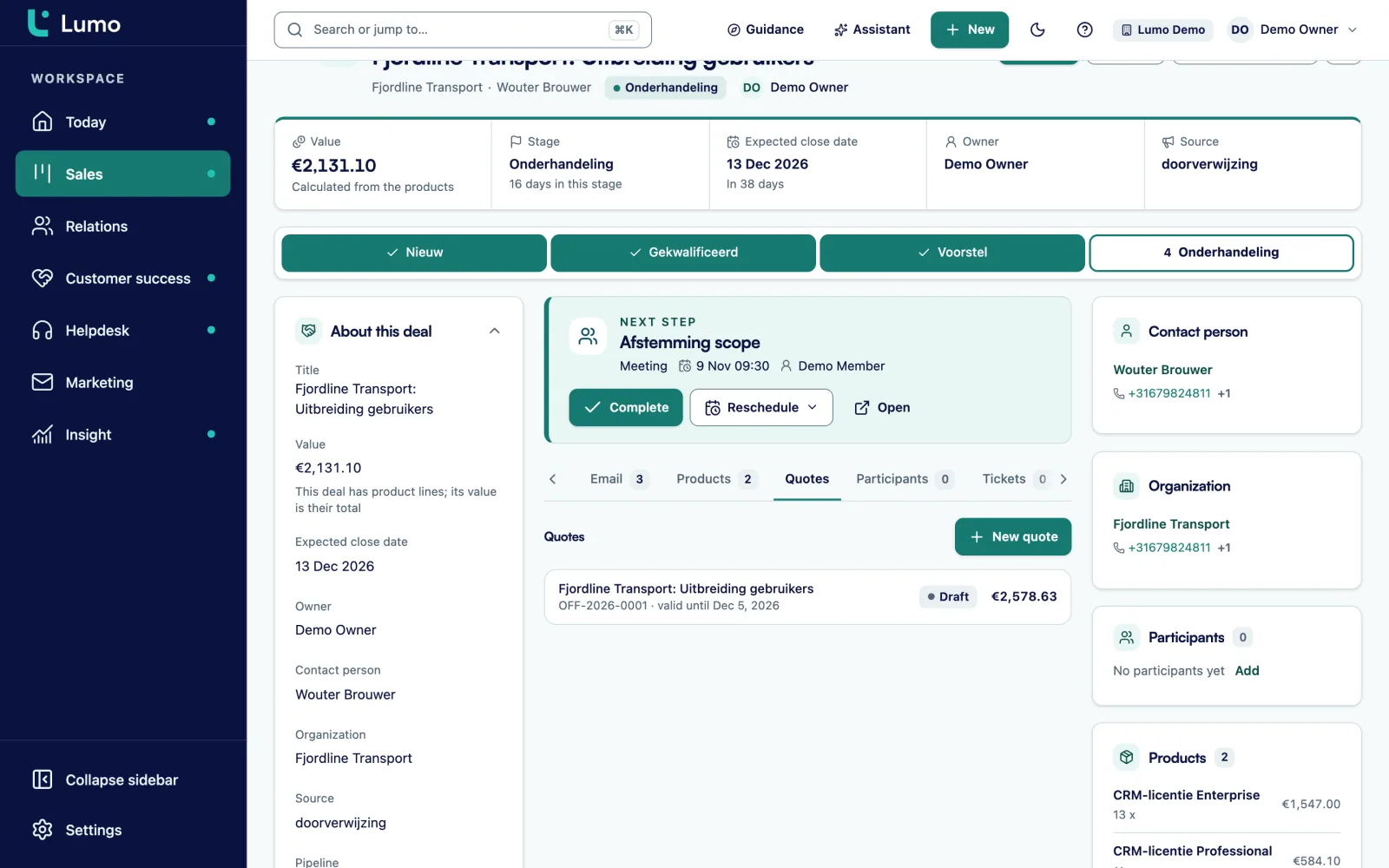
Many agencies work for groups. The holding company signs the framework agreement, and each brand underneath briefs its own work. With a separate card per brand you never see what the group buys from you in total.
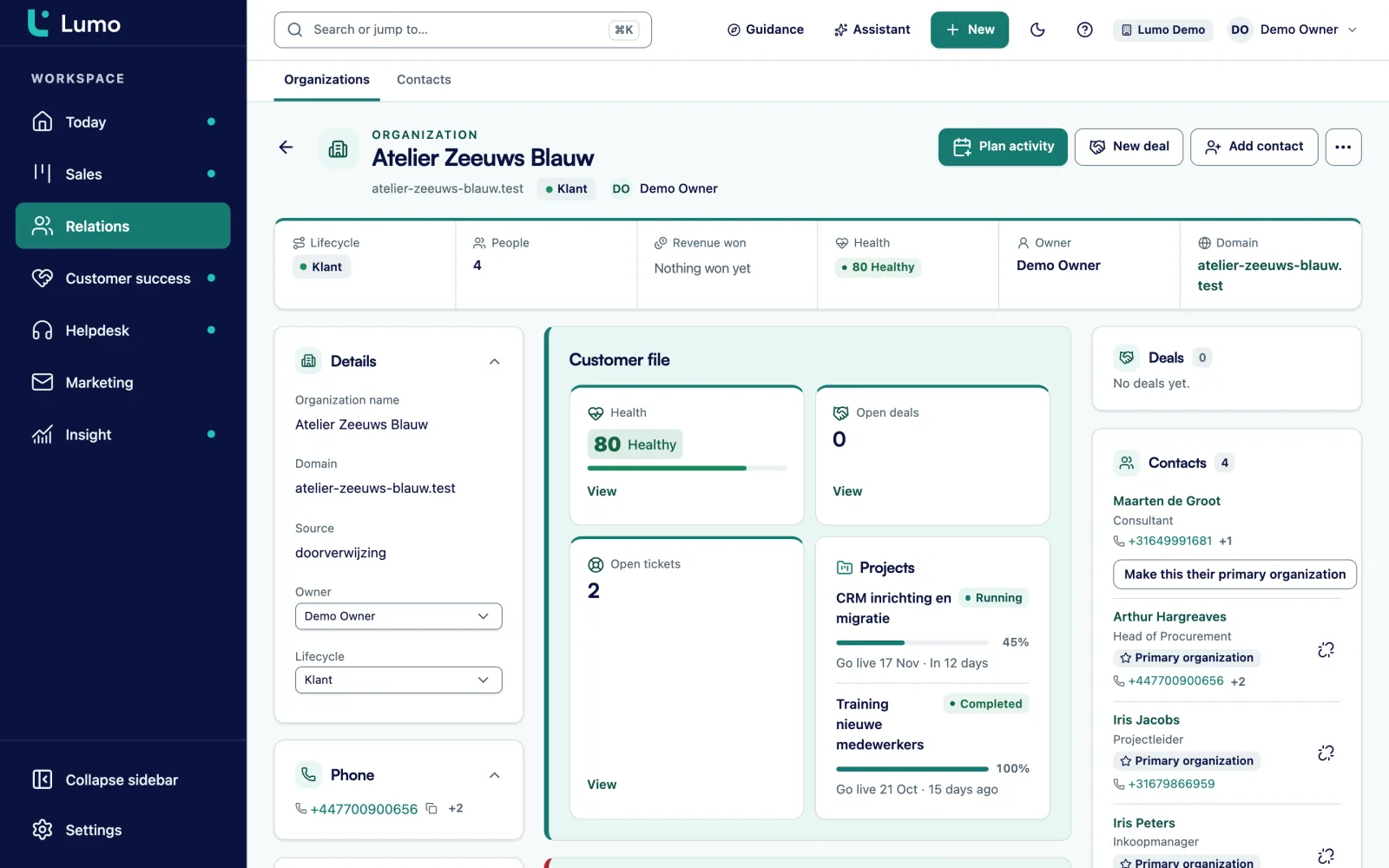
In Lumo an organization can have a parent organization. The brands sit under the holding, and you see open deals per brand and for the whole group. A person can belong to several organizations, with one marked as primary. That fits a marketing manager who works for two brands in the same group.
The organization timeline holds mail, meetings, notes, files and tickets. An important note, such as the agreed rates, can be pinned to the top. A new account manager reads three years of client history in ten minutes.
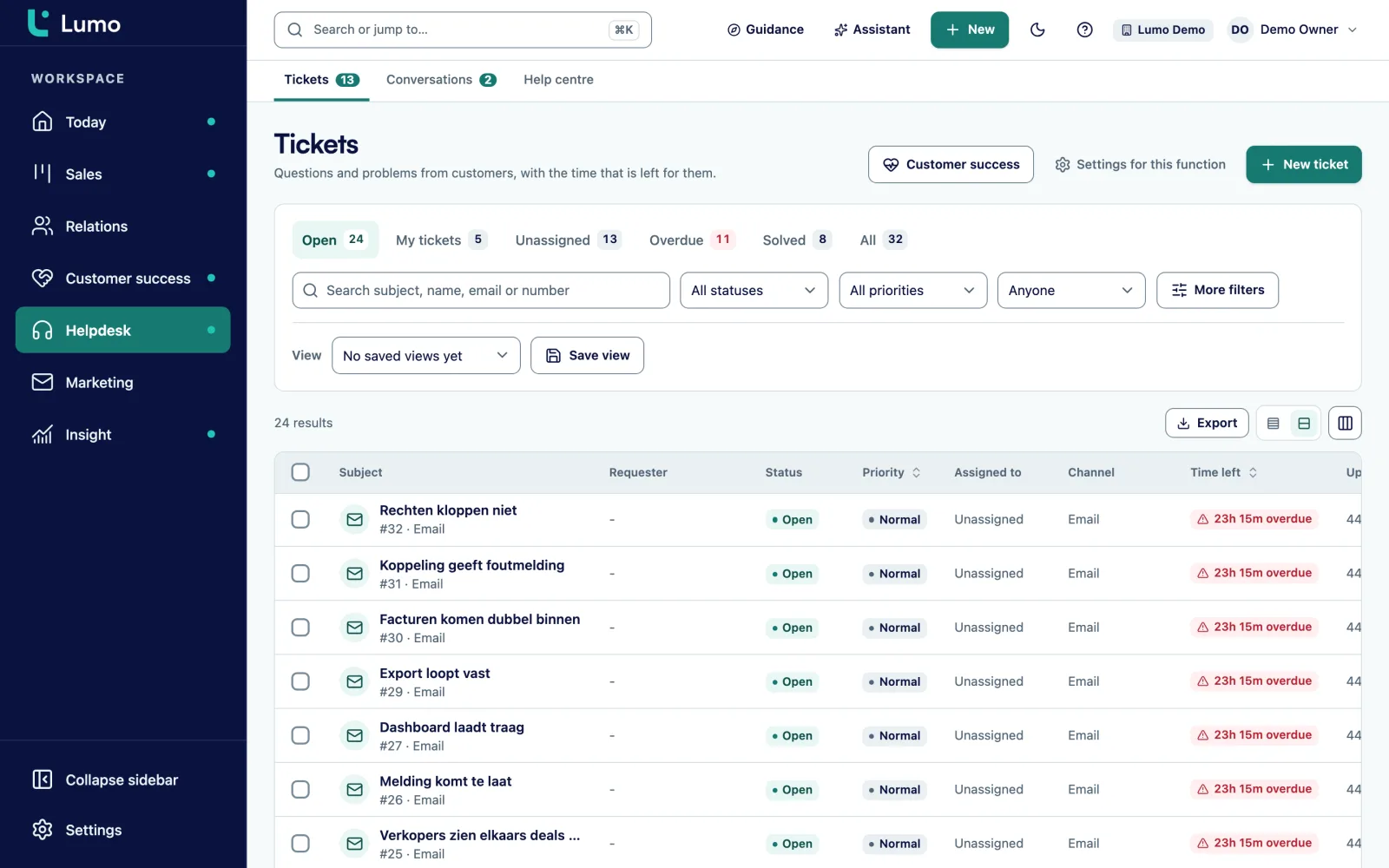
After the signature come the small requests. Change a line of copy, resize a banner, a question about last month's report. When those requests reach one person, they stall the moment that person is ill or in a pitch.
With the helpdesk they arrive as tickets, from a shared mailbox, the client portal or by hand. A ticket has a status, from New through Open, Pending and On hold to Solved and Closed. You assign it to a person or spread tickets over available colleagues. The client never sees internal notes.
In the client portal the client sees their own tickets, opens new requests and replies. They sign in with a link by email, no password. After a ticket is solved they get a short satisfaction question. So the account director walks into the annual review with something more concrete than a feeling.
You add custom fields to deals, organizations, persons, leads, tickets and activities, with types such as select, multiselect, monetary, date and user.
Select field on the deal: Project, Retainer, Pitch or Expansion.
Multiselect field: strategy, content, paid, SEO, design, development.
Date field on the deal, next to the meeting in the calendar.
Monetary field. Shows how many pitches are paid.
Number field on the deal. Useful when the talk turns to extra work.
User field on the organization, separate from the owner of a deal.
Select field: network, website, pitch list, partner or existing client.
Date field on the organization for the annual review.
With automations you capture the fixed steps. A rule starts on a new deal, a stage change, a won or lost deal, a new lead or organization, a completed activity, or a deal that has been stale for a number of days. It creates an activity or note, updates a field, assigns an owner or adds a label. It does not send email. You test it with a dry run first.
Rules agencies often switch on first:
In reports you build the numbers that matter in an agency. The share of pitches won, broken down by origin. Won deal value per account director against a goal line. Lost reasons per quarter. And weighted pipeline per engagement type, so you see whether the coming months rest on small projects or on retainers. Every chart drills down to the deals behind it, and a dashboard can be shared with the team or kept private.
Say a digital agency in Manchester with 35 people. For this example we call it Northline Studio. It has a new business manager, three account directors and four project managers. It works for about forty clients, a third of them on a retainer.
Northline creates two pipelines. New clients with the stages from the example above. And Existing clients with the stages Signal, Proposal and Agreed. So leadership sees in one report how much revenue comes from new clients and how much from growth.
A holding company with four brands is set up as a parent organization with four organizations underneath. The holding's account director is stored in the user field. A request from one of the brands arrives as a ticket in the shared mailbox, and a project manager picks it up.
For a new project the account director puts two product lines on the deal: a one-time line for the design work and a monthly line for the retainer, with twelve cycles. The deal value adds them up. The proposal goes out as a quote through Gmail and the client signs the same day with the code they receive by email.
The new business manager starts each morning on the Today screen: leads to follow up, stalled deals and the tasks for the day. A strategist who prefers Outlook puts the personal BCC address in Bcc, and his mail lands on the right organization and deal. Nobody has to switch mail clients to keep the client picture complete.
This is the order we follow. If you want us to do it, it is part of implementation and onboarding.
Lumo is not time tracking, resource planning or invoicing. You log hours and plan people in your own tool. With the API and webhooks you can, for example, push a won deal to your project tool, or write logged hours back into a custom field. Quotes and the signing page are Dutch only. For an English speaking client you send your own proposal and attach the signed copy to the deal as a file. Reminder emails for unsigned proposals and an automatic stage after signing are not built. So you mark a deal Won yourself after signing, and a stale rule creates a call when a proposal sits too long. Gmail and Google Calendar sync today. The Outlook and Microsoft 365 integration is on the roadmap, and until then the BCC address works with any mail client.
Yes. Every product line has a billing frequency, so a monthly retainer and a one-time project are separate lines on the deal. With an Engagement type select field you split them in reports too.
Yes. The client opens a link, gets a verification code by email, types their name and signs. The signed PDF gets an evidence page. It is not a qualified electronic signature.
There is no ready-made integration. With the REST API and webhooks your own tool can read and write deals and activities. API and integrations
Gmail and Google Calendar sync today. The Outlook and Microsoft 365 integration is on the roadmap. Until then you put the personal BCC address on an email or forward it, and it lands on the right person, organization and deal. Logging mail by hand works too.
An organization can have a parent organization. The brands sit under the holding, each with their own deals and contacts.
Yes, in the customer portal. They sign in with a link by email, see their own tickets and open new requests. They never see internal notes.
Yes. A lost deal gets a reason from your own list. In reports you see lost reasons per period and per origin.
The price depends on the number of users and the modules you switch on. Pricing
In the demo we rebuild your pipeline from intro call to retainer and show how a proposal comes back signed.