See data rules and merging on sample data
In the demo we show the duplicate queue, field by field merging and the data rules. Sales Surge has done more than 150 CRM implementations, and cleaning up is part of almost every move.
A CRM does not get messy in one go. It happens one form, one import and one rushed colleague at a time. This guide shows how to measure the damage, write data rules, merge duplicate records safely and stop the mess from coming back.
Bad CRM data is rarely one person's fault. It is the sum of small things. A web form that creates a new person on every submission. A trade show list where half the company names are spelled differently. An account manager in a hurry who creates "Johnson Ltd" while "Johnson Limited" has existed for three years. A contact who changes jobs and stays at the old company for years.
Each of these costs little on its own. Together they make sure nobody trusts the numbers anymore. A campaign reaches the same person twice. Two colleagues call the same customer on the same day. The revenue by industry report is off because a quarter of the companies have no industry. And the forecast is too high because deals with a close date from last year are still open.
The result is predictable. The team starts working around the CRM. A private spreadsheet appears, notes move to the inbox, and the CRM becomes a place where you fill something in afterwards for your manager. That is why data quality and CRM adoption are two sides of the same problem. People use a system they trust, and a system that gets used stays cleaner.
The good news is that you do not have to fix everything at once. If you make data quality measurable, agree on a few clear rules and close the sources of mess, the CRM gets a little better every month. This guide gives you the formulas, a rules template, a way to handle duplicates and a cleanup plan by week.
Data quality only becomes a conversation once you measure it. These five dimensions cover almost everything that goes wrong in a B2B CRM. Calculate them per record type: persons, organizations and deals.
The share of records where a required field is filled. Formula: records with the field filled divided by all records, times 100. Example: 1,400 of 2,000 organizations have an industry, so 70 percent. Only measure fields you actually use in reports or filters.
The share of records that match reality. You measure this with a sample. Formula: correct records in the sample divided by sample size. Example: you check 50 random contacts and 41 still work at the listed company, so 82 percent.
The share of records without a duplicate. A simple version: count the expected duplicates and divide by the total, then subtract from 100 percent. Example: 120 duplicates in 3,000 persons is 4 percent duplicate, so 96 percent unique.
The share of records that are current or still valid. For deals: open deals with a future close date divided by all open deals. Example: 64 of 80 open deals have a close date after today, so 80 percent. The other 16 are the first ones you discuss.
The share of records that follow the agreed format. Think of country names, phone numbers with a country code and legal forms. Formula: records in the agreed format divided by records with the field filled. Example: 900 of 1,000 phone numbers start with a country code, so 90 percent.
If you want one figure, average the five dimensions per record type. With the examples above, organizations might score 70, 82, 96, 80 and 90, an average of 83.6. The number itself says little. Its movement from month to month does.
A data rule describes what good looks like, how strict you are and who fixes it. Without that last part, a rule is a wish. Use these five columns for every rule: field, rule, severity, owner and when checked. Three severity levels work well: a tip that only shows something, a warning that stands out but still allows saving, and a block that refuses the save. Be strict on few rules and gentle on the rest.
Below is an example set. The choices are examples. Adjust them to your own process.
Thirteen rules sounds like a lot. But only a handful truly block a regular user. The rest guide people without anyone getting stuck.
Finding duplicates is not one search. You combine match keys, give each pair a score and choose thresholds.
For persons: email address first, then normalized name plus organization, then phone number. For organizations: the domain of the website or of email addresses, then normalized name. For deals: the same organization with a similar title and an open status.
Lowercase, remove spaces, strip legal forms (Ltd, Limited, Inc, GmbH, BV), flatten accents, put phone numbers in one format with a country code, and drop www and http from domains. "Johnson Ltd" and "johnson limited" both become "johnson".
An example weighting: same email 60 points, same domain 25, very similar name (fuzzy match) 20, same phone 15, same city 5. A pair with the same email and a very similar name scores 80. A pair with only the same domain scores 25.
For example: 80 or more is almost certainly a duplicate and can go in a fast queue. 50 to 80 is reviewed by a person. Below 50 you leave alone. Careful: at large companies the same domain often means two real colleagues, not a duplicate.
This is called survivorship. A common set: the oldest record is the base, the most recently updated value wins for contact details, a filled field always beats an empty one, and consent or unsubscribe always wins in the safe direction.
All deals, activities, notes and emails move to the winner. The losing record does not vanish right away, so you can undo. After the first twenty merges, check the results before you carry on.
Suppose, and this is a made-up example, you have two persons in your CRM.
Record A was created in March 2024 by an account manager. Name: Sarah Miller. Email: s.miller@examplebuild.co.uk. Organization: Examplebuild Ltd. Phone: empty. Job title: buyer. Three deals, one of them open. Twelve activities. Marketing consent: on, with a trade show form as the source.
Record B was created in September 2025 through a web form. Name: sarah miller. Email: s.miller@examplebuild.co.uk. Organization: Examplebuild. Phone: +44 7700 900123. Job title: head of purchasing. No deals. One activity. Unsubscribed from marketing email in October 2025.
The score with the weighting above: same email 60, same name after normalizing 20, same domain 25. Total 105, well above the threshold of 80. This is a duplicate.
Now survivorship. Record A is older and holds the history, so A is the base and stays. The name comes from A because it is written properly. The phone number comes from B because filled beats empty. The job title comes from B because it was updated more recently, and head of purchasing is probably a promotion. The organization stays Examplebuild Ltd from A, and the organization Examplebuild without a legal form goes onto the list of duplicate organizations itself.
Then the most important field. Record A says consent on, record B says unsubscribed in October 2025. The unsubscribe is newer, and the safe direction always wins. So the merged record is unsubscribed. Get this the wrong way round and you email someone who opted out, which is a problem under GDPR.
After the merge, the three deals, the thirteen activities and all notes sit on record A. Record B is gone from the lists but stays in the log, so you can undo it if it turns out they were two different people after all.
An example plan for a team of ten to thirty users. Larger databases get more time in weeks 2 and 3, not more steps.
Measure the five dimensions per record type and put them in a table. Agree with sales and marketing on the ten to fifteen fields that really matter. Name one owner per record type. Write down the survivorship rules before anyone merges anything.
Start with organizations, because persons and deals hang off them. Work through the highest scoring pairs first. Merge in small batches and spot check. Organizations with the same domain but a different branch get a manual review.
Merge duplicate persons, with email as the strongest key. Then go through every open deal with a close date in the past. Each owner picks per deal: a new date, lost with a reason, or won if that was forgotten.
Fill the most important empty fields, such as industry and country. Then switch the rules on, as warnings first. Only when warnings stay low for a week do you turn the most important few into blocks.
Check every form, integration and import route for how it creates new records. Measure the five dimensions again and compare with week 1. Put the first monthly review in the calendar.
Cleaning up without closing the source is mopping with the tap running. Most bad data comes in through four routes.
Forms. A form should look up the email address first and only create a new person when none exists. Use pick lists for country and industry instead of free text. Capture the source in a hidden field so you know later where a record came from. Read more about forms that land cleanly in the CRM.
Imports. A list from a trade show or a partner is the biggest single source of duplicates. Normalize the list first, compare it with the existing database and import only what is new. Run a test import first and count what would happen.
Email and calendar. A mailbox integration can create a person for every unknown address. It looks handy, but it fills the CRM with newsletters and suppliers. Only log mail with people you already know.
Manual entry. This is where the rules from the template help most. A message saying "this organization may already exist" at the moment of creation prevents more than any cleanup round afterwards.
Data quality without an owner belongs to nobody. Name one person per record type to run the monthly review, and agree that each record owner fixes their own warnings. In a small team that is often the sales manager. In a larger team, someone in sales operations or RevOps.
The monthly review takes an hour if you do it every month. Measure the five dimensions, work through the list of violations per owner, review new duplicate pairs and check which source caused the most mess this month. Share the result in the first sales meeting of the month.
Data quality touches privacy too. When you erase a person on request, you need to stop that same person from coming back through a form or an import. A list of blocked addresses does that, ideally stored as a hash so you do not keep the address itself. And duplicates are a privacy risk: an unsubscribe on one record does not help if the other record still gets email. More on this in the guide on email and GDPR.
Making everything required. Twenty required fields produce twenty times "unknown" or a full stop. Only require what you really use, and only at the moment someone can know it. A deal value at the first call is a guess.
Auto merging without a test. A rule that merges on the same domain will merge every colleague at a large company into one person. Always run a new rule with human review first, and only switch on automatic merging for rules that ran without errors for weeks.
Cleaning up without a log. If you cannot undo, nobody dares to merge. Make sure every merge leaves a trail.
Picking the wrong winner. The newest record is not always the best. It is often a form submission with a half filled name, while the old record holds all the history. Choose the base on history, and the fields on recency and completeness.
A one off cleanup. A big cleanup without a monthly review and without rules at the source is just as messy again after six months. Cleaning is the easy part. Keeping it clean is the work.
Measuring data nobody uses. A field that appears in no report, filter or conversation does not need filling. Remove it instead of checking it.
In Lumo you set up data rules under Guidance and rules, with the severity tip, warn or block. A block really refuses the save, both on screen and through the API. Records that come in through an import, a form, chat or email are not refused but flagged, so nothing gets lost. All violations sit in one list. For deals there are eight default rules you install with one click. Fields can be made required per record type.
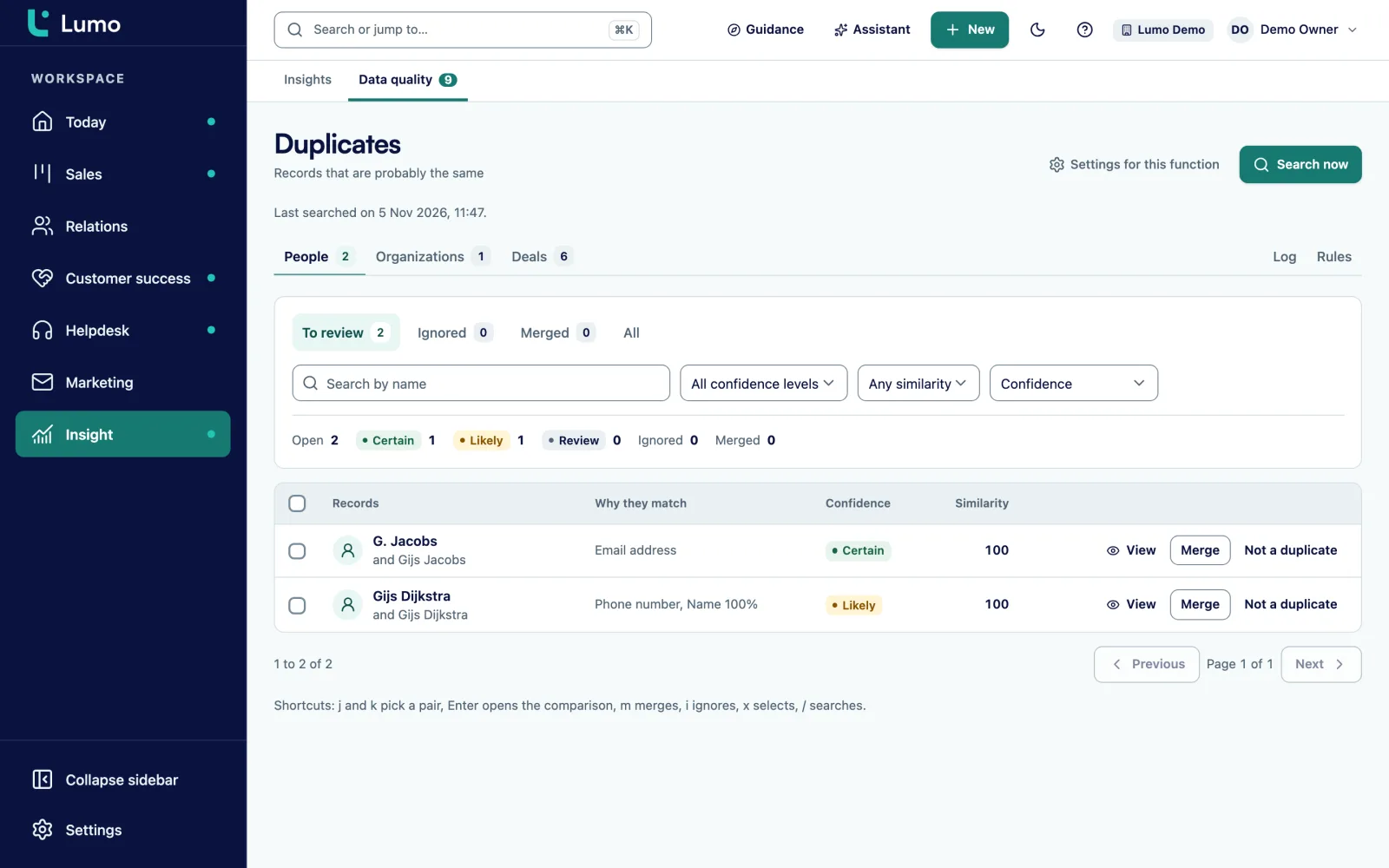
Duplicate persons, organizations and deals land in a queue with a score. You compare field by field, pick the winner and merge. All references move to the winner and the losing record is soft deleted. Every merge is logged and can be undone. You set rules on fuzzy name matching, same domain and a threshold, and decide which field wins. Automatic merging per rule exists, but it is off by default and needs an explicit acknowledgement. After five failed merges it stops by itself. After a GDPR erasure, Lumo keeps a hash of the address so the person does not come back. More on merging duplicates, adoption and data rules and persons and organizations.
How fast duplicate detection runs on a very large workspace has not been measured yet. So start with a limited set of rules and watch how the queue behaves. CSV import is not in Lumo yet. A move from Pipedrive runs through the import wizard, other sources we move over by hand, and that is a good moment to clean up. Also read how security and privacy are handled.
Measure five dimensions per record type: completeness, accuracy, uniqueness, timeliness and consistency. Completeness is filled records divided by all records. Accuracy comes from a sample. Uniqueness from the share of duplicates.
There is no fixed norm. It depends on how many forms, imports and users you have. Measure the share at your baseline and check whether it drops after that. The trend says more than the number.
Use the record with the most history as the base. Per field, take the most recent or most complete value. For consent and unsubscribe, the safe direction always wins, so an unsubscribe stays.
Only for rules that first ran for weeks with human review and no errors, such as an exact email match. Merges based only on domain or name should always be reviewed by a person.
Have the form look up the email address first and only create a new person when none exists. Use pick lists instead of free text, and store the source in a hidden field.
As few as possible. Only require what you use in reports or filters, and only at the moment someone can know it. A few blocks and warnings for the rest works better than making everything required.
Each record owner fixes the warnings on their own records. Per record type, one person owns the rules and the monthly review, often the sales manager or someone in sales operations.
Two things. An unsubscribe on one duplicate does not help if the other one still gets email. And an erased person must not come back through a form or import, so keep a list of blocked addresses.
Once thoroughly, then one hour every month. Measure the dimensions, work through the violations and review new duplicate pairs. Do that monthly and you will not need another big cleanup.
In the demo we show the duplicate queue, field by field merging and the data rules. Sales Surge has done more than 150 CRM implementations, and cleaning up is part of almost every move.