
- Home
- Company
- Demo
Book a demo built around your process
No standard tour. You tell us how you sell, we show how that works in Lumo. By the end you know what it costs, what a switch involves and whether it fits.
- With someone from Sales Surge, not a script
- Your own scenario as the guide
- A price for your situation afterwards
What a demo means here
A demo with us is a working session. Someone from Sales Surge, the agency behind Lumo, a Pipedrive Platinum Partner with more than 150 CRM implementations, looks with you at how you sell today and where it pinches. Then we show in the product what that process would look like.
So we do not start with features. We start with a lead coming in, and follow it to a signed quote and beyond. If you run several pipelines, sell expansions to existing customers or run a helpdesk, we include that. What you do not need, we skip.
In the demo we also tell you what is not there, so you do not find out six months in. Gmail and Google Calendar sync today. The Outlook and Microsoft 365 integration is planned, and if you work in Outlook we show how you work today with the personal BCC address. There is no mobile app, you work in the browser. Data is hosted in London. Quotes and the signing page are in Dutch only.
By the end of the call you know three things. Whether Lumo fits how you work. Roughly what it will cost for your number of users and the modules you want. And what it takes to switch, from a simple setup to a full migration. Still comparing options? Also read how to choose a CRM.
What happens after you send the form
From your request to the call, step by step.
You see a confirmation
Right after sending, you see below the form that your request came in. If sending fails, you see our address info@sales-surge.nl there, so your request does not get lost.
Your request reaches us
It arrives as a lead in our own Lumo workspace, with your company, the number of users and your notes. Our team gets a notification. So we do ourselves what we show you.
We get in touch
Within a week you hear from us, by email or by phone if you left a number. We ask briefly what you want to see and schedule a moment. If you want colleagues to join, such as a rep and the person who decides, now is the time to say so.
We prepare your scenario
Based on what you told us, we set up a scenario that looks like your work: your kind of deals, stages that match your sales and the modules you want to see.
The call
Your process first, then the product. You can interrupt at any moment and ask to see something else.
Price and next step
After the call you get a quote for your situation and a proposal for the next step. That can be a trial workspace, a migration or simply time to think it over.
Your pipeline as it would look for you
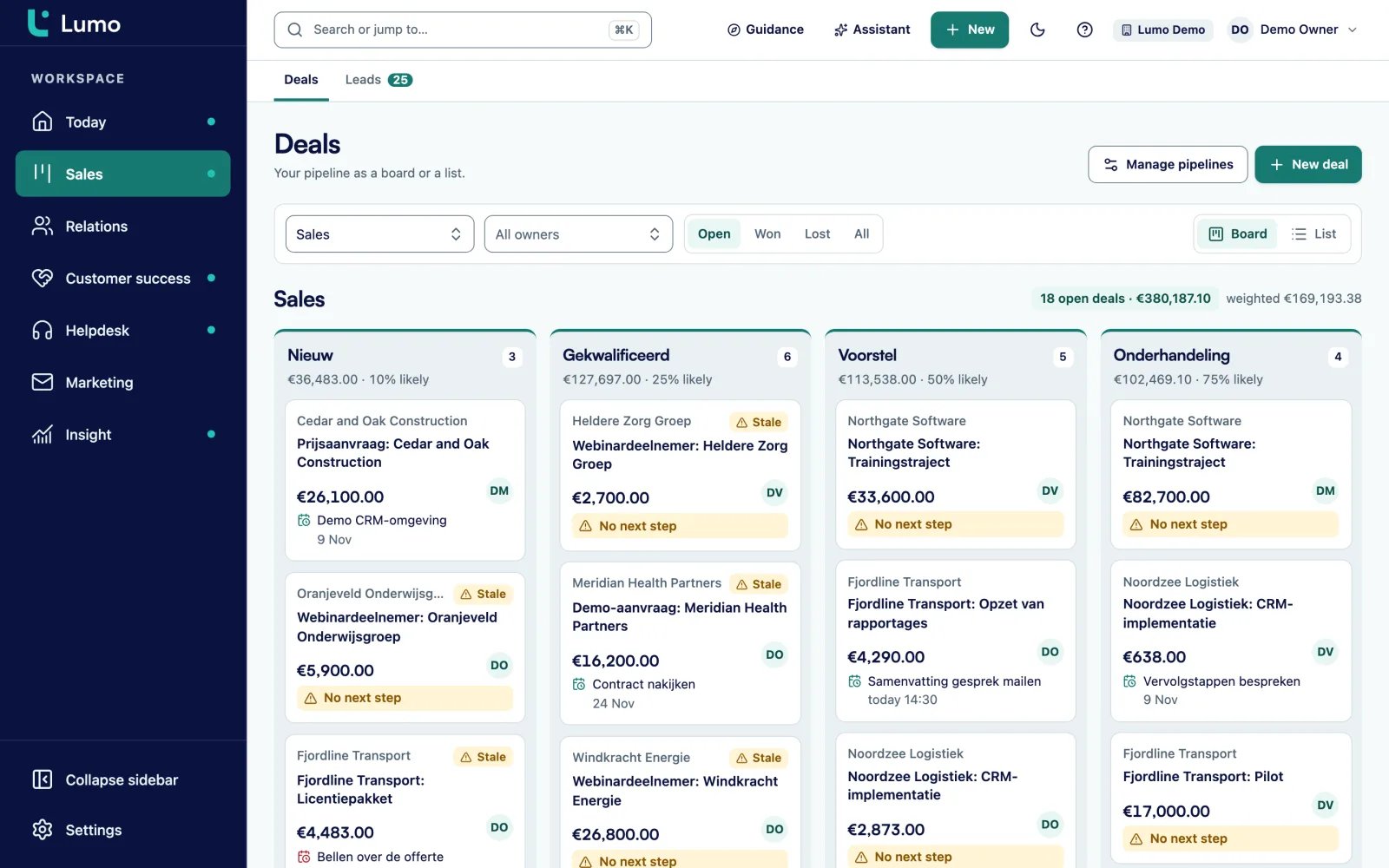
The deal board is usually the first screen we show. You see your deals per stage, with the count, value and weighted value per stage. Each stage has a win probability and a number of days after which a deal starts to rot. A deal that stalls too long gets a warning.
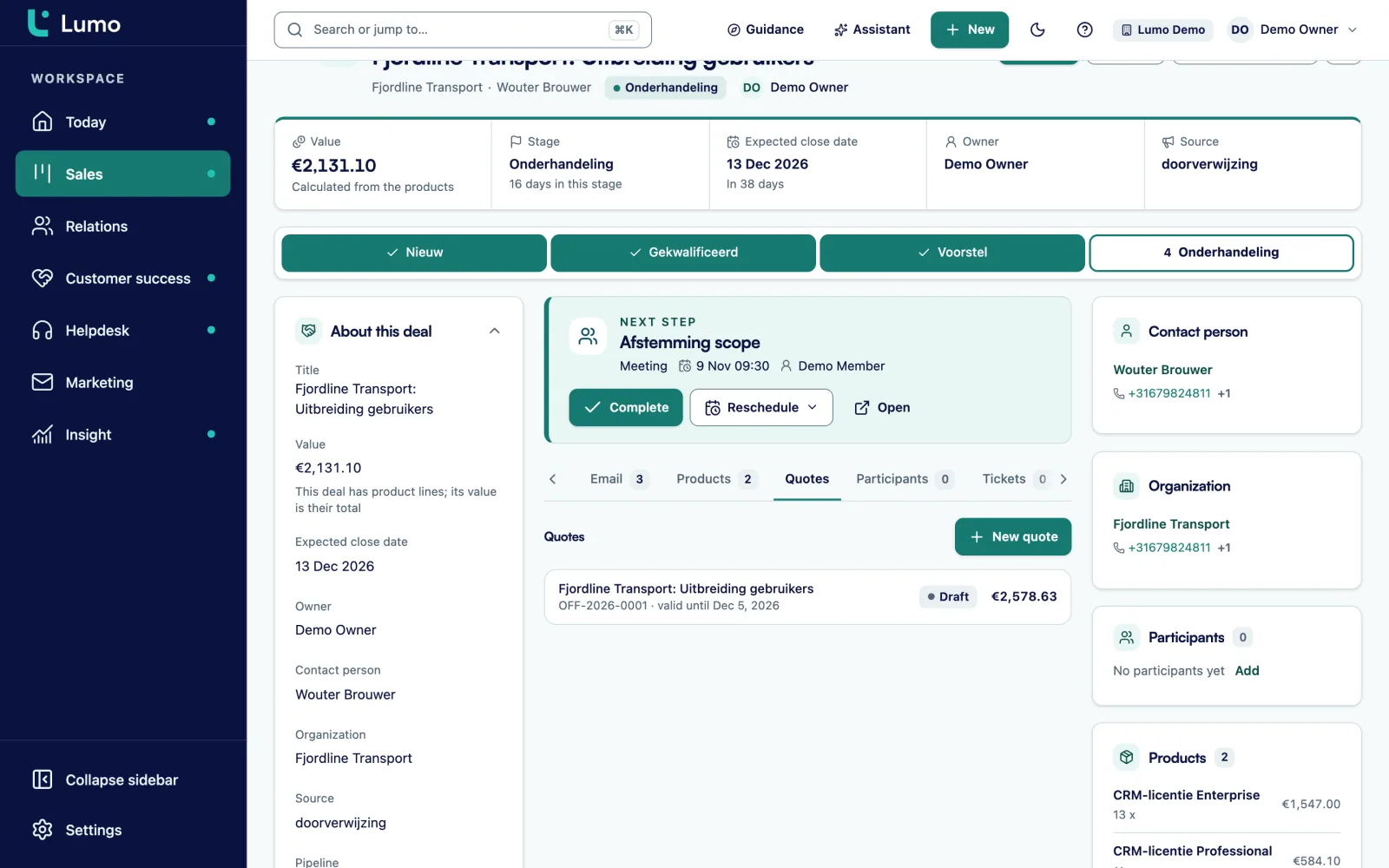
Then we open a deal. You see the next step, the timeline with email and notes, the products with quantity, price, discount and billing frequency, and the participants. From the deal you move it, win it, or lose it with a reason. More on pipeline management.
- Kanban board and list per pipeline
- Warning on stalled deals
- Products with one-time and recurring billing
- Today page with what matters that day
From deal to signed quote
If quotes matter to you, we make one during the call. The lines come from the products on the deal, the number runs per year, like OFF-2026-0001, and your customer's logo is on the PDF. The quote goes out through your Gmail with a signing link.
The recipient gets a six digit code by email, types their name and ticks agree. The signed PDF gets an evidence page with time, IP address, device and a checksum, and a note is added to the deal. Quotes are in Dutch. More on quotes and signing.
- Lines as a snapshot of the deal products
- Signing with a typed name and an email code
- Audit log with a chain integrity check
What else we can show you
We pick what fits your scenario. These are the parts that come up most.
Email on the record
How mail with known contacts lands on the person, organization and deal with Gmail, and how the BCC address works with any mail client, Outlook included.
Reporting
A report of your pipeline by stage, with drill-down to the deals. Or a weighted forecast as a report, based on the win probability per stage.
Switching from Pipedrive
The import wizard with a dry run, and the difference between switching and keeping Pipedrive as the source. See switching from Pipedrive.
Service
Tickets with SLA targets per priority, the customer portal and knowledge base, and how that sits on the same organization record as the deals.
Campaigns and forms
A form that creates a lead, and a campaign with a consent check at the moment of sending. See the whole platform.
AI assistant
What the assistant can do, how it waits for your approval before outward actions, and that it is off by default.
How to get the most out of the demo
- Describe two or three real situations from your sales process in the form.
- Bring someone who works with customers every day, not only the decision maker.
- Know roughly how many people will use the CRM.
- Know where your data comes from: Pipedrive, another CRM or spreadsheets.
- List your hard requirements, such as your mail client, mobile use or where your data lives.
- Think about who will manage the CRM on your side after go-live.
What to know before the demo
Do you work in Microsoft 365 and Outlook? You are welcome. The Outlook and Microsoft 365 integration is planned, and in the demo we show how you work today with the BCC address and the rest of Lumo. If other points weigh heavily for you, such as mobile use or where your data lives, put them in the form. Then we start the call with those.
Questions about the demo
Does a demo cost anything?
No. The demo is free and without obligation.
How soon will I hear back?
Within a week we get in touch to schedule a moment.
Do I get a price in the demo?
After the demo you get a quote for your situation. The price depends on the number of users, the modules and whether you outsource the setup. More on pricing.
Can I try it myself afterwards?
Yes. After the demo we can prepare a trial workspace for you. You can also request one directly through try it free.
Who runs the demo?
Someone from Sales Surge, the agency that builds Lumo. The same people who do the implementation.
Can it be in English?
Yes. The product works in Dutch and English, and the demo can be in either.
I use Outlook. Is a demo still useful?
Yes. The Outlook and Microsoft 365 integration is planned. Today the BCC address works with any mail client, and every other part of Lumo is independent of your mail.
What happens to the details I enter?
We only use them to contact you about Lumo. Your request arrives as a lead in our own workspace.
Request a demo
Tell us briefly how you sell and what you want to see. We get in touch within a week to schedule a moment.
You talk to someone from Sales Surge, the agency behind more than 150 CRM implementations. We ask for your name, work email, company and the number of users. Job title, phone and notes are optional, but the more you tell us, the better we prepare your scenario.