See your campaign next to the pipeline
In the demo we build a segment on contacts that look like yours and show how a submission reaches sales.
You email segments built from the same contacts sales works with. A form submission becomes a person and a lead with source and consent. And an unsubscribe applies to the whole workspace at once, so nobody emails someone who said no.

Most B2B marketers work with an email tool, a form builder and a CRM that belongs to sales. Every month the same routine. Export a list from the CRM, clean it up in a spreadsheet, import it into the email tool and send. A week later sales asks who clicked. So you export the other way.
Meanwhile things go wrong that you never see. Someone unsubscribed in the email tool last month but is still a recipient in the CRM, so they come back with the next export. A lead from the webinar form arrived in the form builder, but the sync to the CRM got stuck for a day. And sales emails a customer who just filed a complaint, because they did not know he was in a campaign.
Then there is GDPR. You need to show who gave consent, when and through which form. When that consent lives in three systems, it is an afternoon of digging.
And the question every marketer gets, is this actually working? Hard to answer when the lead is in one tool and the deal in another.
In Lumo you work on the same database as sales. A segment is a filter on your own people and organizations. A form submission finds the person by email or creates them, creates a lead and records consent and source. An unsubscribe applies to the whole workspace. Consent is checked at the moment of sending, not only when you built the segment.
Read more about email campaigns, web forms or the guide on B2B email marketing and GDPR.
A Wednesday for a marketer running a webinar and sending a newsletter.
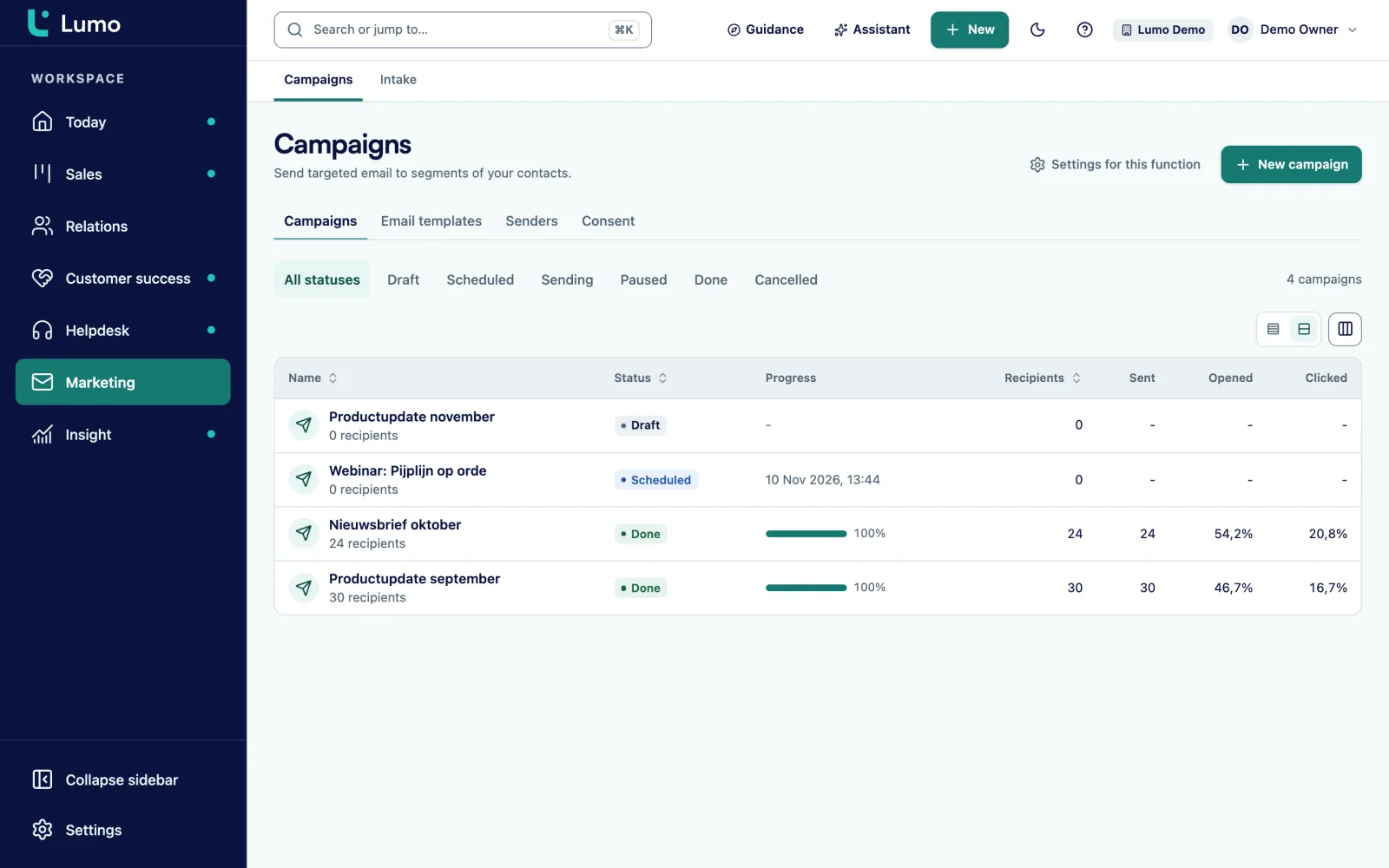
You open yesterday's campaign and see Sent, Delivered, Opened, Clicked, Bounced, Complaints, Unsubscribes and Failed. Below them, the most clicked links.
You build a segment of everyone at organizations in the customer lifecycle stage with a job title in purchasing or management. The live preview shows who drops out and why, for example missing consent.
You build the sign-up form with a consent field and a hidden field for utm_source. Under Link to CRM fields you map the fields. Publishing only works once every required CRM field is mapped.
You open the Template, adjust the copy and the preheader and check the live preview. The plain text version is generated for you. You send a test to two colleagues in the workspace.
In Leads you filter on the webinar source. You see which sign-ups belong to existing customers and which are new. The new ones you set to Working for sales.
You set the invitation in Timing for Monday at nine. You add a follow-up campaign that goes after four days to everyone who did not open. Running campaigns can be paused, resumed or cancelled.
You build a campaign in four steps: Name and sender, Recipients, Template and Timing. For the sender you pick a sender identity with a reply-to address. You verify the sending domain once with a DNS record.
For recipients you pick a saved filter or build a new one. The live preview shows who drops out and why: no consent, unsubscribed before, bounced before or a complaint. For timing you choose draft, send now or schedule.
After sending you see results per campaign. Opens and clicks are counted per unique recipient, and you can switch tracking off per template. A follow-up campaign goes out automatically after a set number of days to people who did not open or did not click. More on campaigns
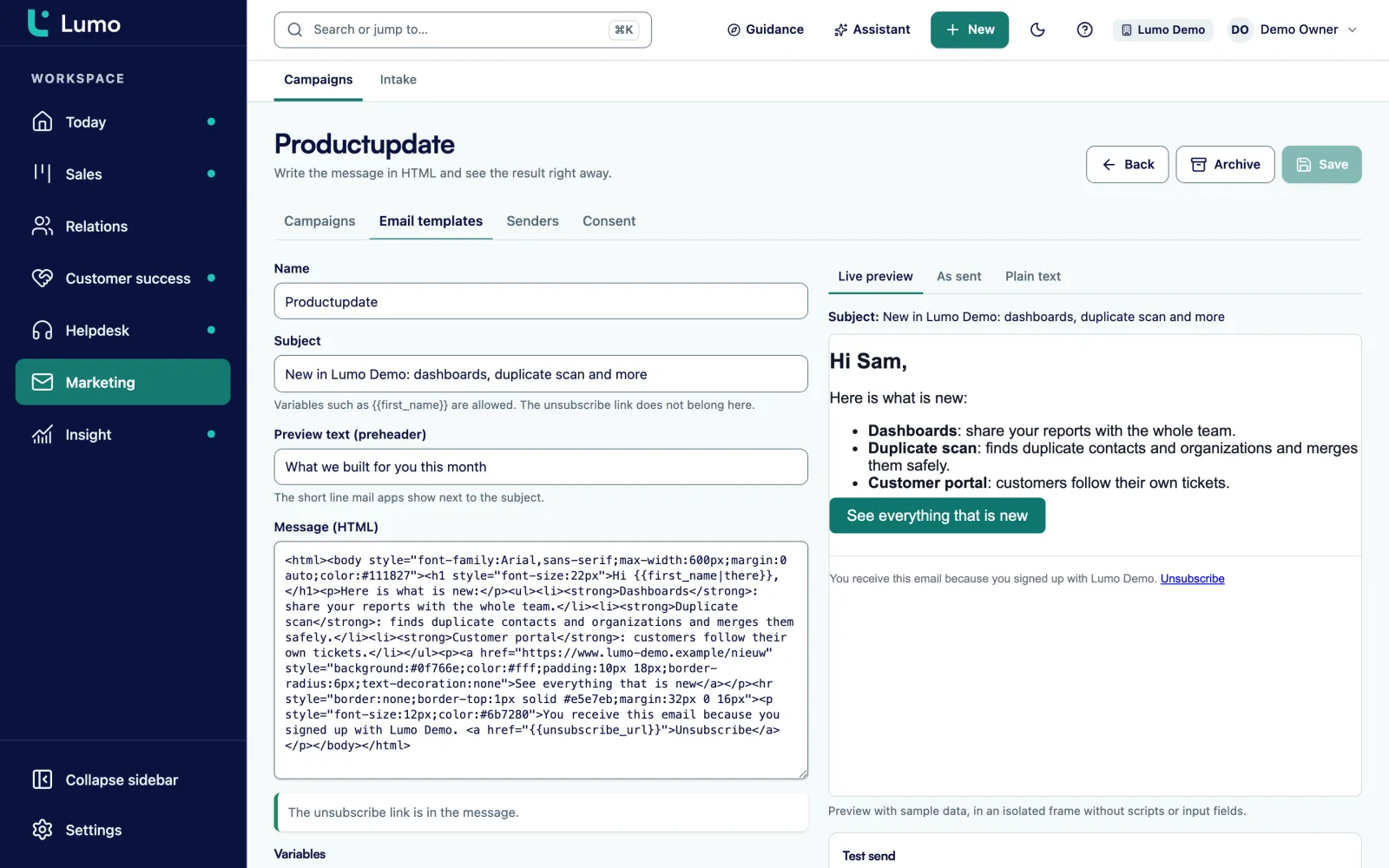
Templates are HTML. You use variables such as first name and organization, with a default for when the field is empty. You set a preheader, the line shown next to the subject in the inbox. The plain text version for mail clients without HTML is generated automatically.
The live preview runs in a sandboxed frame, so you see what the recipient sees. A test send only goes to people in your own workspace. A half-finished email never reaches a customer by accident.
The unsubscribe link is required in every template. Without it the template cannot be used. Archive a template you no longer need. Sales can also reuse a template as the start of a personal Gmail message. Tracking and the unsubscribe line are then stripped, because it becomes an ordinary person-to-person email.
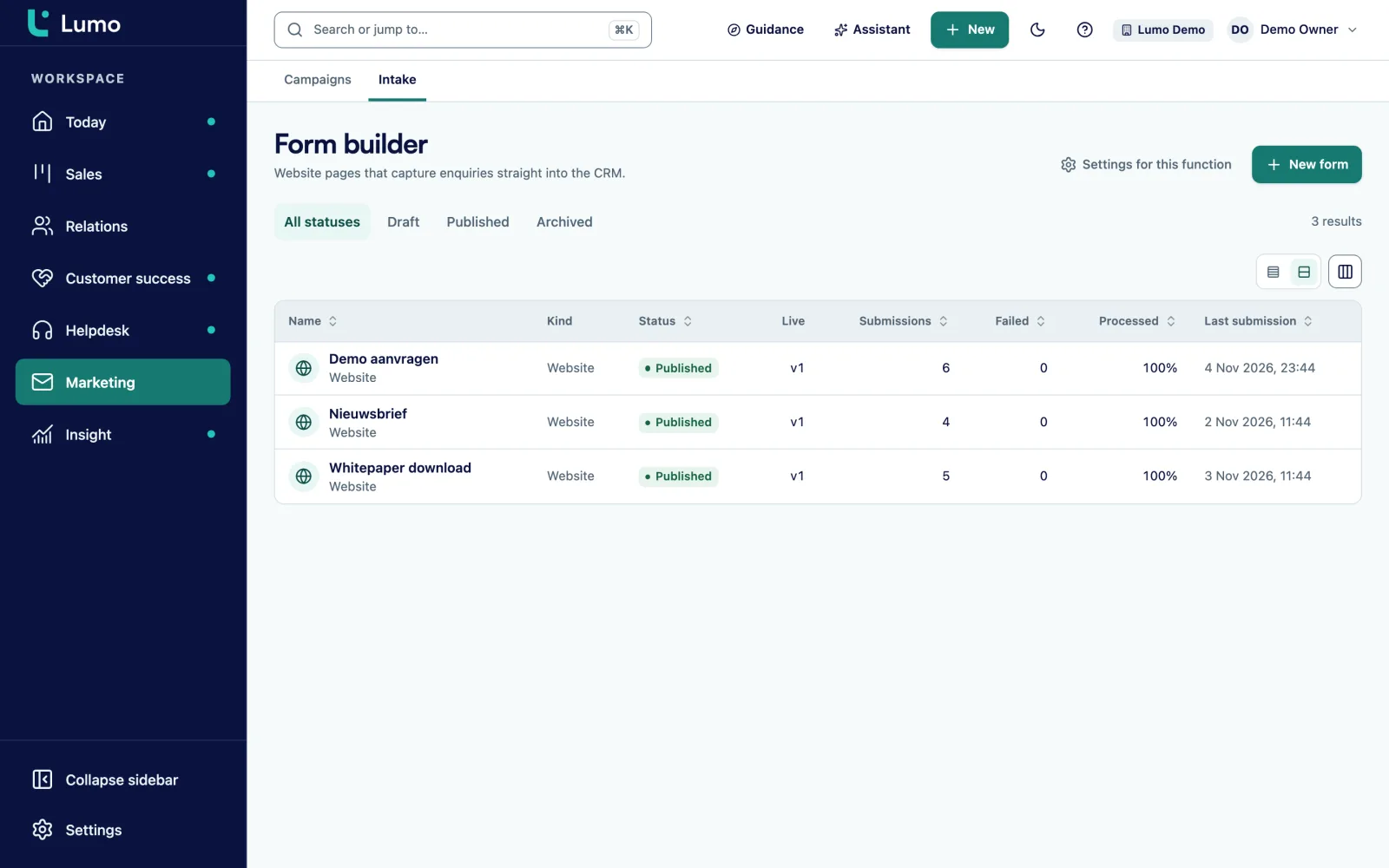
You build a form in tabs: Fields, Link to CRM fields, Conditions, Thank you, Publish, Submissions and Connections. Field types are text, email, phone, number, date, choice, multi-choice, checkbox, consent and hidden. A hidden field is filled from the URL, such as utm_source or utm_campaign.
A form can have several steps and show fields based on earlier answers. Every version is kept, so you can roll back. You publish the form on its own link or embed it on your site with a script.
What a submission does: it finds the person by email or creates them, creates a lead and records consent and source. An anonymous submission never switches consent on by itself, it sends a double opt-in confirmation email. A honeypot and a fill-time check keep bots out. More on web forms
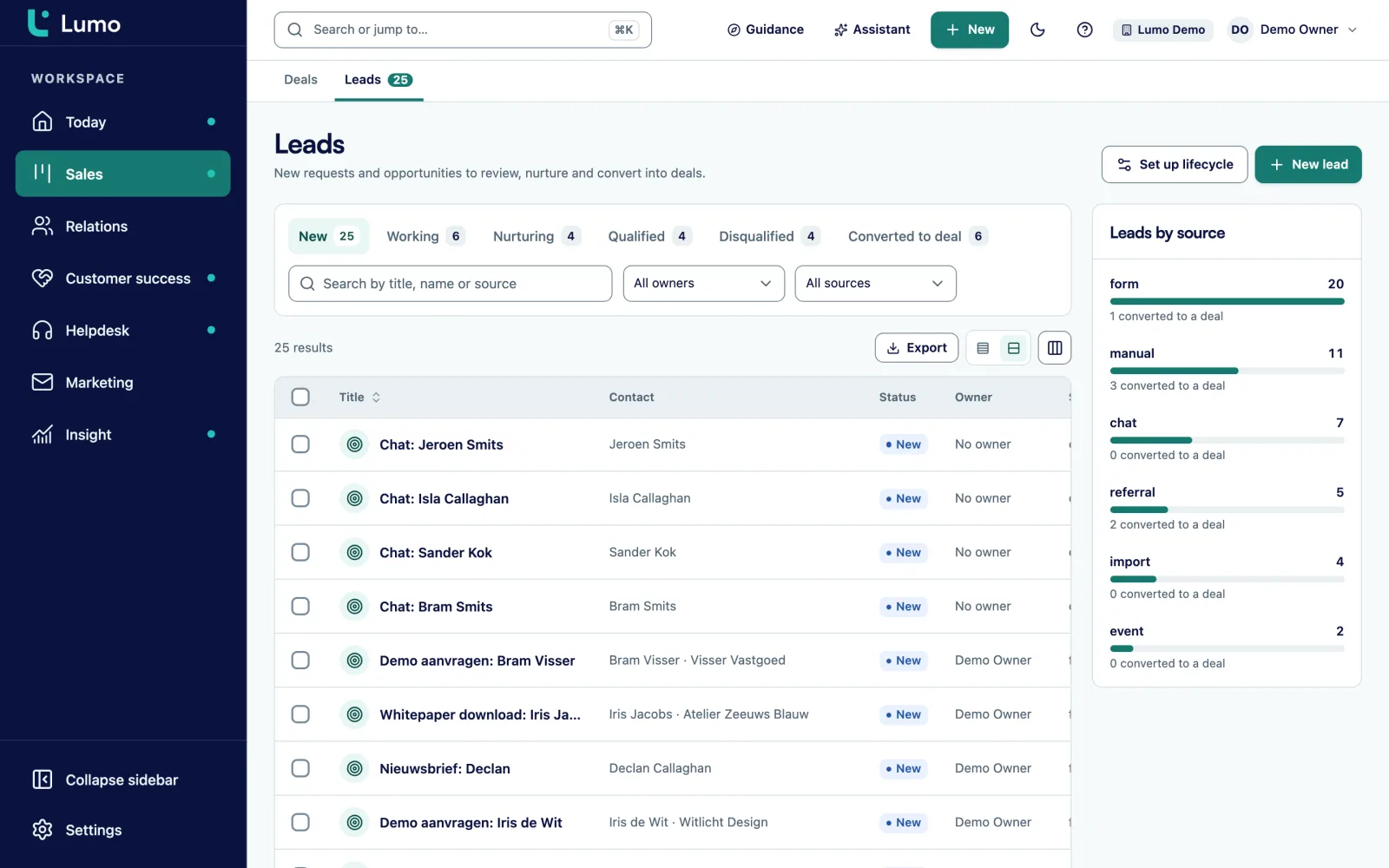
Every lead has a status: New, Working, Nurturing, Qualified, Disqualified or Converted to deal. It has a source and a source detail, so you know whether it came from the webinar form, the chat or a lead ad.
Sales sees new leads on the Today screen under Leads to follow up. A lead that is not ready for a conversation, sales sets to nurturing. That is your group for the next campaign. A lead converts to a deal exactly once, so you never count a conversion twice.
In reports you build an overview of leads per source and per status, and of the share converted to a deal. That answers which source brings leads that sales actually follows up. More on lead management.
A B2B marketer is usually measured on leads and what happens to them next. How many leads per source per month. How many of those sales sees as qualified. How many become a deal. And on the email side: delivery, opens, clicks, unsubscribes and complaints.
In Lumo the first part comes from leads. Source and status sit on every lead, and leads are a source in reports. A funnel from new to qualified to converted is built on lead statuses. Lifecycle stages with automatic rules show how many organizations sit in each stage.
The second part lives on the campaign itself: sent, delivered, opened, clicked, bounced, complaints, unsubscribes and failed, plus the most clicked links. Opens are an upper bound, because some mail apps open messages in advance. Clicks count per unique recipient. How to keep B2B email within the rules is in the guide on email marketing and GDPR.
A saved or new filter on people and organizations, with a live preview of who drops out.
Require explicit consent is on by default and is checked again at the moment of sending.
After a set number of days, an automatic follow-up campaign to people who did not open or click.
An unsubscribe applies to the whole workspace, with one-click List-Unsubscribe. Bounces and complaints are suppressed for good.
Verify your domain with a DNS record and set up senders with a reply-to address.
Lifecycle stages with automatic rules show how many contacts sit in each stage.
A chat visitor who leaves an email address becomes a person and a lead. Live chat
Have it draft a segment or a template. Sending or scheduling always waits for your approval. The AI assistant
Picture a consultancy with twenty consultants and one marketer, running a webinar for finance directors every quarter. This is an example, not a customer. The firm has around 3,000 people in the CRM, part of whom opted in to the newsletter.
Before, the marketer exported a list every quarter, built the invitation in a separate email tool and entered the sign-ups into the CRM by hand afterwards. Twice someone who had unsubscribed still got an invitation.
In Lumo she builds a segment of people with the job title finance director who have consent. The live preview shows that 140 people drop out, most of them for missing consent. She builds a sign-up form with a hidden field for utm_campaign and puts it on the website.
The invitation goes out on Monday. After four days a follow-up goes automatically to everyone who did not open. Each sign-up becomes a lead with the webinar source. If the person already exists, the lead lands on that same person.
After the webinar, the consultant who presented filters Leads on that source. He sees which sign-ups are existing customers and which are new. He converts two new ones to deals. The rest go to nurturing, and that group gets the invitation for next quarter.
What we go through with a marketer before the first campaign.
Templates are HTML, there is no drag and drop block editor. If you design your own, you work from a fixed base template you adjust per campaign. A sequence of several emails is built with the follow-up campaign, not as a long drip. Clicks count per unique recipient, there is no total click count. SMS is not included. Campaigns and submissions are not in the report builder yet, so you read their numbers on the campaign and the leads in reports. There is no daily send limit or approval step, so agree who sends campaigns. We test the Facebook lead ads connection on your own account during setup.
Yes, because segments, unsubscribes and consent then sit on the same people as the deals. You stop exporting lists and sales can see who was in a campaign.
Require explicit consent is on by default and is checked again at send time. An anonymous form submission gets a confirmation email for double opt-in.
The unsubscribe applies to the whole workspace, including later campaigns. One-click List-Unsubscribe is supported. Bounces and complaints are suppressed for good.
Yes, per campaign you see unique opens and clicks and the most clicked links. You can switch tracking off per template.
Yes, with a script or as a standalone link. Hidden fields are filled from the URL, for example with utm_source.
You set a follow-up campaign to people who did not open or click after a number of days. A long multi-step sequence is not available. Automations in Lumo deliberately do not send email.
No. The score is a number you fill in. Source, status and lifecycle stage still give a consistent picture of where a lead stands.
Yes. Campaigns go out from your own verified sending domain and do not depend on your mail client. Personal email you log with the BCC address. A connection with Outlook and Microsoft 365 is on the roadmap.
In the demo we build a segment on contacts that look like yours and show how a submission reaches sales.