Put Pipedrive and Lumo next to your own process
In the demo we show Lumo with your pipeline next to it. If a better Pipedrive setup is enough, we will say so.
If you are looking for a Pipedrive alternative, you want to know what actually differs. Sales Surge is a Pipedrive Platinum Partner and built Lumo. We know both well, and we will tell you where Pipedrive is stronger.
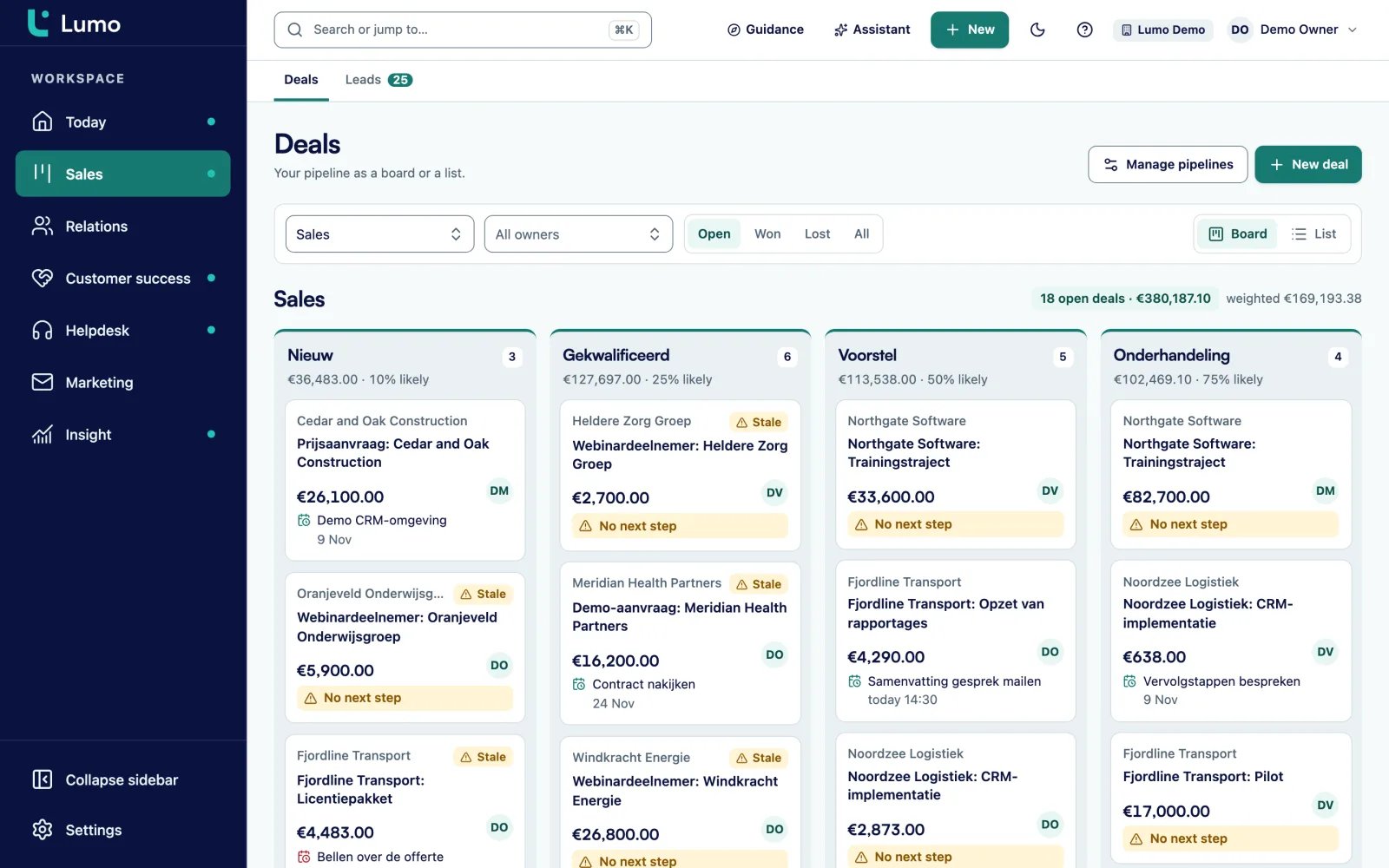
Pipedrive is a sales CRM built around the pipeline. You see deals per stage, drag them forward, and the product nudges you to the next activity. It works, which is why we have set it up for clients for years. Sales Surge has done more than 150 CRM implementations, and a large share of them were Pipedrive. You do not become a Pipedrive Platinum Partner by accident.
But we kept seeing the same pattern. Sales works in Pipedrive. Support lives in a separate helpdesk. Marketing sends from a third tool. Quotes go through a fourth. Each tool keeps its own copy of the customer, and we built the integrations that hold them together. Pipedrive covers part of this with its own add-ons and a large marketplace. That is a good route if you are happy to assemble the stack yourself.
Lumo takes a different route. The pipeline will feel familiar if you come from Pipedrive: stages with a win probability, a deal board with weighted value, a warning when a deal sits still too long. Next to it, quotes with e-signatures, email campaigns, web forms, a helpdesk with a customer portal, live chat and customer success share the same database. A person exists once, and everything that happens with that person hangs off that record.
So the question is not which CRM is better. It is whether you want one system for the whole customer journey, or a strong sales CRM with separate tools around it. Both can work well. Below we go through the themes one at a time: pipeline, email and calendar, quotes, service, marketing, reporting, AI, data and security, and the switch itself. For each one you will see what Lumo does, where Pipedrive works differently, and what you should know before you choose.
Qualitative differences, no prices. Pipedrive changes often, so always check the details yourself.
| Topic | Pipedrive | Lumo |
|---|---|---|
| Focus | Sales CRM centred on the pipeline | Sales, service and marketing in one database |
| Pipeline | Visual deal board at the core of the product | Board and list, win probability per stage, weighted value and stall warnings |
| Leads | Separate leads inbox next to deals | Leads with six statuses, source and a manual score, converted to a deal once |
| Integrations with the common mail providers | Gmail today, Outlook and Microsoft 365 planned, BCC address works with any mail client | |
| Calendar | Calendar sync with the common providers | Two-way Google Calendar sync, up to 10 calendars per user |
| Quotes and signing | Through a documents add-on or an integration | Quote built from deal products, signed with an emailed code, with an audit log |
| Helpdesk | Usually a separate tool through an integration | Tickets with SLA targets, customer portal, knowledge base and live chat built in |
| Marketing | Through its own campaigns add-on or an integration | Campaigns to segments, forms with double opt-in, workspace-wide unsubscribe |
| Reporting | Insights and dashboards around the pipeline | Report builder with nine chart types, goals and drill-down to records |
| AI | Its own AI features in the product | AI assistant that is off by default and asks for approval before outward actions |
| Data quality | Duplicate merging, more through marketplace apps | Merging with undo, and rules that can really block a save |
| Integrations | Large marketplace of ready-made integrations | REST API, webhooks and an MCP server, no marketplace |
| Mobile | Mobile apps | Web app, no mobile app |
| Switching | You stay where you are | Import wizard from Pipedrive, including a mode where Pipedrive stays the source |
Compared on the basis of public information, November 2026. Check the Pipedrive website for current details.
This is where the two are closest. In Lumo every stage has a win probability and a setting for how many days before a deal starts to rot. On the board you see the count, value and weighted value per stage, and there is a totals per stage table. Every stage change is stored with its duration, so later you can measure how long deals hang in a stage. Products on a deal have a billing frequency, from one-time to annual, and the deal value is the sum of the lines. Leads move through New, Working, Nurturing, Qualified, Disqualified and Converted to deal. The Today screen puts tasks, leads to follow up, stalled deals and tickets close to breaching in one place.
What you should know: Lumo has no separate forecast screen. You build a weighted forecast as a report, using the win probability per stage. And the lead score is a number you fill in yourself.
Lumo syncs with Gmail and Google Calendar today. Only mail that involves a known contact is stored, and the body of other mail is never fetched. Mail is private by default. You send from your own Gmail with variables such as first name and organization. The calendar works both ways and never sends invitations on your behalf. Pipedrive connects to more providers. The Outlook and Microsoft 365 integration is planned for Lumo. Until then the personal BCC address works with any mail client: put it in Bcc or forward a mail to it, and it lands on the right person, organization and deal.
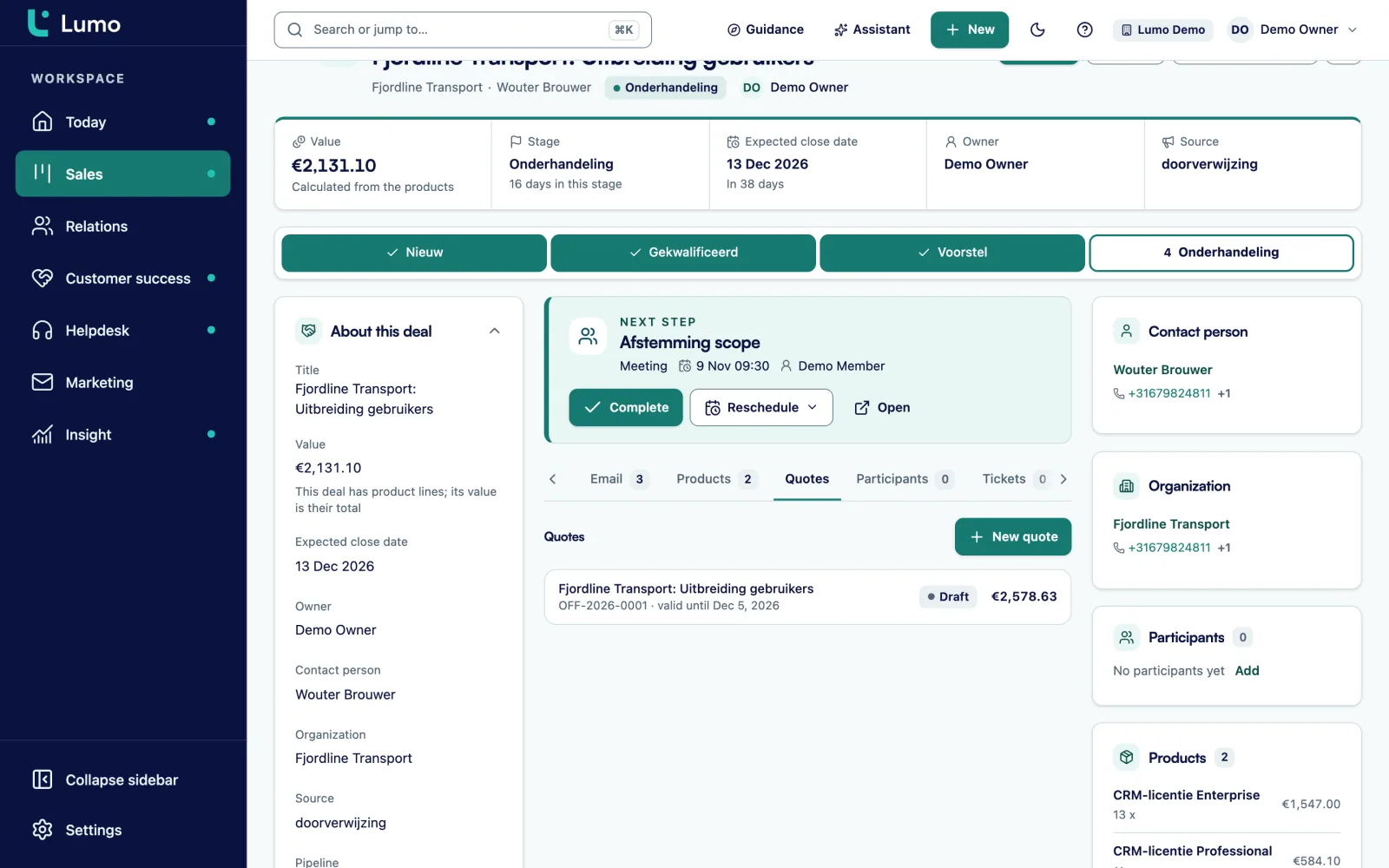
In Pipedrive you usually create quotes with an add-on or an integration with a document tool. In Lumo the quote lives on the deal. Its lines are a copy of the deal products, numbering runs per year (OFF-2026-0001), and the PDF carries your logo and the customer's. The customer signs with a typed name and a six-digit code sent by email. The signed PDF gets an evidence page with time, IP address, device and a SHA-256 hash. Read more about quotes and e-signatures.
If you come from Pipedrive, you know the pattern. The deal sits neatly in the pipeline, but the quote lives in another system. The amount on the deal stops matching what the customer signed, and nobody notices. In Lumo the quote sits on the deal. You choose products with quantity, price, discount and frequency, and the quote takes over those lines.
The quote goes to the customer with the PDF and a signing link. The customer opens the link, gets a code by email, types their name and ticks agree. Declining is possible too. After signing, the signed PDF goes to the customer and a note is added to the deal. Every step is stored in an audit log chained with hashes, and you can run an integrity check on that chain. You can also void a quote.
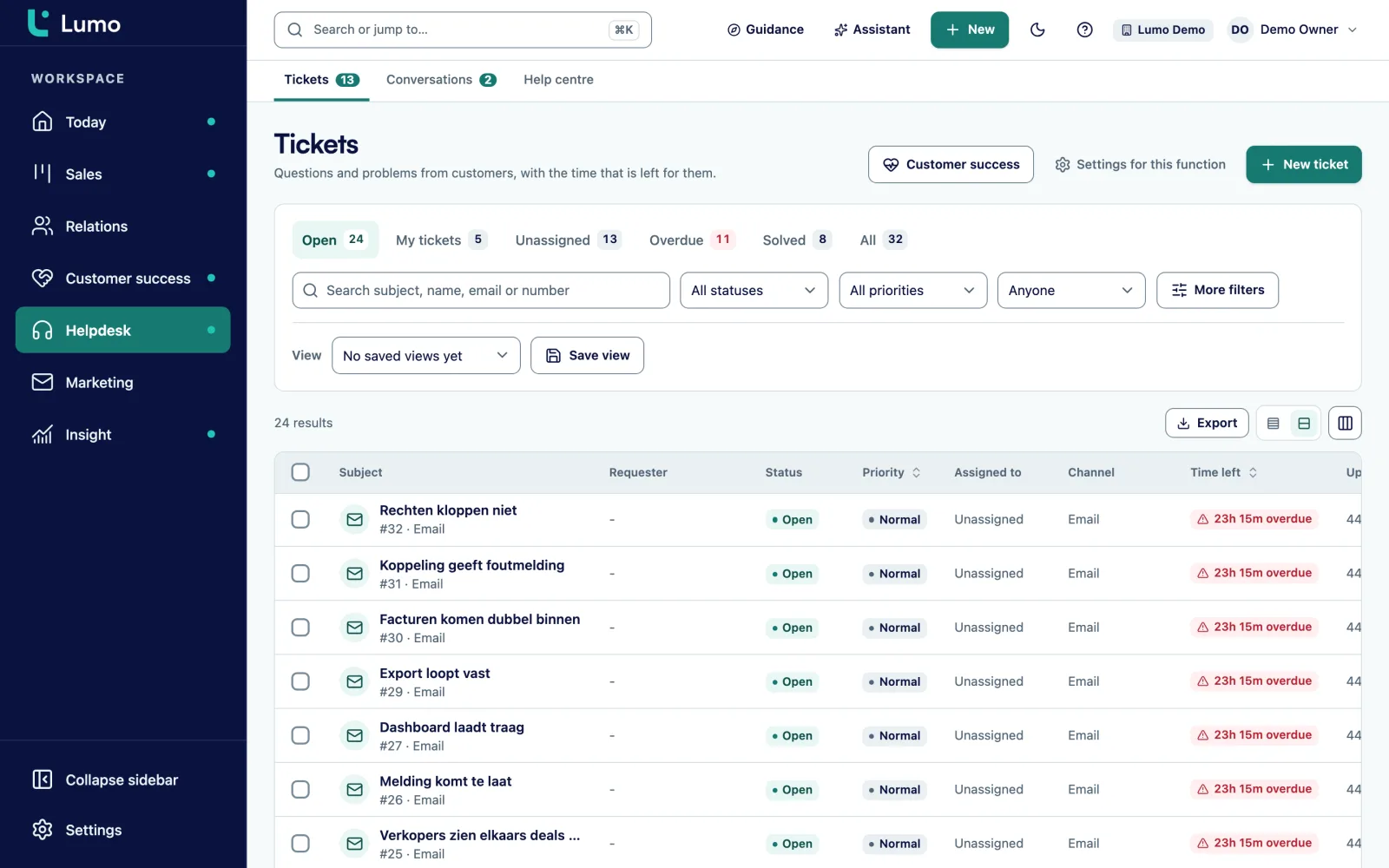
Pipedrive is a sales CRM. For support, most teams pick a separate helpdesk and connect it. That works, but the account manager often cannot see that three tickets are open for the customer he calls tomorrow. In Lumo the helpdesk is part of the same product. Tickets move through New, Open, Pending, On hold, Solved and Closed. You set first-response and resolution targets per priority, with business hours and holidays, and a warning appears at 75 percent. After a ticket is solved a satisfaction survey goes out. Customers get a portal with a passwordless login link, and there is a knowledge base in Dutch and English.
Pipedrive offers its own campaigns add-on. In Lumo email campaigns are part of the product: a four-step wizard, segments from your filters with a live preview of who is excluded and why, HTML templates with variables, and a follow-up to people who did not open or click after a number of days. An unsubscribe applies to the whole workspace, and consent is checked again at the moment of sending. Web forms create a person and a lead, and an anonymous submission never switches consent on by itself but sends a confirmation link.
What you should know: there is no drag-and-drop editor, templates are HTML. And there are no multi-step sequences beyond the follow-up rule.
In the report builder you pick a source, a measure and a breakdown, and see a live preview. There are nine chart types, from KPI and funnel to waterfall and table. You can draw goal lines, drill down to the records and export to CSV. Dashboards are private or shared with the team. You can also ask the AI assistant to build a report from a sentence. Reports that combine tickets and campaigns with deals are on the backlog, and scheduled email reports do not exist.
You see the difference with a Pipedrive setup plus separate helpdesk on the organization record. Deals, tickets and customer health sit together there. The health score runs from 0 to 100 and is based on ticket signals over the last 90 days. An account manager preparing a renewal sees straight away whether the customer just complained three times.
For the support team it works like a normal helpdesk. A public reply or an internal note, macros under a shortcut, assignment across available agents, tags and saved views. Rules take over repeat work. Customers see their own tickets in the portal, but never the internal notes.
Pipedrive builds its own AI features into the product. Lumo has an AI assistant that lets you search in plain language, create records, set up segments and campaigns, build automations and create reports. It has 52 tools: 21 to read, 23 to draft and 8 to commit. Anything irreversible or outward-facing waits for your click on Approve and run. The assistant runs with your own role and permissions, is off per workspace until an admin switches it on, and runs on Google Gemini by default.
Lumo has its own login with two-factor authentication through an authenticator app, which you can make mandatory for admins. There are four roles: owner, admin, member and viewer. Every table is separated per workspace. The audit log is append-only. For GDPR you can export everything about a person or erase them, with a check afterwards. Data is hosted in London, in the United Kingdom. There is no SSO.
Of all switches, the one from Pipedrive is the easiest, because Lumo has its own import wizard for Pipedrive. You connect with an API token, pick what to bring and start with a dry run. Then you choose the mode Only here, or Pipedrive stays the source. In that second mode, changes to activities, notes, deals and leads go back to Pipedrive. Sales Surge handles the implementation if you want: pipeline, fields, roles and training.
We are a Pipedrive partner and we will stay one. So this is not politeness. Pipedrive is strong on a few points where Lumo makes a different choice.
If you mainly sell, do not need a helpdesk or campaigns inside the CRM, and everything runs well, there is little reason to switch.
If three or more of these sound familiar, a demo is worth your time.
The import wizard in Lumo is built for Pipedrive. Read the full approach under switch from Pipedrive.
You connect Lumo with an API token from Pipedrive. To practise first, use trial mode with sample data.
Owners, pipelines and stages, organizations, persons, deals with product lines, leads, activities and notes.
The dry run reads everything from Pipedrive and shows what would happen. Nothing is written.
The import resumes if it stops, and importing twice does not create duplicate records.
Only here makes Lumo the source. Pipedrive stays the source keeps Pipedrive leading and writes changes back, with updates via webhook and a check every quarter of an hour.
Lumo is a web app, so reps on the road work in the browser. You build a forecast as a report using win probability per stage. You connect other tools through the API and webhooks rather than a marketplace. If you work in Outlook, use the BCC address until the Outlook and Microsoft 365 integration is there. Data is hosted in London. Bring these points to the demo and we will look at how to handle them together.
For teams that want sales, service and marketing in one system, yes. For a team that only sells, works mostly on mobile and is happy today, there is little reason to switch.
Because across more than 150 CRM implementations we kept building the same integrations between separate tools. Lumo puts those parts in one database. We still set up Pipedrive for clients as well.
Yes, with the import wizard. You start with a dry run. After that, Pipedrive can stay the source for a while as Lumo reads along and writes back. Switch from Pipedrive
Yes. In the mode Pipedrive stays the source, part of the team works in Lumo while changes to activities, notes, deals and leads go back to Pipedrive.
We do not quote other vendors' prices. Lumo pricing depends on the number of users and the modules you switch on. About pricing
Gmail and Google Calendar sync today. The Outlook and Microsoft 365 integration is planned. Until then you put the personal BCC address in Bcc or forward a mail to it, and it lands on the right records.
No, Lumo is a web app. You work in the browser.
Yes. You request a trial workspace and we set it up for you. There is no self-signup. Free trial
In the demo we show Lumo with your pipeline next to it. If a better Pipedrive setup is enough, we will say so.