See how in-app guidance works
In the demo we show tours, checklists and data quality rules on sample data, and talk through how to map them to your own data contract.
A CRM that is half used costs money and gives you nothing to steer on. This guide shows why teams drop off, how to measure use with five numbers and what to do each week in the first two months.
The pattern is almost always the same. The CRM goes live, there is a two hour training, and in the first week everyone updates their deals. By week three half the meetings live in personal calendars again and the real status sits in a spreadsheet the sales manager emails around every Friday. In month three someone in the leadership meeting asks why the CRM numbers do not add up. The answer is that nobody keeps them up to date.
That is rarely bad will. It comes down to a few familiar things.
The CRM takes time and gives nothing back. An account manager who fills in five fields after every call and never gets anything out of it will stop. Fairly, really. Input without use feels like admin for someone else.
The old system is still around. As long as the pipeline spreadsheet lives, the CRM is a second place. People pick the place the boss looks at.
Nobody knows what has to go in. "Keep your deals updated" is not an agreement. Does a deal need an amount after the first call? When do you mark it lost? Without clear rules everyone fills it in differently, and then no report is right.
The manager does not run the team from the CRM. This is the big one. If the sales manager asks "where are we with that deal?" in the weekly meeting instead of opening the board, the CRM is optional. Everyone picks up on that immediately.
It does not work where people work. A rep who spends the day in email and calendar will not log anything if it means switching screens and typing it all again.
So adoption is not a training problem. It is a design problem and a behaviour problem of the people who lead. The good news is that you can measure both and improve both week by week. If you have not gone live yet, read the guide on CRM implementation too. Much of adoption is won or lost in the setup.
Measure behaviour, not logins. Together these five numbers tell you whether the CRM is really where the work happens. Calculate them every week, per team and per person.
Users who created or changed at least one record in the week, divided by all licensed users. Logging in alone does not count. Example: 9 of 12 people changed something, so 75 percent.
The number of deals, people and companies a rep changed in the week, divided by the number of reps. Compare it to the number of conversations someone has. Twenty calls and three updated records means nothing is being logged.
Open deals with at least one planned future activity, divided by all open deals. This is the most honest number there is. A deal without a next step is not being worked, even if it is still on the board.
Open deals where every field from the data contract for their stage is filled, divided by all open deals. Example: 54 of 80 deals comply, so 67 percent. Calculate it per stage, because the leak is usually in one stage.
Deals with email on the timeline in the last fourteen days, divided by deals with any activity in that period. A low score means conversations happen outside the CRM, and a colleague who takes over an account starts from zero.
None of these numbers has a universal norm. The figures in this guide are examples. Watch the direction over four to eight weeks and the differences between teams. That is where the conversation is.
People use a system when it makes their own work easier. "Leadership wants visibility" works for about a week. So write down per role what someone gets out of it, and make sure that is true on day one.
One list of what needs doing today, so you stop searching your inbox for who you promised to call back. Email and meetings that land on the customer record by themselves, so you do not retype them. And a pipeline you can point at in the weekly meeting instead of telling it all from memory. The agreement that goes with it: what is not in the CRM does not exist in the meeting.
No more collecting spreadsheets on Friday. You see for yourself which deals are stalled, which have no next step and where the pipeline is getting thin. Coaching conversations are about deals instead of about whether the numbers are right. The page for sales managers shows what that looks like in practice.
The history of a customer in one place, including what sales promised. No handover document nobody reads. Tickets, meetings and signals on the same company. At renewal time you know what happened over the past year.
Use these three paragraphs in your kickoff and in the first session. Be honest about what it asks: a few minutes a day to plan the next step and move a stage. That is the trade.
The data contract is the agreement on what must be in the CRM at minimum, per deal stage. Minimum is the key word. Every field you make required costs time on every deal. Only ask for what you actually use in a report or a decision.
Here is a template you can copy and adapt. The stage names are an example.
Two rules apply in every stage. An open deal always has a future next activity. And a deal that sits in a stage longer than the agreed period gets discussed or closed.
Write the contract on one page and keep it inside the CRM, not in a separate folder. Adjust it after four weeks based on what you see. The guide on CRM data quality covers rules and checks in more depth.
A template per week: who, what and what is delivered at the end. Stretch or compress the weeks for the size of your team, but do not skip a step.
Who: project lead and sales manager. What: write the data contract, set up stages and required fields, decide per role what people see on their start screen, pick two or three champions. Delivered: a working CRM with real data, the contract on one page and a date when the old spreadsheet stops.
Who: the whole team, opened by leadership. What: one hour on why and what it gives each role, then one hour of practice on their own deals. Delivered: everyone has checked their own open deals and set a next activity on each one.
Who: sales manager. What: the spreadsheet becomes read only, the first weekly meeting runs entirely from the board. Connect email and calendar. Delivered: a baseline of the five numbers.
Who: champions. What: two half hour drop-in sessions for questions, a short explanation of one thing that often goes wrong. Delivered: a list of the five most asked questions with answers inside the CRM.
Who: project lead and sales manager. What: review numbers per person, remove fields nobody uses, tighten rules where data is often missing. Delivered: version 2 of the data contract.
Who: a small group per role. What: a session on reports for managers, on quotes and follow-up for reps, on the account view for customer success. Delivered: every team has its own dashboard that is used in its meeting.
Who: sales manager and leadership. What: one on one conversations with anyone lagging behind, a fixed onboarding route for new hires, the quarterly review runs fully on CRM numbers. Delivered: a second measurement compared to the baseline, and an owner for the CRM after the project.
A long training at the start does not stick well. People remember what they actually do the week after. So use short formats spread over the weeks.
Practice on real data. In the first session, have everyone open and update their own deals. That teaches more than a demo with made-up companies, and the CRM gets more complete straight away.
Explanation inside the screen. A short tour in the place where someone has to do something works better than a manual in a separate folder. Keep every tour short and focused on one task.
Office hours instead of refresher training. A fixed half hour a week where people can drop in with their question. It also surfaces the things in the setup that are wrong.
Champions per team. A colleague who knows the CRM well gets asked before a project lead does. Give champions a few hours a week and name them in the communication.
An onboarding route for new hires. Every new colleague gets the same checklist for the first two weeks. Otherwise the mess starts again with every new hire.
The most important thing a manager can do costs nothing. Run the team from the CRM and accept nothing else.
The weekly meeting on the board. Put the deal board on the screen. Go through the deals that can close this month, then the deals that sit too long in a stage, then the deals without a next activity. What is not on the board is not discussed. A rep who mentions a deal verbally is asked to enter it after the meeting.
Fridays without spreadsheets. Stop asking for separate overviews. If the overview from the CRM is wrong, that is the conversation.
Coaching on deals. In a one on one, open that person's deals and discuss three of them. Why has this one been in proposal for four weeks? Who is the decision maker? That is how people learn that entering data is useful.
Lead by example. A manager who does not log their own customer conversations cannot expect anyone else to.
Do this consistently for eight weeks. That is usually when the CRM becomes the place where the work happens by itself.
An example with made-up numbers, to show how you read the metrics. Say a software reseller with twelve account managers and one sales manager moves from a shared spreadsheet to a CRM.
The week 2 baseline looks like this. Share of active users: 8 of 12, so 67 percent. Records updated per rep: 6 a week on average. Deals with a next activity: 38 of 95 open deals, so 40 percent. Deals with required fields filled: 41 of 95, so 43 percent. Logged email: 22 of 70 deals with activity, so 31 percent.
The sales manager looks per person and sees that four people do almost nothing. Two of them travel a lot and say that entering everything afterwards takes too long. The other two never connected their email. On required fields, the leak sits almost entirely in the proposal sent stage: products are missing on the deal.
In week 4 the team removes two fields nobody used, everyone connects email and calendar, and the weekly meeting only covers the board. The two people who travel a lot block ten minutes at the end of each day to set their next steps.
The week 6 measurement: 11 of 12 active, 14 records per rep, 71 of 98 deals with a next activity (72 percent), 70 of 98 with required fields (71 percent) and 49 of 75 deals with logged email (65 percent).
The lesson is not in the numbers themselves. Those are invented. The lesson is that every number pointed to a concrete cause, and that each cause could be fixed within two weeks.
Making everything required. Twenty required fields on a deal do not give you better data. They give you invented data, or deals that never get created. Start small and only add a field once you use it.
Measuring adoption by logins. Someone who logs in every day and changes nothing is not using the CRM. Measure what changes.
Leaderboards with names on a big screen. A ranking of who enters the most gets you a lot of entries and little substance. Discuss numbers per person one on one.
Letting the old place live on. Every week the spreadsheet exists next to the CRM is a week in which people get to choose. Set a date and keep it.
Stopping at go-live. Most projects end at go-live. Real adoption only starts then. Name an owner who keeps improving the CRM after the project.
Exceptions for the top performer. If the best rep enters nothing and gets away with it, the rest follows. Those are exactly the deals you want to see.
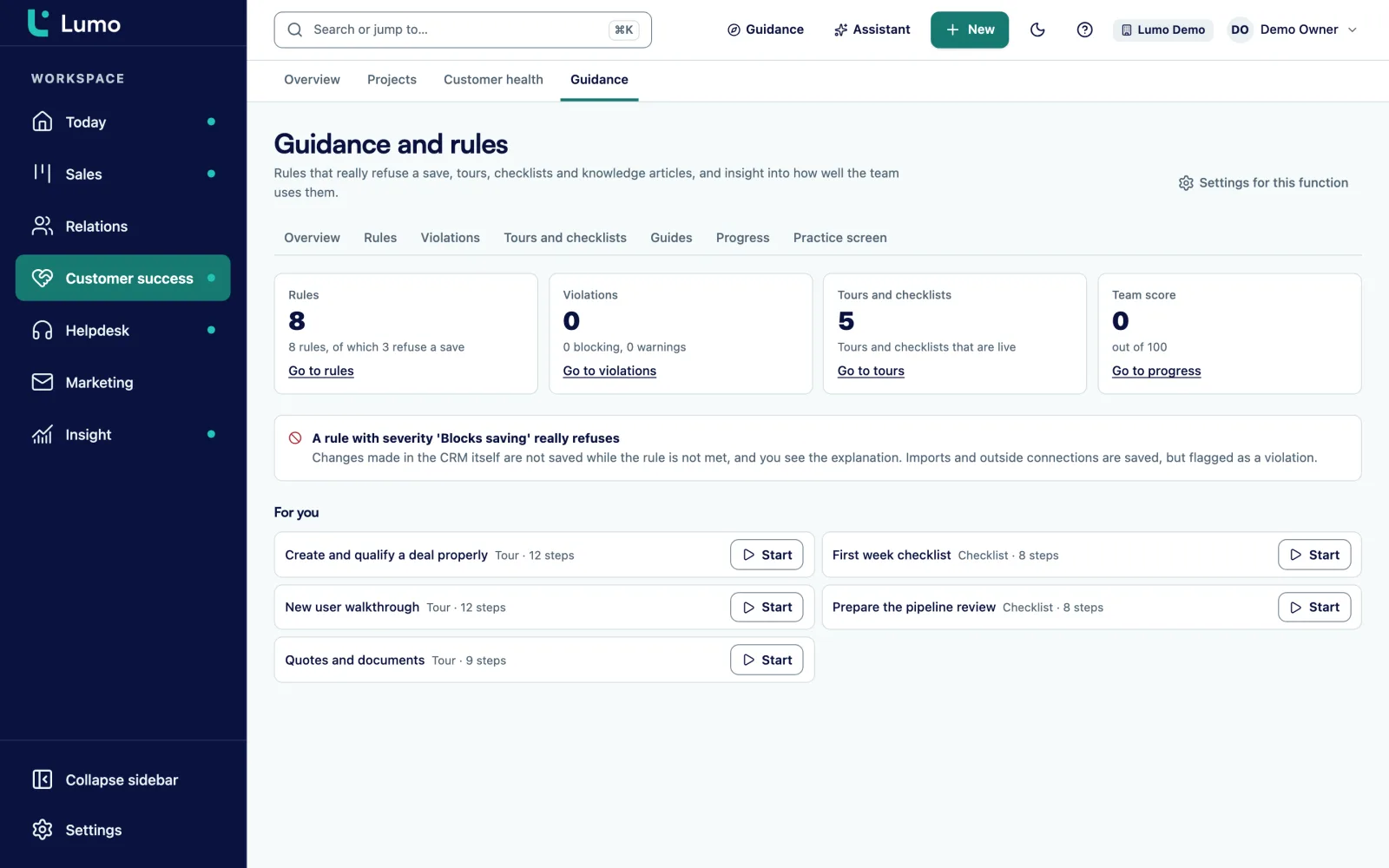
Lumo has an area called Guidance and rules. You build tours and checklists that show up inside the screen, write knowledge guides in Markdown, and publish a version when it is ready. You assign guidance to people and see their progress and an adoption score per person.
Data quality rules have three levels: tip, warn and block. Block refuses the save for input in the app and through the API. Imports, forms, chat and email are flagged but not refused. There are eight default rules for deals you can install, plus a list of violations. That is how you turn the data contract from this guide into rules.
The Today page shows each user their tasks, leads to follow up and stalled deals. Read more about adoption in Lumo, activities and calendar and duplicate records.
Lumo is a web app. There is no mobile app, so people on the road work in the browser or block fifteen minutes at the end of the day for their next steps. Email and calendar sync with Gmail and Google Calendar today. The Outlook and Microsoft 365 connection is on the roadmap. If you use Outlook, you use the personal BCC address now: put it in Bcc or forward an email to it, and it lands on the right person, company and deal. Logging email by hand works too. If you want help with the rollout, see implementation. Sales Surge, the maker of Lumo, has done more than 150 CRM implementations.
The degree to which your team really uses the CRM as the place where work happens. Not how many people log in, but whether deals, meetings and email are up to date in it.
Through behaviour. For example the share of users who change records in a week, records updated per rep, the share of deals with a next activity, the share of deals with required fields filled and the share of deals with logged email.
Usually because it takes time without giving anything back, because the old spreadsheet still exists, because it is unclear what has to go in, or because the manager does not run the team from the CRM.
Plan on six to eight weeks of consistent leadership after go-live. The first two weeks matter a lot, but the habit only forms once the weekly meeting has run from the CRM several weeks in a row.
Only the fields you actually use, per stage. Too many required fields lead to invented data. Start with a small data contract and extend it when needed.
A ranking or reward for data entry mostly produces a lot of entries. It works better when the CRM makes people’s own work easier and the manager only discusses what is in the CRM.
First ask why. There is often a practical problem behind it, such as email that is not connected or too many fields. If it still does not happen after that, it is a normal conversation about agreements, like any other work agreement.
Name an owner, measure the same numbers every week, clean up fields and reports every quarter and give new colleagues a fixed onboarding route.
In the demo we show tours, checklists and data quality rules on sample data, and talk through how to map them to your own data contract.