Put one of your current journeys into Lumo
In the demo we rebuild a journey from request for quote to order, with your stages, participants and lost reasons.
A manufacturing order arrives after months of drawings, quotes, samples and talks with procurement, engineering and quality. Lumo tracks that whole journey on one deal, with everyone involved, and keeps service and complaints after delivery on the same customer.

In manufacturing you rarely sell from a catalogue. You sell a part made to drawing, a machine adapted to a production line, or a series that fits a customer's schedule. So it usually starts with a request for quote. Then comes a technical review, a quote with prices per quantity, sometimes a sample or a pilot run, an audit by the customer's quality team and a negotiation with procurement. Only then do you get an order, or a framework contract with call-off orders.
That journey easily takes six to eighteen months. On the customer side three or four people are involved: the buyer, an engineer, someone from quality and sometimes management. On your side too: the account manager, a sales engineer, production planning and the project lead.
Here is a familiar case. A sales engineer agreed with the customer's engineer that a tolerance could be a bit wider. That agreement sits in an email in his personal inbox. Three months later procurement asks for a new quote, and inside sales builds it on the old drawing. The price is wrong, the customer hesitates, and the deal stalls for another two months.
After delivery the second part begins. A complaint about a dimension out of tolerance. A question about spare parts. A warranty case. These often reach the field rep, who is not the right person, and afterwards nobody knows whether the complaint was resolved.
Lumo keeps the whole journey on one deal and one organization. Everyone involved is a participant on the deal. Mail with known contacts lands on the timeline by itself. Drawings and specifications sit on the deal as files. The pipeline shows which stage each journey is in and for how long. And complaints and service requests arrive in the helpdesk, with a status and an SLA, next to the deals.
Screens and statuses carry these names in the app.
A request through the form on your site arrives as a lead with status New. A request from an existing customer goes straight into the pipeline as a deal.
You add the buyer, the engineer and the quality manager as participants. Drawings and specifications are attached as files to the deal and the organization.
You add parts or machines with quantity, price and discount to the deal. The quote copies those lines and goes to the customer through Gmail with a signing link.
Per stage you set Win probability and Rots after (days). A journey that sits too long in Sample gets the Stale label on the deal board.
A complaint or service request becomes a ticket, from New through Open and Pending to Solved. The customer then gets a satisfaction question.
A starting point for made-to-order work and machine building. The percentages are the win probability you set per stage, so a weighted forecast means something.
Exit criterion: the drawing or specification is in, quantities and the required delivery date are known. Rots after 5 days.
Exit criterion: engineering confirmed it can be made and the cost price is calculated. The review sits as a note on the deal.
Exit criterion: the quote went out with prices per quantity and lead time, and the buyer has received it. Rots after 21 days.
Exit criterion: the sample was delivered and approved by the customer's quality team. Rots after 45 days, because this is where journeys sit longest.
Exit criterion: price, quantities, payment terms and delivery terms are agreed with procurement.
Won on a signed order or framework contract. Lost with a reason: Price, Lead time, Technically unsuitable, Customer makes it in-house.
A manufacturing journey involves many people and many documents. That is why a deal in Lumo is more than an amount and a stage.
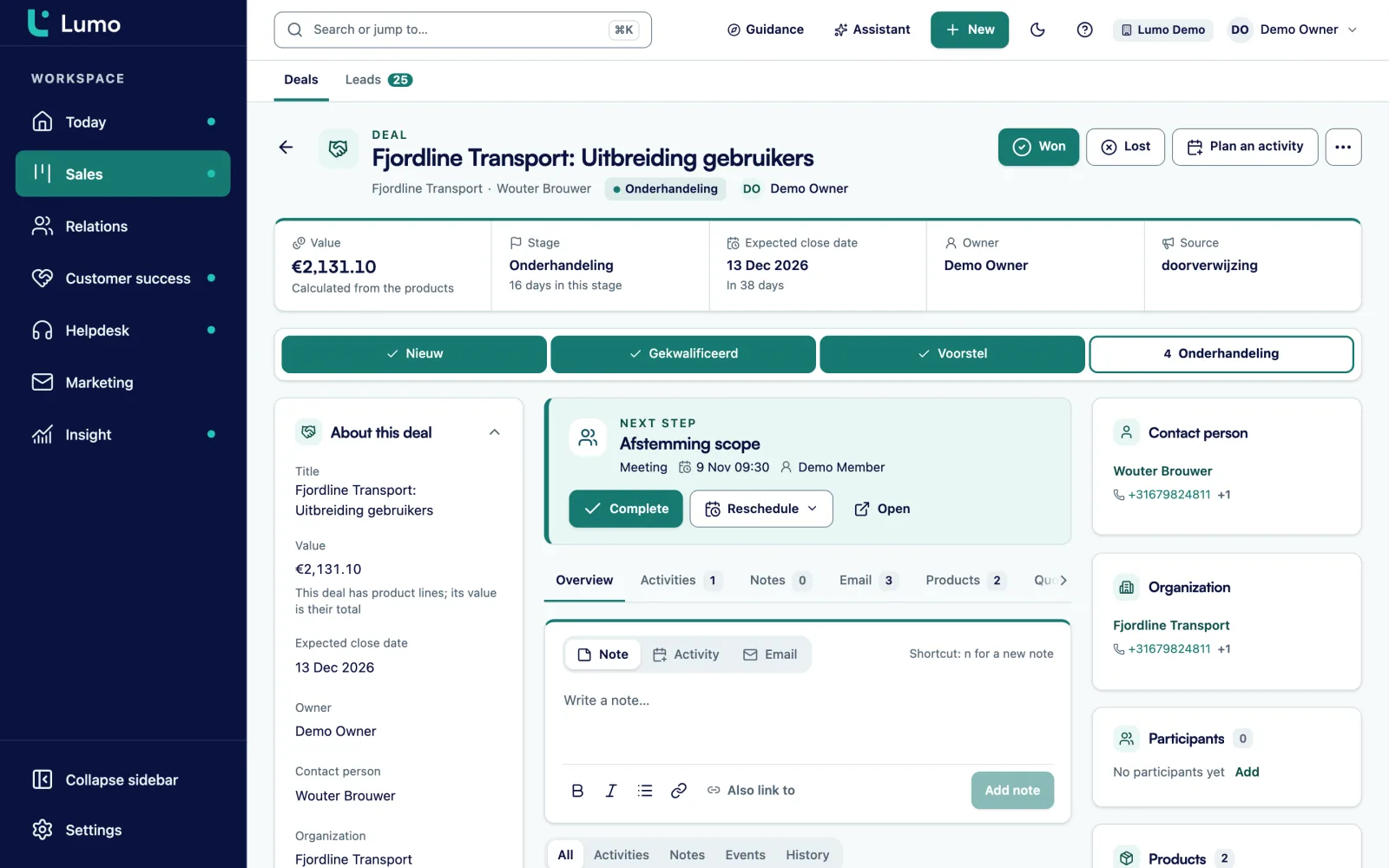
A deal has participants: every person on the customer side who has a say. You upload files and link them to several records at once, for example a drawing to the deal and to the organization. Downloads use a temporary signed link. The Next step shows on the deal card, so everyone sees what has to happen now.
The timeline holds mail, meetings, notes and stage changes. Lumo stores every stage change with the time the deal spent in the previous stage. That helps when you want to know where journeys really slow down. An important technical agreement gets pinned as a note at the top, so inside sales builds the next quote on the right revision.
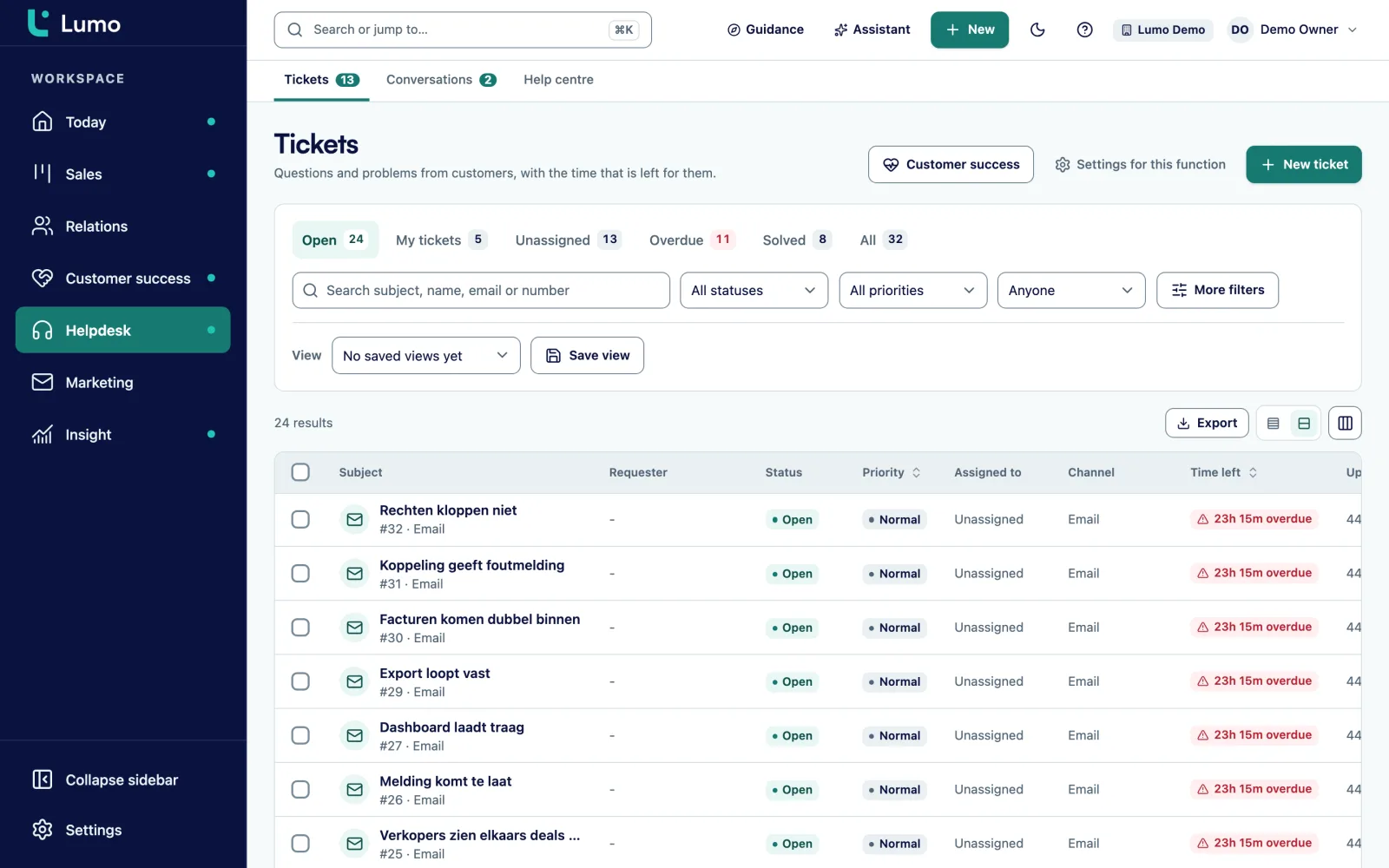
A customer with a complaint wants to know that someone has picked it up and when they will hear back. In the Lumo helpdesk every complaint or service request arrives as a ticket, from a shared mailbox, the customer portal or by hand.
A ticket moves through New, Open, Pending, On hold, Solved and Closed. Per priority you set SLA targets for first response and resolution, with business hours and holidays. At 75 percent of the target a warning appears. An internal note, such as a measurement result from quality, is never shown to the customer.
In the customer portal the customer sees their own tickets and opens new requests. From 90 days of ticket signals Lumo calculates a health score from 0 to 100 per organization. So the account manager knows whether a complaint is still open before he discusses a new quote.
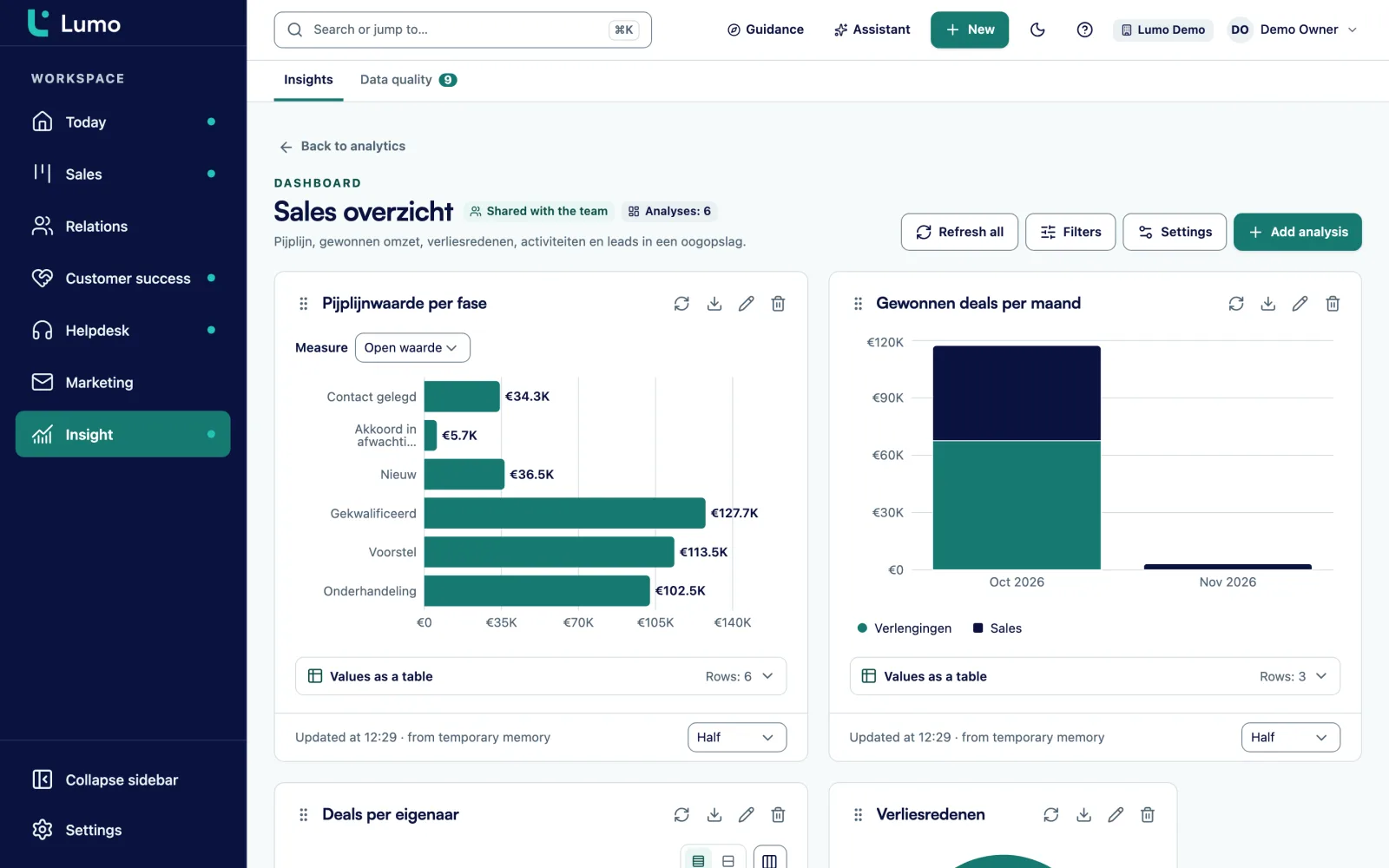
With long sales cycles the question is not only what is in the pipeline, but when it lands. Leadership wants to know which orders will probably be signed in the next six months, so production can plan for them.
In reports you pick a source, a measure and a breakdown. You build a weighted forecast by multiplying deal value by the win probability per stage, broken down by expected close date per month. A goal line shows whether you are on track. Stage history shows how long deals spend in each stage on average, and so where journeys slow down.
Every chart drills down to the deals behind it. A dashboard can be shared with leadership or kept private. Exchange rates add up deals in euros, dollars and pounds.
You add custom fields to deals, organizations, persons, leads, tickets and activities. A field can be required.
Text field on the deal, so every quote belongs to the right version.
Select field, for example stainless steel, aluminium, steel or plastic.
Number field on the deal. Shows which journeys load production the most.
Yes or no field. A data quality rule can block a deal from moving to Negotiation without approval.
Select field such as automotive, food, medical or agri.
Date field on the organization for timely renewal.
Text field on the organization, for the API integration.
Select field on the ticket: Complaint, Warranty, Spare part or Question.
In a journey of a year the risk is not that someone forgets a step, but that a deal sits for months without anyone noticing. That is what automations are good at. A rule reacts to a new deal, a stage change, a won or lost deal, a new lead or organization, a completed activity, or a deal or lead that has been stale for a number of days. It creates an activity or note, updates a field, assigns an owner or adds a label. It does not send email.
Rules manufacturers often use:
The lead side works the same way. An RFQ from the website that sits on New for a day goes to inside sales. You test every rule with a dry run first, and the rules overview shows which rules are on and off.
Say a machine builder with 120 employees that builds packaging machines for the food industry. For this example we call it Brink Machinery. It has three account managers, four sales engineers, an inside sales team of three and a service department. A third of its revenue comes from Germany, through a dedicated account manager.
Brink creates two pipelines. New machines with the stages from the example above, with a 45 day rot period in the sample stage, which Brink calls Factory acceptance test. And Retrofit and expansion for existing customers, with shorter stages. German deals carry euros, deals with a British customer carry pounds, and reports convert them.
Each deal lists the customer's buyer, technical manager and production manager as participants. The specification and line layout sit as files on the deal. The sales engineers connect Gmail, and the account manager for Germany works in Outlook and puts the BCC address on his emails.
The service department works in the helpdesk. Breakdown reports arrive through a shared mailbox and get a priority. A high priority breakdown has an SLA of four business hours for the first response.
Every month leadership reviews a dashboard with weighted pipeline per quarter of expected close, average duration per stage and lost reasons. It turns out journeys slow down mostly in the test stage. That becomes the management conversation, rather than the question of why the numbers are disappointing.
This is the order we follow in an implementation.
Lumo is not an ERP, CPQ or PDM system. Costing, bills of materials, production planning and drawing management stay in your own systems. There is no ready-made ERP integration. With the API and webhooks you bring customer numbers into Lumo and let your ERP react to a won deal. There is no product configurator for variants: a quote consists of lines from your product catalogue. Quotes and the signing page are Dutch only. For a German or English speaking customer you send your own quote and attach the signed copy to the deal.There is no separate forecast view, but the report above does that job. Gmail and Google Calendar sync today. The Outlook and Microsoft 365 integration is on the roadmap.
Not out of the box. With the REST API you read and write persons, organizations, deals, leads and activities, and webhooks let your ERP react to what happens in Lumo. API and integrations
Yes, as a report. You multiply deal value by the win probability per stage and break it down by expected close date. There is no separate forecast screen.
Yes. A deal has participants, for example the buyer, the engineer and the quality manager. A person can also belong to several organizations.
Yes. You upload files and link them to deal and organization. Downloads use a temporary signed link. Lumo is not drawing management, so the master stays in your own system.
Yes, in the helpdesk. Tickets have a status, priority and SLA, and internal notes are not visible to the customer.
Gmail and Google Calendar sync today. The Outlook and Microsoft 365 integration is on the roadmap. Until then you put the personal BCC address on an email or forward it, and it lands on the right person, organization and deal.
Yes. You set the currency per deal, and reports convert to your own currency with exchange rates.
The price depends on the number of users and the modules you switch on. Pricing
In the demo we rebuild a journey from request for quote to order, with your stages, participants and lost reasons.