
See lead scoring with your own rules
In a demo we load the basic set and work out together which points fit the way you sell. Pricing depends on users and modules.
Lumo gives every person and every company points for what they do and who they are. Cold, warm or hot, with thresholds you set and rules you can read back in one sentence. Built for marketing teams that need to know who is ready for sales, and for sales teams that need to know who to call today.
Most B2B teams have had this meeting. Marketing reports forty qualified leads passed to sales this month. Sales says three were worth a call. Both are right, because nobody ever agreed on what qualified means. For one person it is someone who downloaded an ebook. For the other it is someone who asked for a quote.
So two things go wrong. A sales rep calls someone who read a single blog post and gets a cold answer. Meanwhile the head of operations who visited the pricing page three times, opened two emails and filled in a form waits a week, because she sits in a list of a hundred other names. The signal was there. Nobody added it up.
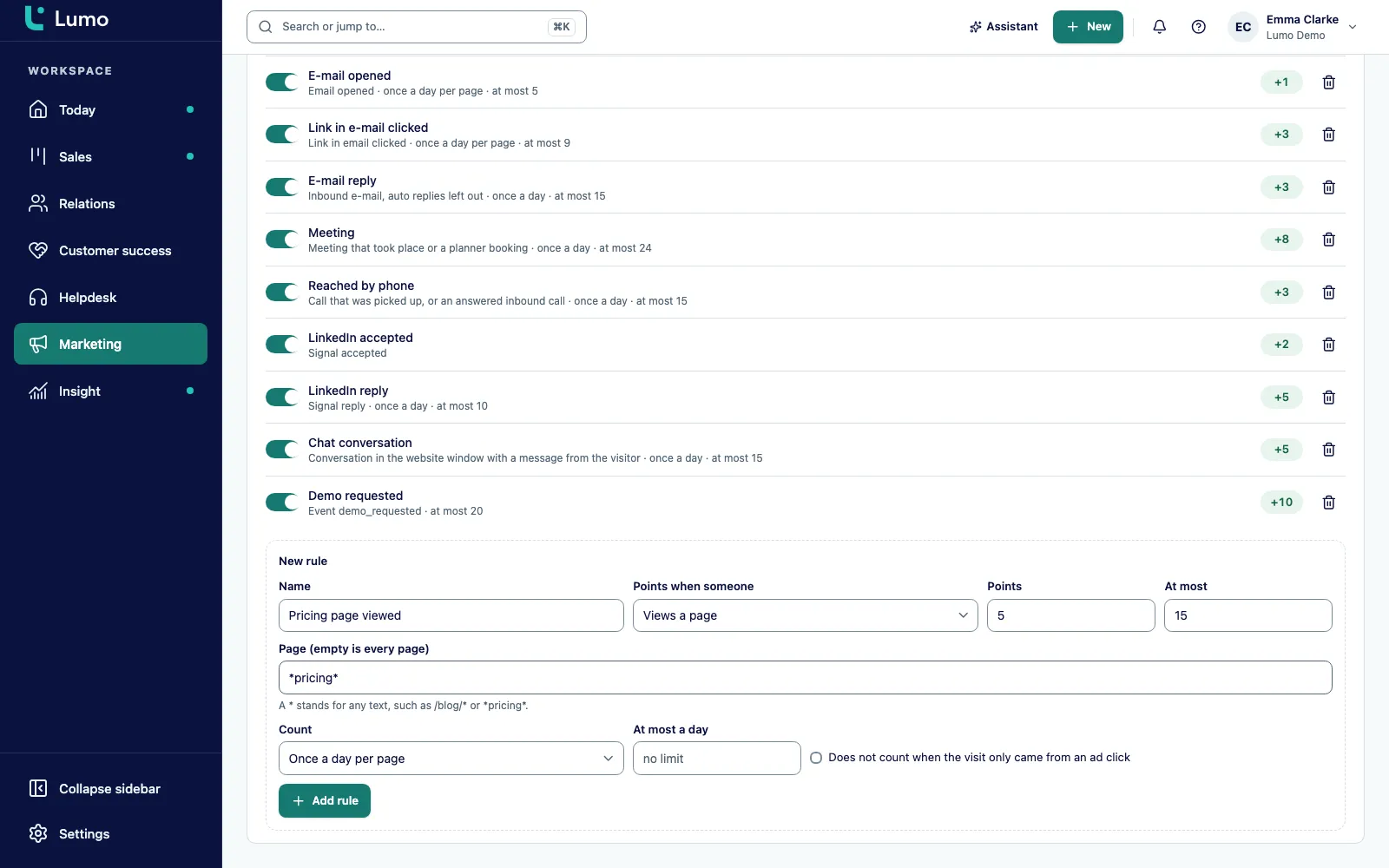
A clever model does not fix that. Written agreements do. A page view is worth 1 point. A form submission is worth 15. A meeting is worth 8. Anyone above 15 is hot. You can disagree about those numbers, and then you change them. But everyone reads the same rule.
That is why lead scoring lives inside Lumo and not in a separate marketing tool. Lumo is a RevOps CRM with Marketing, Sales and Customer Success and Support under one roof. The points come from what already happens in Lumo: website visits, forms, email opens and clicks, meetings, calls, LinkedIn signals and chat. There is nothing to sync, because the source data and the score sit in the same database. And because your people and your AI agents work in the same data, an agent reads exactly the score your sales team sees.
Below we walk through how to set up rules, how the thresholds work, what happens when someone turns hot, and what is deliberately left out. If your main question is how to work the leads that come in, read about lead management as well.
The names below match the labels you see in the app.
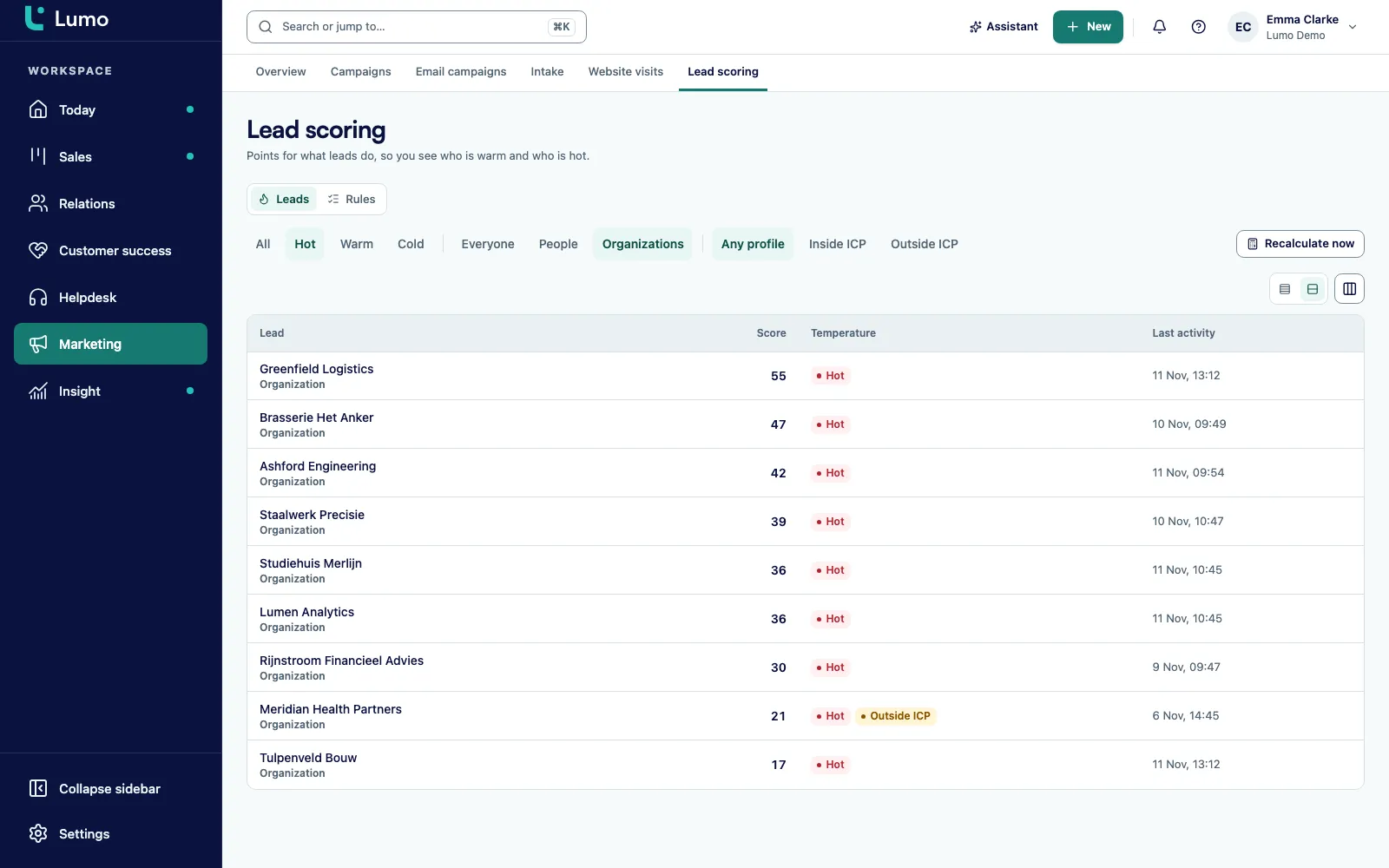
An admin turns on lead scoring under Settings, Features. The Marketing section then shows Lead scoring, with the tabs Leads and Rules.
In an empty workspace, click Add basic set. You get rules for page views, return visits, forms, email, meetings, calls, LinkedIn and chat. Adjust the points afterwards or add your own rule.
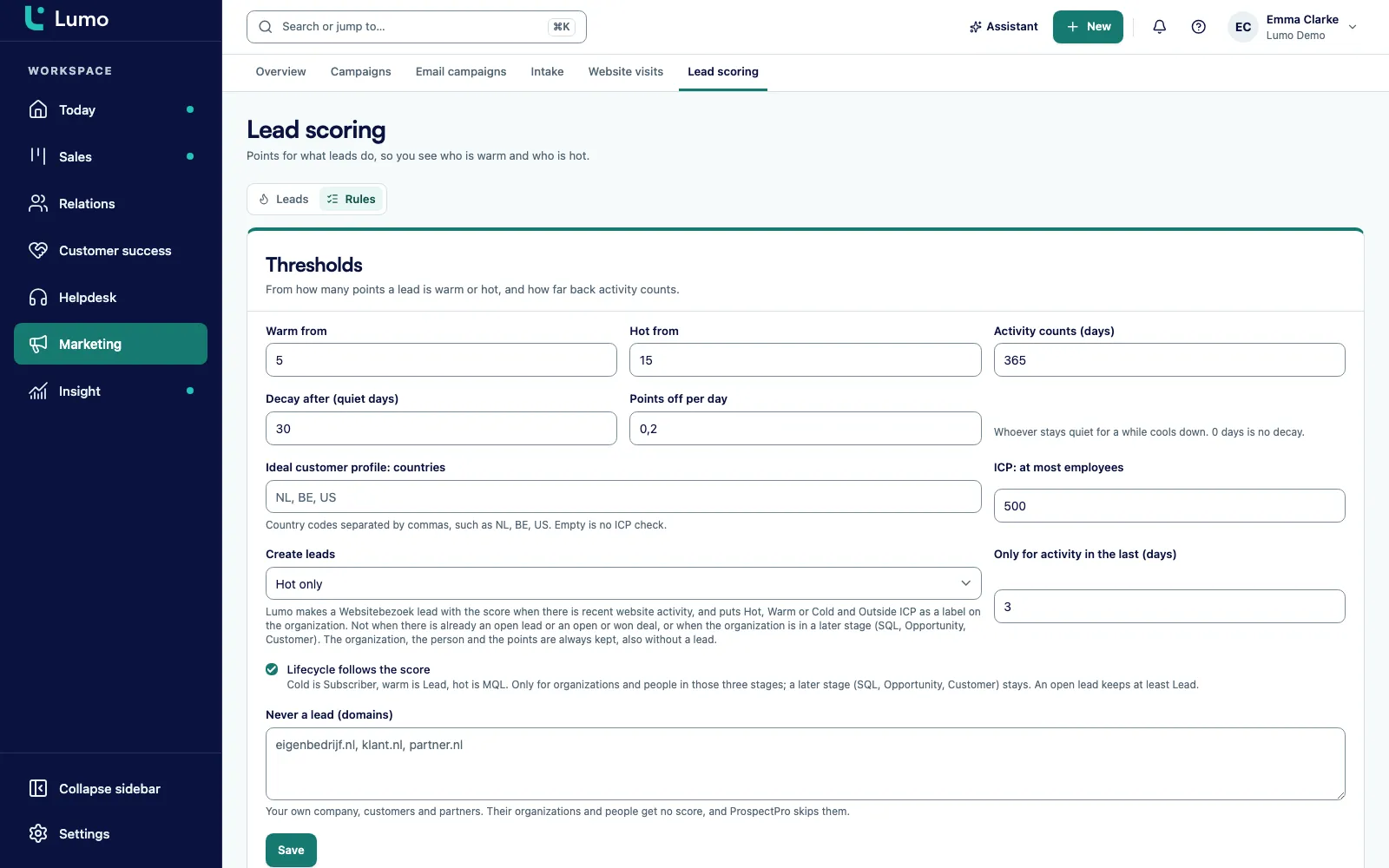
In Thresholds you choose Warm from and Hot from, how long activity counts under Activity counts (days), and when scores fade under Decay after (quiet days) and Points off per day.
Under Create leads you pick Never, For every scored visitor, From warm or Hot only. Turn Lifecycle follows the score on or off.
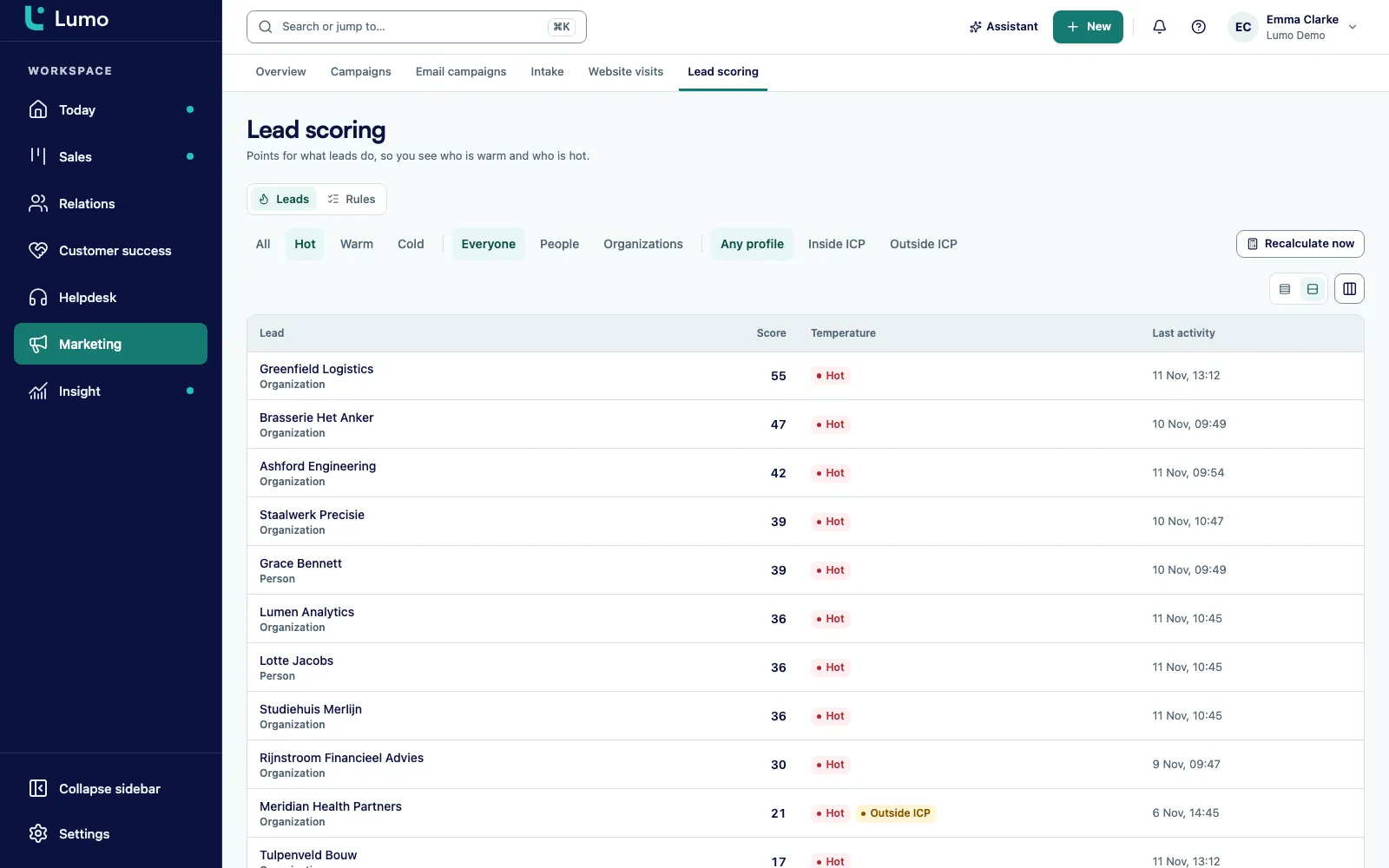
Filter on hot and Inside ICP. After changing a rule, click Recalculate now so you do not have to wait for the next 15 minute run.
A rule starts with the event that earns points. You pick the source: someone views a page, returns on a new day, triggers a custom event, submits a form, opens an email, clicks a link in an email, sends or replies to an email, has or books a meeting, is reached by phone, gives a signal such as a LinkedIn reply, starts a conversation in the website chat, had page views in Pipedrive, or has a field with a given value.
For each rule you set the points and a cap, or leave the cap open. You also choose how often it counts: every time, once per day per page, or once per day. That stops someone who hits refresh ten times from turning hot. A daily maximum adds one more limit on top.
Pages are matched with a pattern using an asterisk. /blog/* covers every blog post, *pricing* covers every URL with pricing in it. A field rule looks at a value on the record, such as a person's job title or a custom industry field on the company. And you can tell a rule to ignore visits that came only from an ad click, so your own ad budget does not inflate the score.
The default thresholds are low on purpose. Warm from is 5 and Hot from is 15. In the basic set a form submission is worth 15 on its own. So anyone who asks you for something is hot straight away. Someone who reads five pages is warm. That is how it should be: asking is a stronger signal than reading.
Activity counts for a year by default, 365 days. But a score that never drops tells you nothing after six months. So scores decay. After 30 days without activity, 0.2 points come off per day by default. You can set the quiet period between 0 and 365 days and the decay between 0 and 100 points per day.
Lumo does not keep a running counter that only goes up. Each run recalculates the score from the underlying events. Change a rule, and after the next run every score matches the new rule. That run happens every 15 minutes, and right after a tracking event Lumo also recalculates that one visitor. Only an owner or admin can change the thresholds.
B2B purchases rarely come down to one person. An analyst reads your site, a manager opens your email, a director books a meeting. Each of them on their own looks lukewarm. Together, that account is hot.
So in Lumo every person has a score and every company has one too. The company collects the activity of its visitors and its people. A field rule on the company, for example on industry, also counts for the people who work there.
You also define your ideal customer profile: the countries you sell in and the maximum number of employees. That does not add points. It works as a filter and a label, Inside ICP or Outside ICP. A hot visitor from a country you do not serve shows up for what it is. And under Never a lead (domains) you list your own domain, your customers and your partners, up to 500 domains. They never get a score, so your own colleagues browsing the pricing page never turn hot.
A score in a column is nice, but someone has to act on it. So Lumo can create a lead for you. Under Create leads you pick Never, For every scored visitor, From warm or Hot only. The default is hot only, and only with activity in the last 2 days. You can set that window between 0 and 90 days.
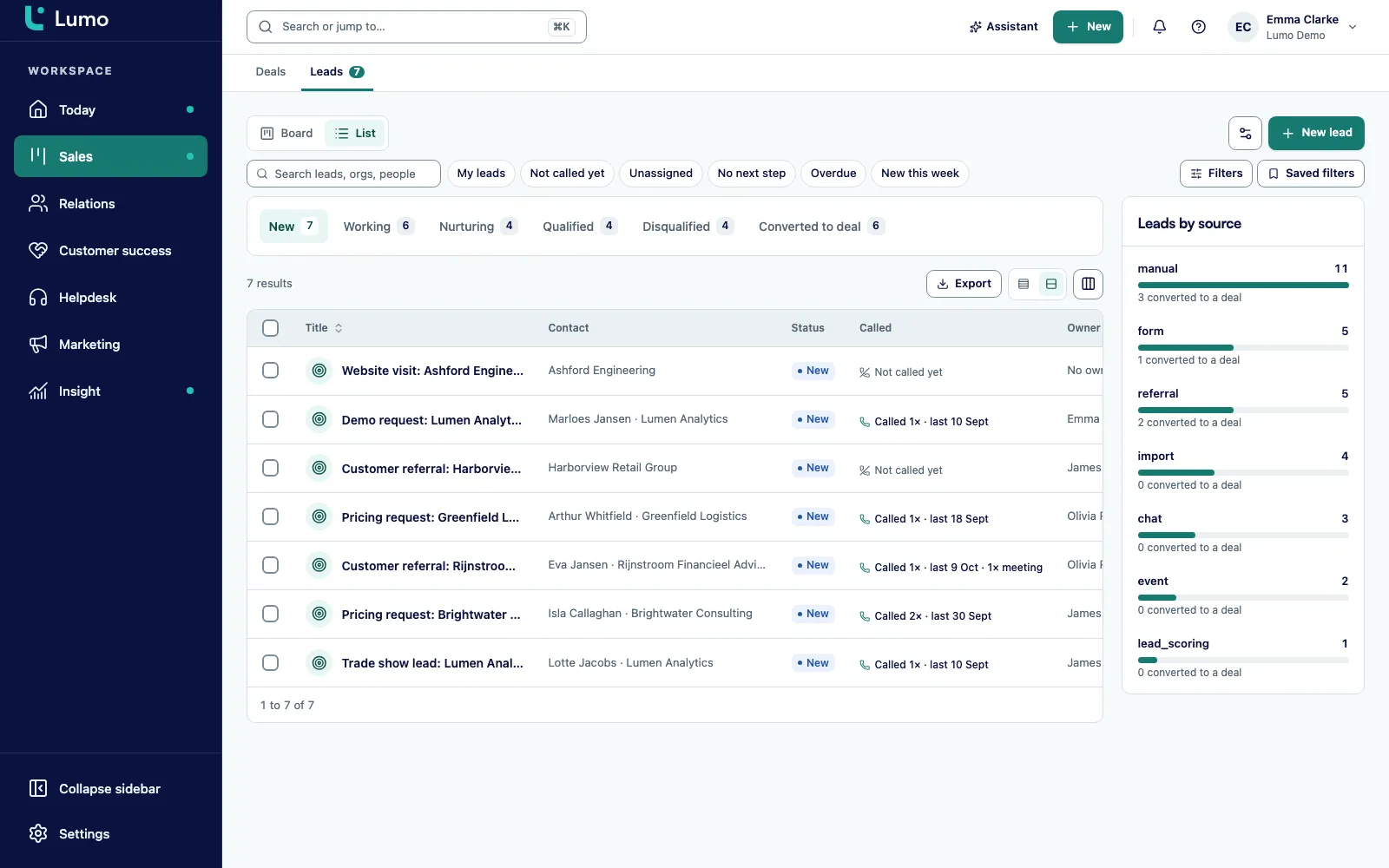
The lead is named after the website visit and lands in your normal lead list. On the company Lumo adds a hot, warm or cold label, plus an outside ICP label where that applies. Lumo does not create a lead when there is already an open lead, an open or won deal, or when the company is already in a later lifecycle stage. An existing customer reading your help articles does not become a new lead.
With Lifecycle follows the score turned on, Lumo sets the stage for you: cold is subscriber, warm is lead, hot is MQL. It only moves records between those three stages. Anyone further along, such as a customer, stays where they are. Each run moves at most 500 records. This setting is on by default.
Cold, Warm and Hot, with Warm from 5 and Hot from 15 as defaults. You see the temperature on the Leads tab and in the company list of Website visits.
Filter by temperature, by type (people or companies) and by profile: Any profile, Inside ICP or Outside ICP.
Form 15, meeting 8 capped at 24, email link click 3 capped at 9, page view 1 with at most 10 per day.
Opens from the Apple privacy proxy, from scanners and your own opens do not count. Neither do auto replies or robot senders.
Scores run every quarter hour, and straight after a tracking event for that one visitor. After a rule change you click Recalculate now.
Sales filters include Score from. The marketing overview shows Hottest leads.
Only an owner or admin can change thresholds or add the basic set. Turn lead scoring off and its screens and MCP tools disappear.
A company recognised by ProspectPro without any points yet counts as a visitor with score 0, so it can still get a lead.
A score is only as good as the signals under it. So Lumo takes points from the parts of the product you already use, not from a separate connector that syncs at three in the morning.
Website visits. With the tracking script from website visitor tracking, page views, return visits and custom events count, such as a click on your demo button. Known visitors are linked to a person, business visitors to their company.
Forms. A submission on a web form is worth 15 in the basic set. That is exactly your hot threshold.
Email. Opens, clicks and replies from email campaigns and regular email count, with a cap per rule.
Calls and meetings. A meeting someone has or books, for example through the meeting scheduler, is worth 8. Reached by phone is worth 3. An accepted LinkedIn request is worth 2, a reply 5. Those signals come from calling campaigns and cadences.
Chat. A conversation in the live chat window is worth 5, capped at 15.
Pipedrive. Moving over from Pipedrive with page view counts per person? That field counts as a source at 1 point per view, capped at 20.
Marketing owns the rules and thresholds, together with sales. The marketing overview shows Hottest leads next to what your campaigns cost. More on Lumo for marketing.
Sales reps work from the Leads tab filtered on hot and inside ICP, or add Score from to their own filters. The lead from the website visit sits in the regular lead list. See Lumo for sales teams.
Sales managers can check whether hot leads actually get worked, because score, lead and activity live in the same place.
Customer success mainly benefits from existing customers not turning into new leads. An open or won deal, or a later lifecycle stage, blocks it.
RevOps and leadership get one definition of warm and hot that lives in the software and not in a slide deck. Anyone who wants to change it changes a number. More on Lumo for RevOps and leadership.
Say you sell a compliance training platform to logistics companies. You use the basic set and the default thresholds, warm from 5 and hot from 15. Create leads is set to Hot only. Your buying signal rule matches the pattern *pricing*. This is an invented example, not a customer story.
Monday. An HR lead at a freight company, call her Priya at Example Freight Ltd, finds your blog through a search. She reads three articles. She has not accepted cookies, so the visits only count at company level. The company gets 3 points. Cold.
Tuesday. She comes back, accepts your cookie banner and opens the pricing page. A return visit is worth 2, the pricing page matches your buying signal rule for 3 more. Together with Monday the company is at 8. Warm. Because Lifecycle follows the score is on, the company moves from subscriber to lead.
Wednesday. She requests a trial through your form. That is 15 points. Lumo now also knows who she is, because the submission links her to a person record. Priya and her company are both well above 15. Hot. The stage becomes MQL, and because there was activity in the last 2 days and no open lead or deal yet, Lumo creates the website visit lead.
Thursday. Your account executive sees the lead at the top of the hot filter. He calls and reaches her, another 3 points, and books a meeting she accepts: 8 more.
A month later. There is a deal and the lead has been converted. Lumo creates no new lead, even when Priya still reads the odd blog post. Had there been no deal and no further activity, the score would start to fade after 30 quiet days at 0.2 points per day. With the defaults it takes months before she is cold again.
Lumo is built to be used without a screen too. An AI agent works through the MCP server or the REST API in the same data as your team. Lead scoring has eight tools: list_scoring_rules, create_scoring_rule, update_scoring_rule, delete_scoring_rule, add_default_scoring_rules, list_lead_scores, get_lead_score and recalculate_lead_scores.
An agent can also record signals that count towards the score with record_person_signal and record_signal, and read or replace signal definitions with list_signal_definitions and replace_signal_definitions. Every tool is also available as a REST call at POST /api/v1/tools/ followed by the tool name.
Reading needs the scope marketing:read, writing needs marketing:write. Adding the basic set needs a key with workspace:admin, just as only an owner or admin can do it in the app. So an agent can pull the hot leads every morning and prepare a summary, while it works with exactly the same rules as your team. Read how that works on headless CRM and AI agents.
Do this with someone from sales in the room. Then the definition of hot belongs to both teams from day one.
Lead scoring in Lumo is rules and points. There is no predictive or AI model behind it that learns on its own who will buy. That is a choice: you can explain every score. To make the rules better, you review them yourself, for example by checking with sales after a few weeks which hot leads turned out right. There is also no separate fit score next to the behaviour score. Your ideal customer profile works as a filter and label, inside or outside ICP. If you want attributes to count, add a field rule on job title or industry. And scores exist for people and companies, not for deals. For deals you use the pipeline with its stages.
Lead scoring gives every person and company points for behaviour and attributes, so you can see who is ready for a conversation. In Lumo you set the rules and thresholds yourself and everyone gets a temperature: cold, warm or hot.
No. The score comes from rules and points that you define. That way you can explain and adjust every score. The AI assistant and your own agents can read the score.
Warm from 5 points and hot from 15. Activity counts for 365 days. After 30 quiet days, 0.2 points come off per day. An owner or admin can change all of these.
Every 15 minutes for the whole workspace, and right after a tracking event for that one visitor. After a rule change you can click Recalculate now.
No, not while there is an open or won deal, an open lead, or when the company is already in a later lifecycle stage. You can also put customer domains under Never a lead.
No. Opens through the Apple privacy proxy, from scanners and your own opens are ignored. Auto replies and robot senders are ignored too.
Yes, with a field rule. Pick the source where a field has a value, such as a person's job title or a custom industry field on the company. A field rule on the company also counts for its people.
With Lifecycle follows the score on, cold is subscriber, warm is lead and hot is MQL. Lumo only moves records between those three stages. Anyone further along stays put. Each run moves at most 500 records.
There is no trigger on a score change itself. With automations you can build rules on a lead being created or updated, with actions such as setting the lifecycle stage or adding someone to a cadence. Use the Test button to check that your rule runs on the leads Lumo creates from the score before you switch it on.
Yes. Forms, email, meetings, calls, LinkedIn signals and chat earn points too. Page views are often the first signal though, so with the script you see earlier who is looking around.
In a demo we load the basic set and work out together which points fit the way you sell. Pricing depends on users and modules.