
See your own campaigns next to your own deals
In a demo we set up a campaign with a mailing, a form and a spend entry, and show how members and deals come in.
In Lumo a marketing campaign is a record of its own, with members, parts and spend. For each campaign you see which leads and deals it touched and what was won, calculated from the same data your sales and service teams work in. Built for marketers, sales managers and RevOps who want one answer to the question of what a campaign produced.
It is the quarterly review. Someone asks what the trade show in Birmingham actually brought in. Marketing has the badge scans in a spreadsheet, the booth invoice in the finance system and the click numbers from the follow up email in the email tool. Sales has a feeling. Two of the deals in the pipeline started with a conversation at the stand. Or was it three? The CRM says the source is "event", which covers every event of the year.
So someone spends an afternoon matching email addresses from the scan list against contacts in the CRM, checking which companies later got a deal, and adding the booth, travel and the paid social boost by hand. The result is a number nobody fully trusts, and next quarter the same afternoon happens again.
The marketer is not the problem. The problem is that the campaign does not exist anywhere as a thing. The email lives in one tool, the form in another, the costs in a third and the deals in a fourth. A campaign becomes a story people tell, not a record you can open.
Lumo is a RevOps CRM that puts Marketing, Sales and Customer Success & Support under one roof, and it is built to be used by people and by AI agents. That is why a marketing campaign is a record in Lumo. It has a name, a channel, dates, a budget and a utm_campaign. You attach the parts to it: the invitation email, the registration form, the landing page, a call campaign. Lumo keeps track of who the campaign touched and works out, every time you open it, which leads and deals came from it.
One thing to get straight first, because the word campaign means two things in Lumo. Email campaigns are the mailings themselves: a template, a segment, sending, opens and clicks. A marketing campaign is the umbrella above that. The mailing hangs off it as one part, next to a form, a landing page and the spend. The mailing tells you who clicked. The marketing campaign tells you what the whole effort produced.
Bold names are the labels you see on screen, under Marketing.
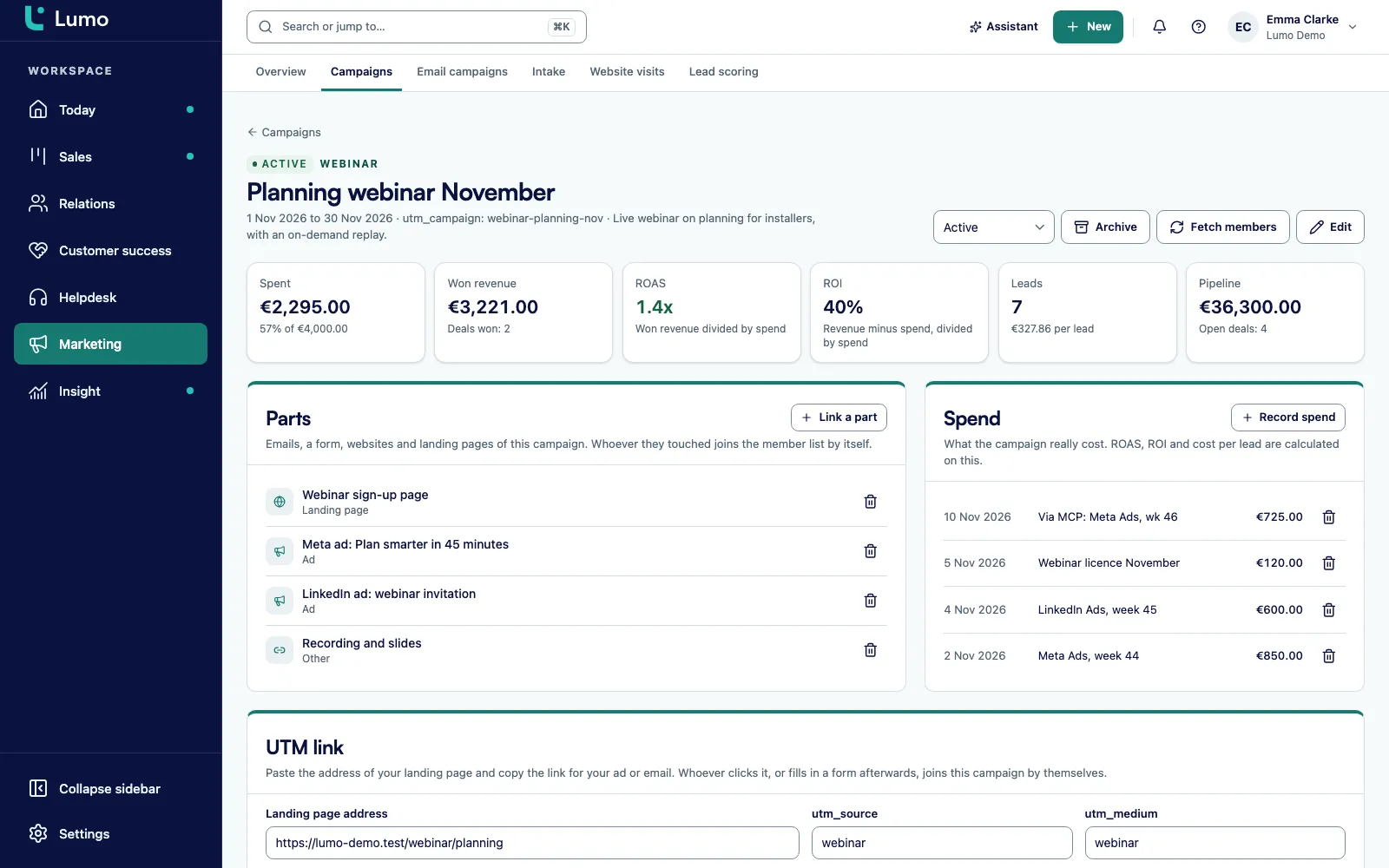
Open Campaigns and choose New campaign. Give it a name, a channel, a status, start and end dates, a budget and a utm_campaign. In the field for ad channel names and numbers, add the exact campaign name from Meta or Google Ads, or the Meta campaign number, one per line.
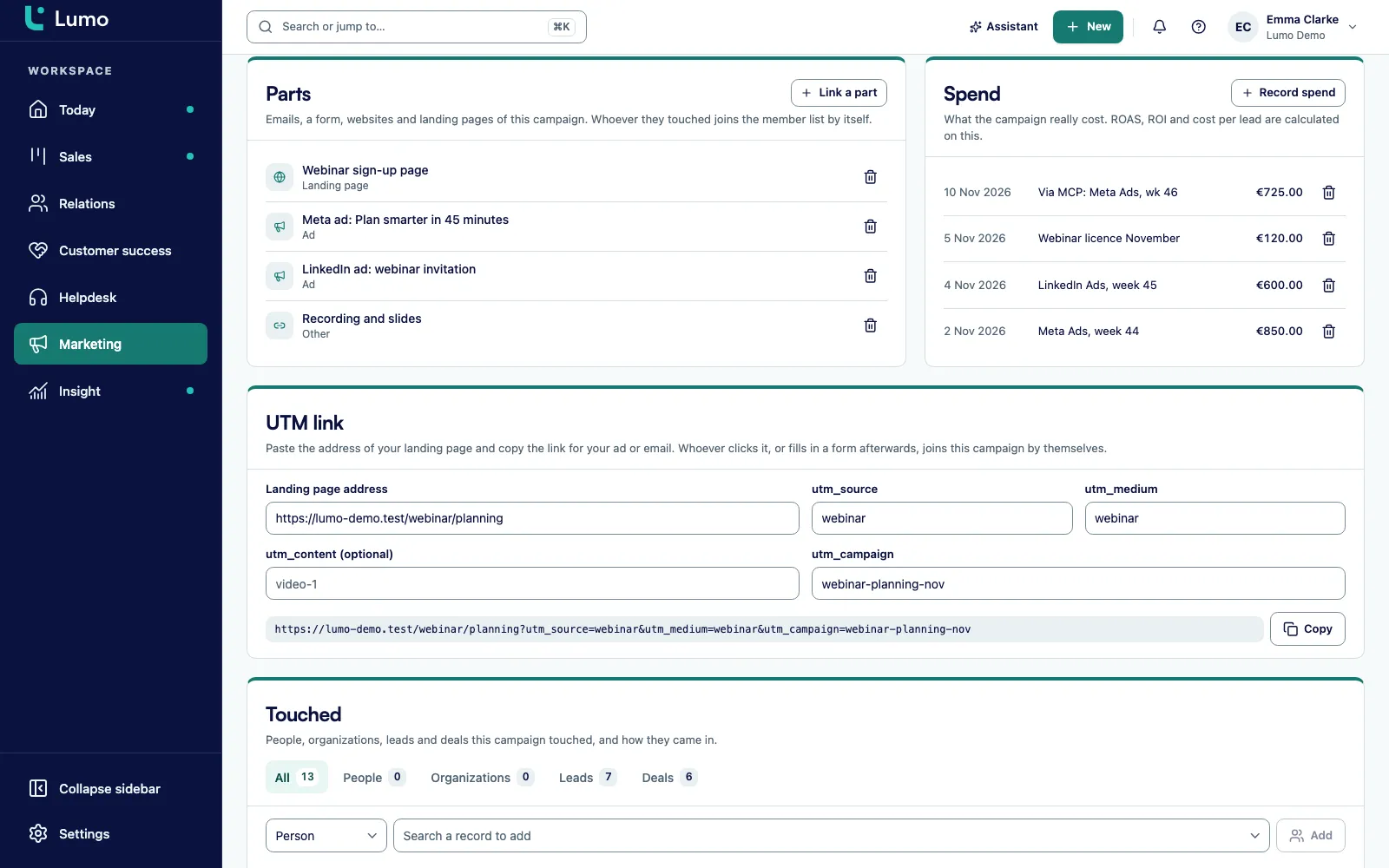
Under Parts you attach an email campaign, a form, a landing page, a website, a call campaign, an ad or something else. Anyone who receives, submits or visits an attached part becomes a member of the campaign.
With UTM link you paste the landing page address, add an optional utm_content and copy the link for your ad or email. Visits and form submissions carrying that utm_campaign count towards the campaign.
Under Spend you choose Record spend and enter an amount, a date and a note. That is where the booth, a sponsorship or ad costs go. Ad spend from Meta, Google Ads or LinkedIn goes here too, weekly or monthly, or you let an agent record it.
Under Touched you find the people, organisations, leads and deals the campaign reached, each with its source. Lumo refreshes the list every hour. If you want it now, choose Fetch members.
The campaign result shows won deals, open deals, the ROI and the amount per lead. The Overview puts all campaigns side by side under Best campaigns.
A campaign in Lumo is not a tag on a contact. It is a record with its own fields, a status and a list of attached parts. You pick one of ten channels, from email, paid social and paid search to events, webinars, outbound and partner. You set a start and an end, a budget in the campaign currency, and a description so a colleague still knows what it was about six months later.
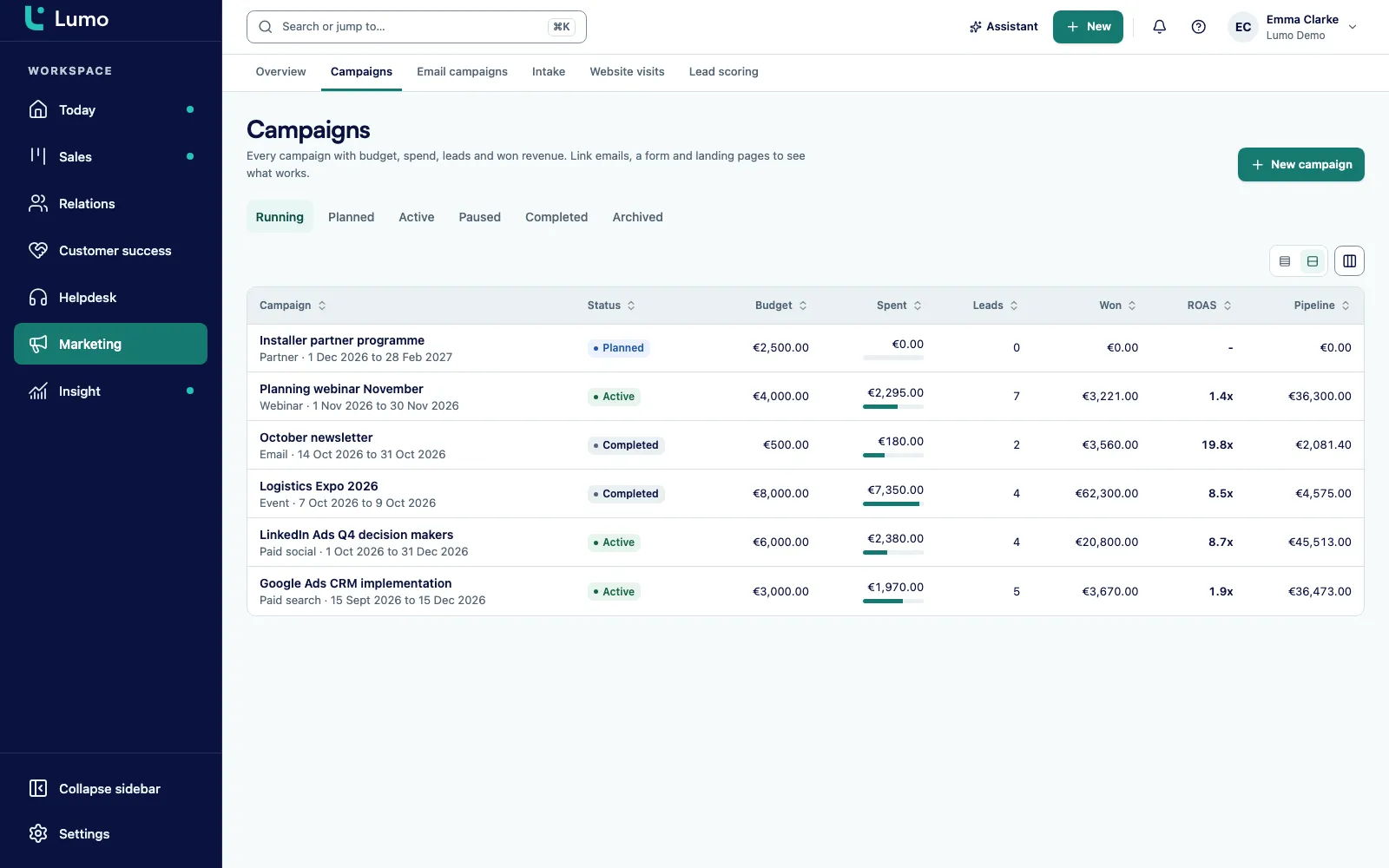
The Campaigns list shows everything side by side: status, budget, spend, leads, won, ROAS, ROI, pipeline and how many records the campaign touched. In one glance you see which campaign is still running, which one is over budget, and which one creates plenty of pipeline but has not won anything yet.
The matching keys do the quiet work. A utm_campaign or a campaign name from Meta belongs to exactly one campaign. If a colleague tries to reuse the same utm_campaign on a second campaign, Lumo tells them another campaign already uses it. That way a visit never ends up counted twice because someone copied a name.
The hard part of attribution is knowing who saw a campaign. Lumo builds that list itself, every hour. Recipients of an attached email campaign or call campaign become members. Anyone who submits an attached web form becomes a member. Visitors of the attached landing page become members, as long as you track website visits with the Lumo script. And visits and submissions that carry one of the campaign keys as utm_campaign count as well.
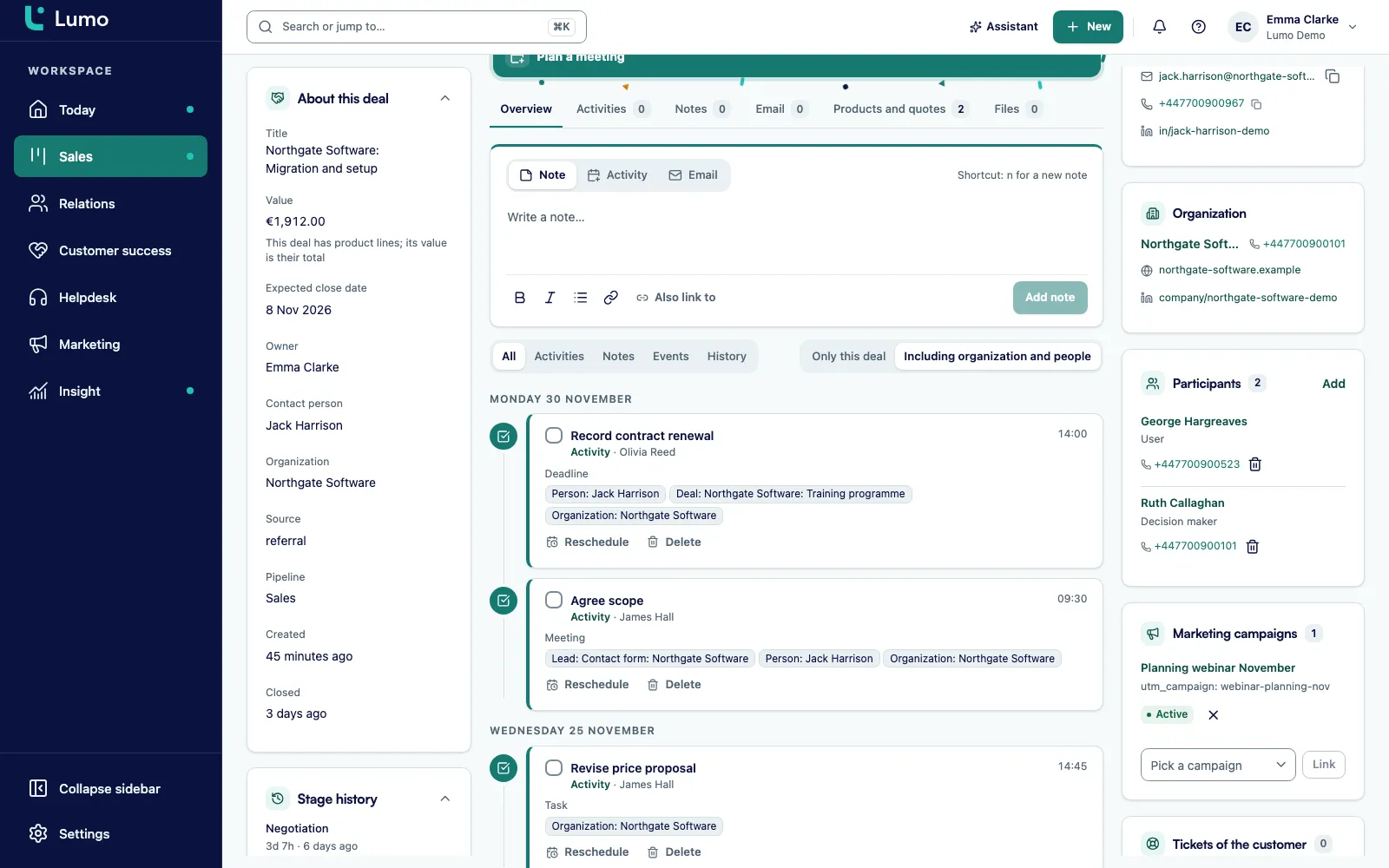
You can also add members by hand. On a person, organisation, lead or deal there is a Marketing campaigns block where you pick a campaign and attach it. Useful for the business cards from the stand, or for a deal the account manager knows came out of the event.
Every member shows where it came from: by hand, through the API, email, form, website visit or utm. So you can always trace why someone belongs to a campaign. And because members are normal CRM records, sales sees in the Marketing campaigns block on the organisation which campaigns that company has already been part of.
A deal counts towards a campaign when the deal itself is a member. Or when a member, or the organisation of a member, got or won a deal on or after the moment of contact. Lumo checks that inside the campaign window: from the start date to the end date plus 30 days. A deal created three weeks after the trade show counts. A deal that shows up four months later does not.
Against that you set the costs. Under Spend every entry has an amount, a date and a note. Every cost goes in with Record spend: Meta, Google Ads, LinkedIn, a booth, printing, travel. If you would rather not do that by hand, an agent records the ad spend through the API with record_campaign_spend. The matching keys meanwhile tie the leads and visits from those ads to the right campaign.
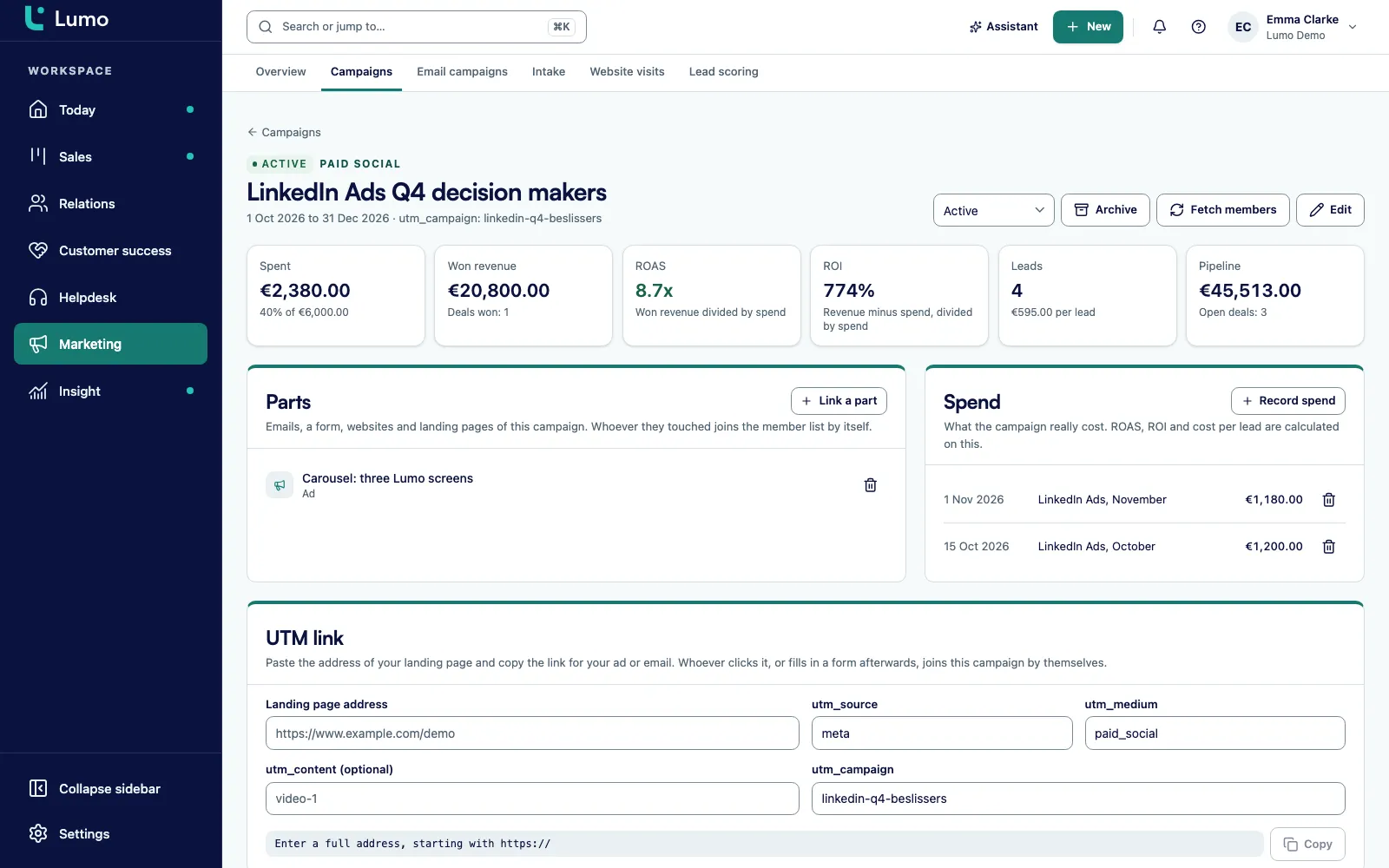
Lumo recalculates the result from the CRM every time you look. ROAS is won revenue divided by spend. ROI is revenue minus spend, divided by spend. You also see the amount per lead and the pipeline that is still open. With no spend recorded, ROAS stays empty, so you never see an impressive ratio that means nothing.
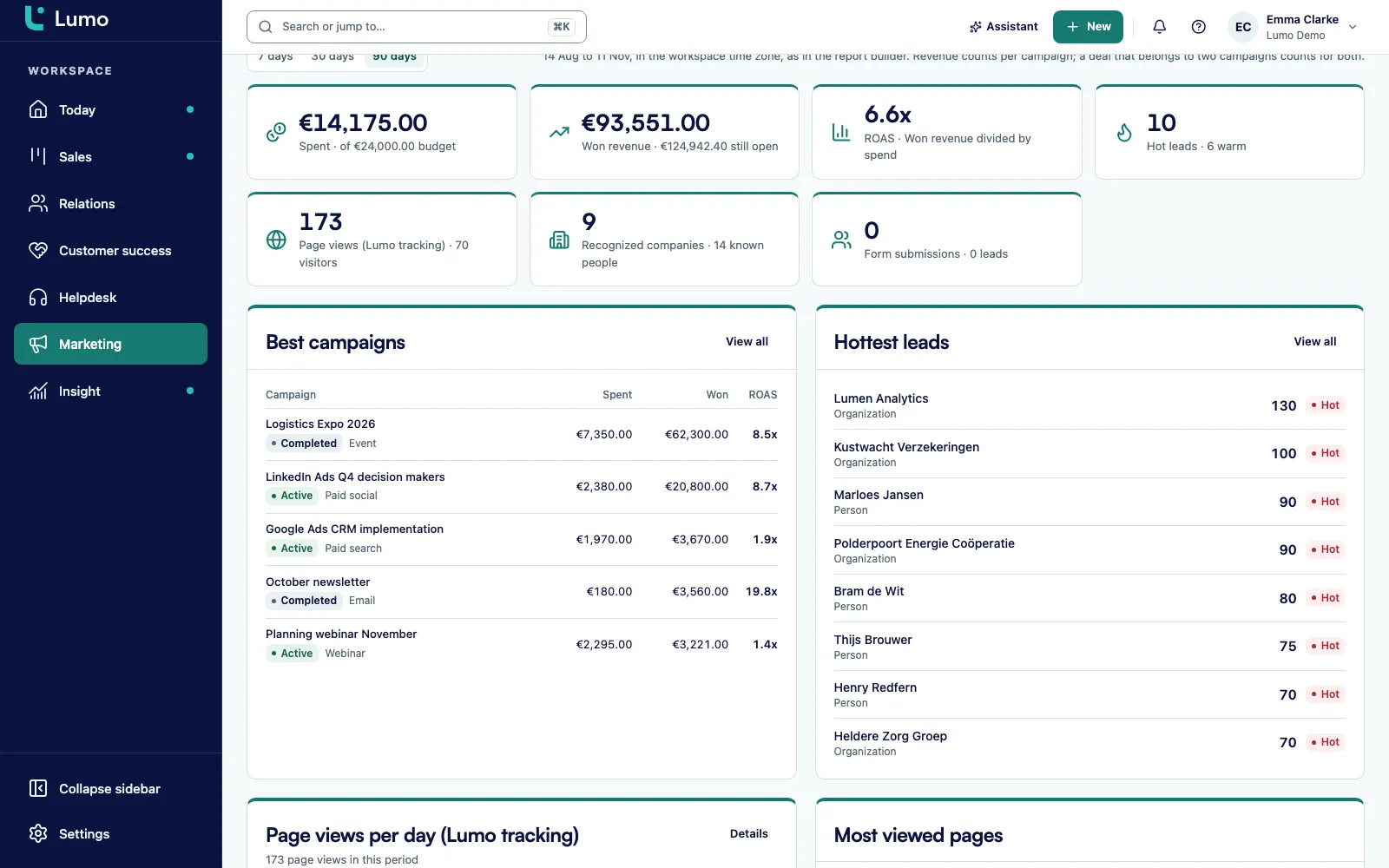
The Overview under Marketing answers three questions: what your marketing costs, what it brings in, and which leads are warm right now. At the top you get the headline numbers for a period of 7, 30 or 90 days. Money spent against budget. Won revenue, with what is still open. ROAS. Hot leads, with the number of warm leads below. Plus page views from Lumo tracking, recognised companies and form submissions.
Below that are the blocks. Best campaigns ranks your campaigns by what they produced. Hottest leads comes from lead scoring and shows who deserves a follow up today. Page views per day and the most viewed pages come from Lumo website tracking.
Under the overview sits a footnote worth taking seriously. Revenue counts per campaign, and a deal that belongs to two campaigns counts in both. If you add up won revenue across all campaigns, you will get more than what actually came in. When you want to slice the numbers further or build a board level dashboard, use reports and dashboards, where campaign spend is available as its own source.
Every item below works this way in the app today.
Planned, Active, Paused, Completed and Archived. An archived campaign can be restored at any time.
Email campaign, form, landing page, website, call campaign, ad and other, all attached under Parts.
People, organisations, leads and deals, each with a source: manual, API, email, form, website visit or utm.
Every hour Lumo looks for new members through the attached parts and keys. Fetch members does it on the spot.
Build the UTM link inside the campaign. A utm_campaign or matching key can only belong to one campaign.
A deal counts from the start date until 30 days after the end date, if a member or their organisation got or won it.
Budget, spend, leads, won, ROAS, ROI, pipeline and touched, side by side in the Campaigns list.
Deleting a campaign removes the campaign. The contacts, leads and deals that belonged to it stay in place.
Marketing creates the campaigns, attaches the parts and records the spend. What changes is that nothing needs reconstructing at the end of the month. Members come in on their own and the result is already there. Read more about marketing work in Lumo on Lumo for marketing teams.
Sales sees the Marketing campaigns block on every record. Before calling an organisation, the account manager can see that two people from that company attended the webinar and one filled in the form. That is a better opening than "I noticed you visited our website". Leads that come out of a campaign are worked in lead management.
Sales managers look at the pipeline column. Which campaign creates deals that get stuck in the pipeline? That usually turns into a conversation about qualification, not about marketing.
Customer success runs campaigns for existing customers, such as a customer event or a webinar on a new module. When an account manager later wins an expansion at an organisation that was a member, it counts.
RevOps makes sure the keys are right, that every ad uses a UTM link and that spend gets recorded every week. Without that discipline, any attribution model is a guess.
Leadership reads the Overview: spend against won revenue over 90 days. And reads the footnote about double counting.
Say an industrial parts distributor, call it Northgate Supply for this example, takes a stand at a trade show in October. This is an invented example to show how it works, not a customer case.
The marketing lead creates a campaign called "Trade show October". Channel event, status Planned, start 1 October, end 31 October, budget 12,000 pounds. The utm_campaign is tradeshow-oct. She adds the exact name of the Meta campaign that promotes the stand.
She attaches three parts. A pre show invitation, built as an email campaign to existing customers and prospects. A form on the landing page where visitors book a slot at the stand. And a call campaign for the week after the show, set up in call campaigns and Cadence.
She records spend by hand as it happens: 7,500 pounds for the stand, 1,200 for travel and 900 for LinkedIn ads. She records the Meta ad spend at the end of each week. The business cards from the stand she adds as members by hand, through the Marketing campaigns block on each person. Every hour Lumo adds email recipients, form submitters and landing page visitors who came in through the UTM link.
On 15 November the campaign result shows nine leads and four open deals. One deal is won on 25 November. It counts, because the window runs to 30 November. A second deal is won in January. That one no longer counts. One of the open deals also belongs to a webinar campaign from September, because the contact attended that first. On the Overview that deal counts in both, and the footnote says so.
In the quarterly review there is one screen. Spent, won, open, per lead. The sales manager looks at the same numbers, because they come from the same deals.
Lumo is built to be used by people and by AI agents. For marketing campaigns the MCP server has seventeen tools. An agent reads the overview with get_marketing_overview, campaigns with list_marketing_campaigns and get_marketing_campaign, and results with get_campaign_results. It creates and edits campaigns with create_marketing_campaign and update_marketing_campaign, attaches parts with add_campaign_asset, adds members with add_campaign_members and triggers an immediate refresh with sync_campaign_members. Spend goes in with record_campaign_spend.
That makes a weekly routine easy to set up. Every Monday an agent pulls last week's ad costs from your own records, books them per campaign with record_campaign_spend and then reads what each campaign returned with get_campaign_results. Every tool is also a REST endpoint at POST /api/v1/tools followed by the tool name. Read more about AI agents in Lumo and the API and MCP server.
An agent gets a key with the marketing:read scope to read and marketing:write to write. Changing marketing settings needs a key with workspace:admin. One thing to know: the AI assistant inside the app has no tools of its own for marketing campaigns. That work runs through the MCP server.
This is what we go through for the first campaigns in a workspace.
A marketing campaign collects what other parts of Lumo do. The mailings are built in email campaigns. Registrations come from web forms. Landing page visits and the utm_campaign from links come from website tracking. A call round after an event is set up in call campaigns and Cadence and attached as a part.
Who is warm comes from lead scoring, shown next to the campaigns on the Overview under Hottest leads. The leads and deals that attribution relies on are simply the leads and deals your sales team works with. There is no separate marketing copy of your customers. And when you want to calculate further or build a dashboard, campaign spend is a source in reports.
Lumo has no live connection to Meta Ads or Google Ads. So Lumo does not fetch the costs itself: you record them per campaign with Record spend, or an agent does it through the API. Creating ads, setting budgets or managing audiences stays in those platforms. There is also no first touch, last touch or linear model: a deal counts in full for every campaign that touched it. And deals in a currency other than the campaign currency count as a number, not as revenue. What to do instead: record costs at a fixed moment each week, always use the UTM link, and compare won revenue per campaign rather than the sum across all campaigns.
An email campaign is a single mailing: template, recipients, sending, opens and clicks. A marketing campaign is the umbrella above it, with budget, dates, spend and members. The mailing is attached to it as a part, next to a form or a landing page.
Not live. You record ad spend per campaign, yourself or through an agent with record_campaign_spend, and the matching keys tie the leads from those ads to the right campaign. Costs from Google Ads and other channels you record with Record spend.
A deal counts if it is a member itself, or if a member or the organisation of a member got or won a deal on or after the moment of contact. That applies from the campaign start until 30 days after the end.
Yes. A deal that belongs to two campaigns counts in full for both. Revenue is not split across campaigns, so do not add up won revenue across all campaigns.
Every hour. Fetch members starts a refresh right away. You can also add members by hand on any record, in the Marketing campaigns block.
They count as a number of deals, but not as revenue. Lumo does not convert exchange rates. The campaign result shows a notice when this applies.
The campaign is removed, but the contacts, leads and deals that belonged to it stay. If you only want it out of sight, archive it instead and restore it later.
Yes, through the MCP server or the REST API. There are tools to create campaigns, attach parts and members, record spend and fetch results. The AI assistant inside the app does not have tools for marketing campaigns.
Lumo data is stored in London, in the United Kingdom. That includes campaigns, members and spend.
In a demo we set up a campaign with a mailing, a form and a spend entry, and show how members and deals come in.