
Let your agents work in Lumo
In the demo we connect an agent over MCP to a workspace with sample data, and show how the assistant builds, tests and switches on an automation.
Lumo is the RevOps CRM that puts Marketing, Sales and Customer Success & Support under one roof, built for people and AI agents alike. Your agents read and write through the REST API and the MCP server, under a key that can never do more than the person who made it. Everything they do lands on the same records your team sees.
The film
Relax. Your agent already planned it. Last night. In ninety seconds you see how your team works in Lumo, how your agents run it headless, and how the assistant builds, tests and switches on an automation.
Monday, 08:00. A customer emailed late on Friday afternoon with a question about an upgrade. Nobody replied, because it was late on Friday. Now the team is getting coffee and the question is simple: who is calling him back? The account manager assumes support has it. Support thinks it is a sales question. And the email sits in one inbox, belonging to someone who is off today.
That is how it goes in most teams. Not because people don't care, but because follow-up falls between people. More and more, it also falls between people and software. Plenty of teams now run their own AI agents. One summarises incoming email, one recognises companies on the website, one pulls action items out of call notes. Those agents do useful work, but they do it next to the CRM. Their output ends up in a Slack channel, a spreadsheet or an email to one person. So someone still has to copy it across.
That is the real problem with AI agents in sales and service. It is not whether they are smart enough. It is whether their work ends up where your team looks. An agent that decides a customer needs a call but cannot record it has solved nothing. An agent that can write, but with a key that can do anything, is a risk nobody wants to own.
Lumo is built so you don't have to choose. Your agent works in the same database as your team. It looks up the customer, sees the open deal, logs a call and creates a lead when it is a new request. It does that under a key with only the rights it needs, with a rate limit, and with a trail in the audit log. On Monday morning the account manager opens Today and the call is already there, with the note the agent wrote overnight. So nobody asks who picks it up. It is already done.
Headless means something specific here: you can run Lumo without anyone opening the interface. Your agents and your own systems read and write through the API and the MCP server. Everything they do lands on the same people, organisations, deals, leads and activities your team sees on screen, and on time entries, call campaigns, tickets and planner bookings too. There is no separate agent layer and no second database.
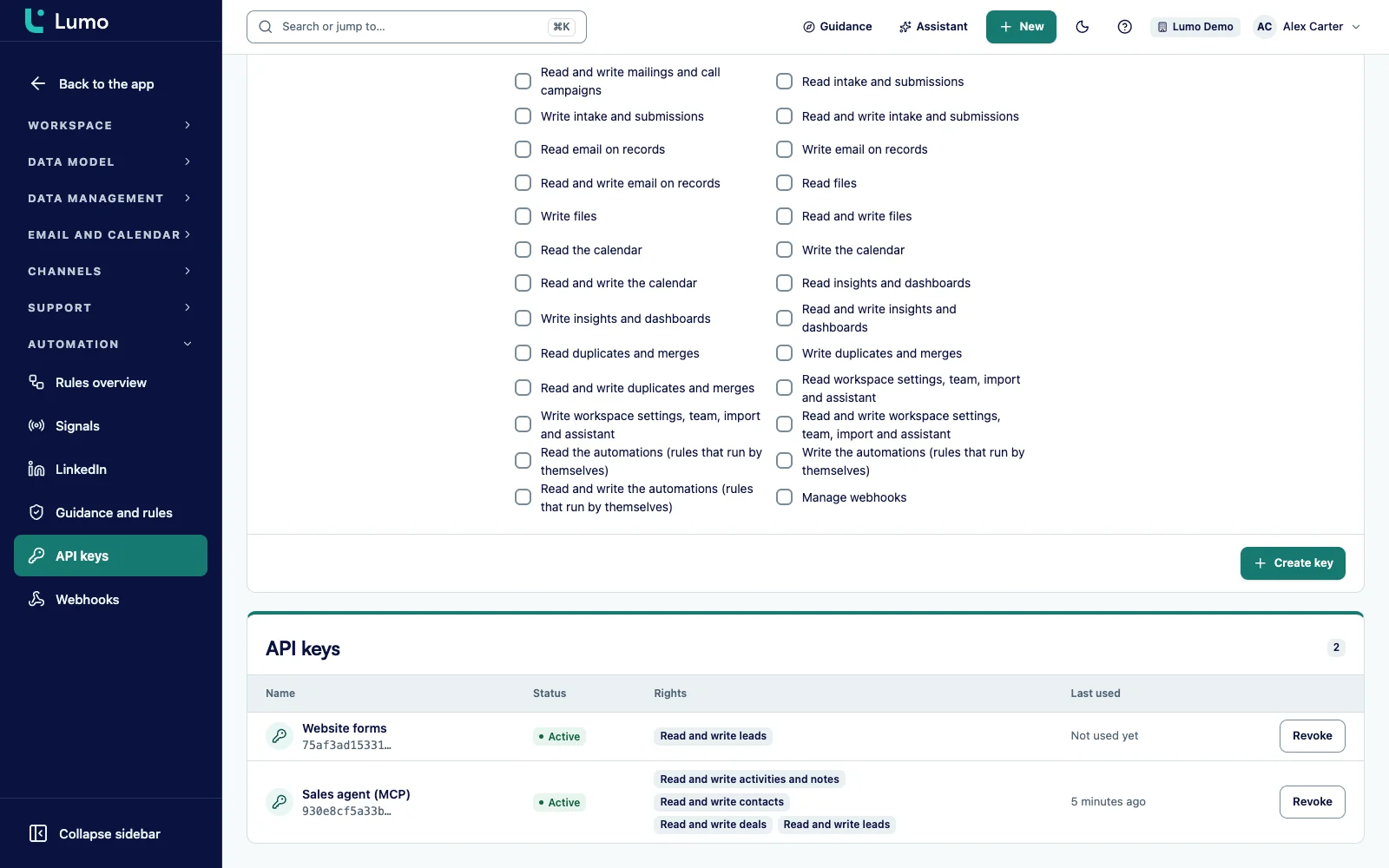
Four ground rules come with that. First, one key per agent. Every user creates their own keys under Settings, API keys, even a read-only user. Each key gets rights across 24 areas of the workspace, each read, write or both. A key without write rights cannot change anything, not even through a side door. And a key never goes above the rights of the person who created it. What each role may do is set under roles and permissions.
Second, limits. By default 600 requests per minute per key, at most 1 MiB per request and lists of up to 200 records per page. An agent stuck in a loop hits the limit instead of filling your workspace.
Third, no duplicates. If your agent sends an Idempotency-Key, a repeated request within 24 hours does not create a second record. Agents retry when a connection drops, so this matters.
Fourth, a trail. Every write through the API is in the audit log with the source api and the person who created the key. Under API keys you see when each key last worked. An owner or admin with the Connections and keys permission sees every key in the workspace and can revoke any of them.
If you don't want to build your own agent, you can work from the inside. Ask the AI assistant in plain language for an automation. It builds the rule, tests it on a real record and only switches it on after you approve. That is an agent too, in the sense that it keeps working after you go home.
Every user creates their own keys, and your agent never gets more rights than you have. Your agent does the rest.
Go to Settings, API keys and click Create key. Give it a name that says which agent uses it, such as "Inbox agent". Under Rights pick only what it needs, or start with Read only.
Fill in Expires on for a pilot or a temporary agent. Copy the key straight away. You will not see it again, so store it in the vault of your agent platform.
Point your MCP client at the /mcp address of your workspace with the key as a Bearer header. The client asks for the tool list and only sees the tools the key may use. With a connector in Claude.ai or ChatGPT you only enter the address and click Allow in Lumo. Lumo then creates a key that lasts 90 days.
Let the agent use only search, get_person and list_deals for a few days. Check that it finds the right customers. Only then give it write rights on leads or activities.
What the agent writes shows up on the timeline of the person, the organisation and the deal. Under API keys you see Last used, and the audit log shows every change with the source api.
If it works, create a second key with broader rights and revoke the old one. If the agent does something you don't want, click Revoke. It stops at once.
MCP is the open standard AI agents use to call tools in other systems. Lumo runs an MCP server at /mcp. Your agent sends a request with its API key and gets back the list of tools it may use. If the key can only read contacts, the agent only sees the tools to search and fetch a person.
There are 593 tools, grouped in 24 domains. A regular key sees 506 of them. The other 87 are for owner and admin work and only appear for a key with workspace:admin, which only an owner can create. Add ?toolsets= to the address to narrow an agent further, for example to deals and activities.
So an agent can do far more than keep contacts up to date. It searches with search, pulls deals with list_deals and logs a call with log_activity. It records hours with log_time or starts a timer with start_timer, see time tracking. It puts people in a call campaign with create_call_campaign and logs the result with record_call_outcome, see telephony. It adds people to a Cadence with add_people_to_cadence and picks up LinkedIn actions with claim_linkedin_actions. It reads a score with get_lead_score from lead scoring, fills in a person with enrich_person, and finds a free slot with get_planner_availability before it books with create_planner_booking in the planner. For marketing there are tools such as create_marketing_campaign and record_campaign_spend.
Tools that contact a customer, send email or delete something for good ask for an explicit confirm: true. And every tool is also a REST endpoint under /api/v1/tools, so a script without an MCP client can do exactly the same. The fixed routes are documented on REST API.
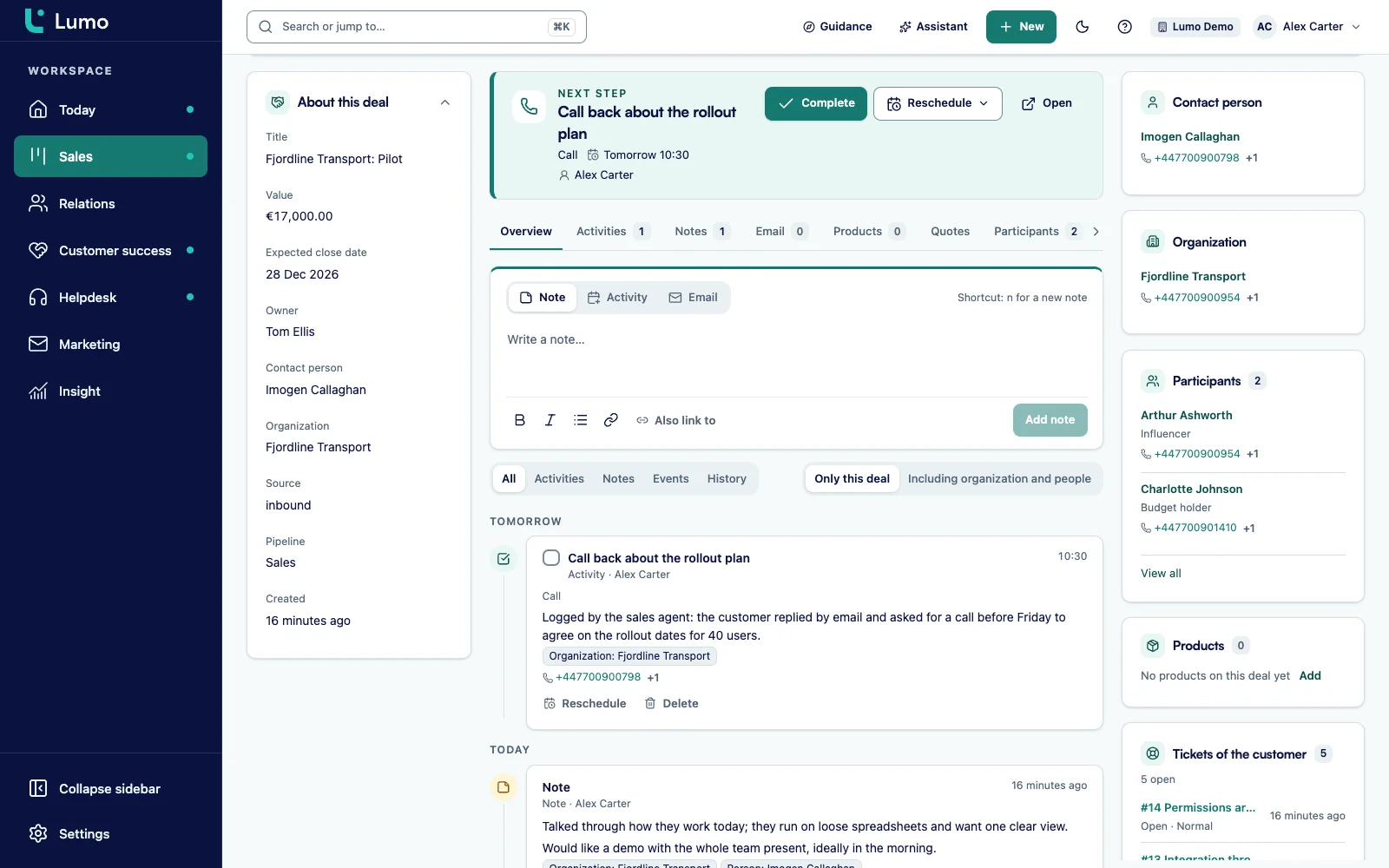
The difference with an agent next to your CRM is where the work ends up. Lumo has no agent inbox and no separate tab of suggestions. A call your agent logs is simply an activity. It sits on the timeline of the person and the deal, in the activity list, and on Today for whoever has to make the call, on the day it is due.
That works because the API and the MCP server use the same write path as the screens. The same required fields, the same links, the same warnings when something is off. If the agent breaks a rule, it gets an error with an explanation per rule, and nothing is half saved. A lead that comes in over MCP gets the source mcp if your agent does not set one, so you can later filter on exactly what your agents created. An activity logged over MCP is owned by whoever created the key. To give it to another colleague, your agent sets an owner through the REST API.
Your own automations react to what an agent does too. When the agent creates a lead, a rule such as "New lead, then call task for today" starts just as it would for a lead from a web form. So agents and rules work together without you wiring them up.
Nobody wants an agent that can do anything. So in Lumo every agent runs under its own API key with rights per area. For each of the 24 areas you choose whether the key may read, write or both. Write does not include read, so a key that only creates leads cannot export your customer base. Managing webhooks is a separate right.
Every user creates their own keys, even a read-only user. But a key never goes above the rights of its creator. If a rep may not see colleagues' hours, neither can their agent. Only an owner can create a key with workspace:admin, and even that key acts as an admin at most, never as an owner.
You see the key once. After that only a hash is stored, so even someone with access to the database cannot recreate a key. The key goes in the Authorization header and is never read from the URL. Expires on gives it an end date, and Revoke switches it off at once.
The limits are firm. 600 requests per minute per key, then a clean 429 with the wait time. At most 1 MiB per request. Unknown fields are refused instead of silently ignored. After 30 failed attempts per minute from the same address, the door closes for a moment. Read more on security and privacy.
Not every team builds its own agent, and you don't have to. You can also set up an agent through the AI assistant in Lumo. You type what you want: "When a lead has had no activity for a week, plan a call for the owner today." The assistant turns that into an automation with a trigger, conditions and actions. It has 52 tools for this: 21 that read, 21 that prepare a draft and 10 that only act after your approval, such as switching on an automation or sending a campaign.
It always saves that automation switched off. Then it runs a test on a real record from your workspace and shows what would happen: Would run or Would not run, with the reason. Nothing is saved or sent during that test. If it looks right, the assistant asks for your approval to switch the rule on. Only when you click Approve and run does it go live.
From then on the rule keeps working, even when nobody is logged in. Rules for stalled deals and leads are checked every hour. That is the kind of agent most teams are really after: one that remembers an agreement and carries it out every day. More on what else the assistant can do is on the AI assistant page.
You don't see the result in the agent. You see it in your team's morning. What your external agents logged overnight and what your automations planned shows up on Today, per person, with anything overdue at the top. The account manager does not have to dig through a channel for what the agent suggested. It is on the customer.
Nothing goes out without someone knowing. An automation can send an email from a template, from the Gmail account of the record owner. The builder then warns that this sends a real email to the person on the record. Over MCP, every tool that sends email asks for confirm: true, and the assistant only sends a campaign after you approve. If you want a person to have the last word, let the rule create a task "Send the recap" instead. Then the account manager sends it.
A stalled deal reaches the same rule at most once a week. An agent that creates the same task every night would bury your team. With "Skip if such an open activity exists", a rule also avoids that when it is triggered twice. More on the rhythm of calls and follow-up is on Cadence.
Everything below is in the product. What is not there yet is in the note further down.
At /mcp, JSON-RPC 2.0, with 593 tools in 24 domains. A regular key sees 506, and the list follows its rights.
56 fixed routes under /api/v1 plus openapi.json in OpenAPI 3.1. On top of that, every MCP tool is reachable through /api/v1/tools.
24 areas, each read, write or both. A key never goes above the rights of its creator.
Connect Claude.ai and ChatGPT with OAuth 2.1. Lumo then creates a key for 90 days within your own rights.
Expires on for temporary agents, Revoke to stop at once, Last used to see which agents still run.
600 requests per minute per key, 1 MiB per request and at most 200 records per page. An Idempotency-Key prevents a duplicate record for 24 hours.
Every change through the API is logged with the source api and the creator of the key.
Signed notifications on a new person or another event, so your agent does not have to keep polling.
This is an example, not a customer case. Say a company that installs solar panels and heat pumps has six sales reps and two people in the back office. Requests come in by email, through the web form and by phone. The team built its own AI agent that works through the shared inbox every evening.
The admin goes to Settings, API keys and creates a key "Inbox agent" with Contacts read, Leads write, Deals read and Activities write, and sets Expires on to three months out. He points the agent at /mcp.
Friday, 23:10. An existing customer emails that he is thinking about a heat pump next to his panels. The agent calls search with the email address and finds the person and his organisation. With list_deals it sees a won deal from last year and no open deal. It calls create_lead with the title "Heat pump for existing customer" and the person linked. Then it plans a call for Monday at 08:30, linked to the lead, with a summary of the email as the note. It does that through the REST API, with the customer's account manager as the owner. With log_activity the call would have been on the admin's name, because over MCP an activity gets the key's creator as its owner.
Saturday, 02:40. The agent loses its connection for a moment and sends the same request again. Because it sends an Idempotency-Key, there is still only one lead.
Sunday. Lumo has an automation the assistant built earlier: "Lead a week without activity, then follow up". It runs every hour, but this lead is new, so nothing happens.
Monday, 08:00. The rep opens Today. At the top is the 08:30 call, with the summary attached. On the lead he sees the source mcp. At 08:40 he sets the lead to Qualified. Later, in the audit log, the admin sees that the lead and the activity were created through the API under the Inbox agent key. Nobody had to ask who picks it up.
We go through these points during implementation as well.
The headless layer is not a separate product. It is another way into the same system. The technical details, with every route, error code and webhook, are on API and integrations. How keys, roles, two-factor sign-in and the audit log fit together is on security and privacy.
Rules that keep running inside Lumo are built under automations, by hand or through the AI assistant. To set the rhythm of calls, email and LinkedIn, see Cadence. An external LinkedIn engine also talks to Lumo through the API, with the Cadence write right. And an overview of every connection, including Gmail and the Pipedrive import, is on integrations.
With 593 tools an agent can do almost everything, but not everything. Signing in and two-factor, managing keys, team members and roles, connecting Gmail or the calendar, and reading secrets back all happen in Lumo itself. The public side, such as the signing page, the client portal, the help centre and forms for visitors, does not run over MCP either. A file larger than about 4 MB does not fit in one call. And within its creator's rights, a key sees every record in the workspace. If an agent should see less, narrow its rights per area or use ?toolsets=.
A CRM you can use without opening the interface. In Lumo your agents and systems read and write through the REST API and the MCP server, and everything lands on the same records your team sees on screen.
593 tools in 24 domains, from search, list_deals and log_activity to log_time, create_call_campaign, get_lead_score and create_planner_booking. A regular key sees 506. The other 87 are for admin work and need workspace:admin.
Any agent or client that speaks MCP, or that can make HTTP requests to the REST API. You connect Claude.ai and ChatGPT as a connector over OAuth: enter the address, click Allow in Lumo and you get a key that lasts 90 days. Lumo does not prescribe an agent platform.
Every user, even a read-only user, for themselves. A key never goes above the rights of its creator. An owner or admin with Connections and keys sees every key and can revoke them.
No. An agent can do exactly what its key allows, per area read, write or both. A key without write rights cannot change anything, and tools that email, contact a customer or delete ask for confirm: true.
On the timeline of the records, under Last used for the key, and in the audit log, which shows every change with the source api and the creator of the key.
If it sends an Idempotency-Key, the second request within 24 hours does not create a new record. A different request with the same key is refused.
Yes, through the AI assistant. You describe what should happen, it builds an automation, tests it on a real record and switches it on after you approve.
Yes, but never unnoticed. An MCP tool that sends email asks for confirm: true. An automation sends a template email from the Gmail account of the record owner. And the assistant only sends a campaign after you approve.
Click Revoke under API keys. The key stops at once. What the agent already wrote is in the audit log, so you can see what to undo.
In the demo we connect an agent over MCP to a workspace with sample data, and show how the assistant builds, tests and switches on an automation.