
See who visited your site
In a demo we put the script on a test page, create a custom event and follow a visit onto an organization and into lead scoring. Lumo is built by Sales Surge, with more than 150 CRM implementations behind it.
Which company read your pricing page three times yesterday? Lumo shows you the companies visiting your site, the pages they viewed and, once someone identifies, the web activity on that contact in your CRM. Marketing, sales and customer success see it in the same system, and so can your AI agents.
Tuesday, 9:30. An account executive has a call at ten with a prospect that went quiet three weeks ago. What she does not know: someone at that company looked at the pricing page twice last night, then read the page about the accounting integration. That information exists. It just sits in an analytics tool that marketing opens once a month, as a sitewide total, with no idea which company was behind a visit.
So she opens the call with the pitch from three weeks ago. Marketing sees a chart where the pricing page does well, without knowing that half the traffic came from one prospect. Customer success has the opposite problem. An existing customer reads the cancellation page three times, and nobody notices until the cancellation arrives.
That is not a people problem. It is a data problem. Site visits live in one system and your accounts live in another. Raw page views say little. Page views tied to an organization that is already in your pipeline say a lot.
That is why website tracking lives inside Lumo. Lumo is a RevOps CRM with marketing, sales and customer success and support under one roof, built to be used by people and by AI agents. Tracking is simply part of it. One script tag on your site sends page views and custom events to Lumo. Lumo works out which company was looking and links that to the organization in your CRM. When a visitor identifies, for example by signing up, the visit is also recorded on the contact.
All of this without cookies. The script does not set or read any. A visitor id is only stored in the browser after the visitor gives consent. Until then a visit is counted at company level only. Lumo never stores the raw IP address, only a salted hash. Further down this page we explain exactly how that works and what it means for your cookie banner.
What you do with the visits is up to you. Feed them into lead scoring, let Lumo turn hot visitors into leads, or just take a quick look before you pick up the phone.
The names below are the labels you see on screen.
Go to Settings, Features and turn on Website. With the feature off, the screens disappear and the script returns a 404. You cannot track by accident.
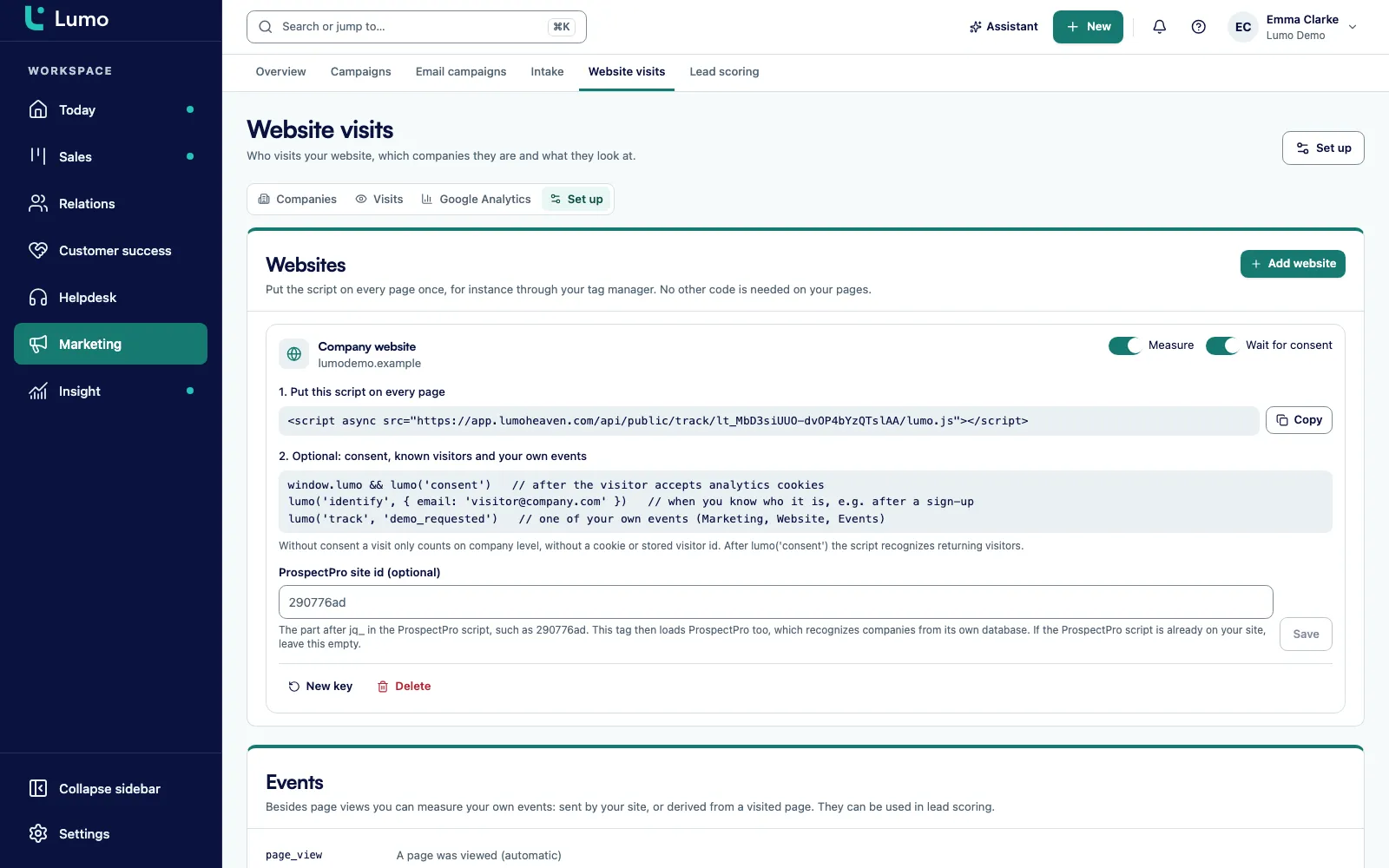
Go to Marketing, Website visits, the Set up tab, and choose Add website. Enter a name and a domain. The script only tracks on that domain and its subdomains. Only an owner or admin can do this.
Copy the script from step 1 on the Set up tab and add it to your site or tag manager. Have your cookie banner call lumo('consent') as soon as a visitor agrees.
Step 2 on the same tab shows how to call lumo('identify', { email }) after a signup and how to send custom events. You manage those events under Events.
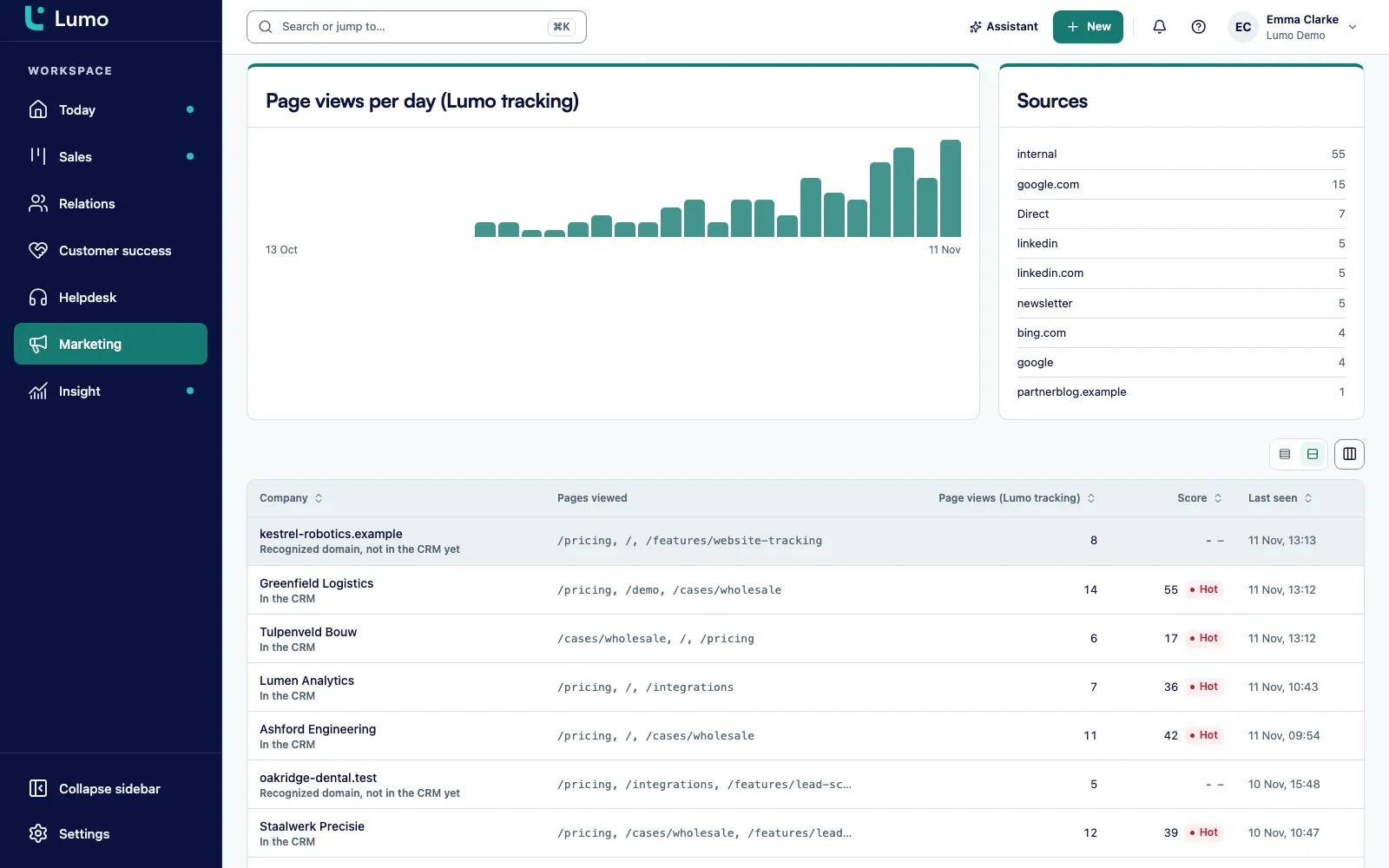
The Companies and Visits tabs show who visited over 7 days, 30 days or 90 days. The top row shows page views, visitors, recognized companies and known contacts.
In Lead scoring you award points for a page view, a return visit or a custom event. A visitor's score is recalculated right after each tracking event.
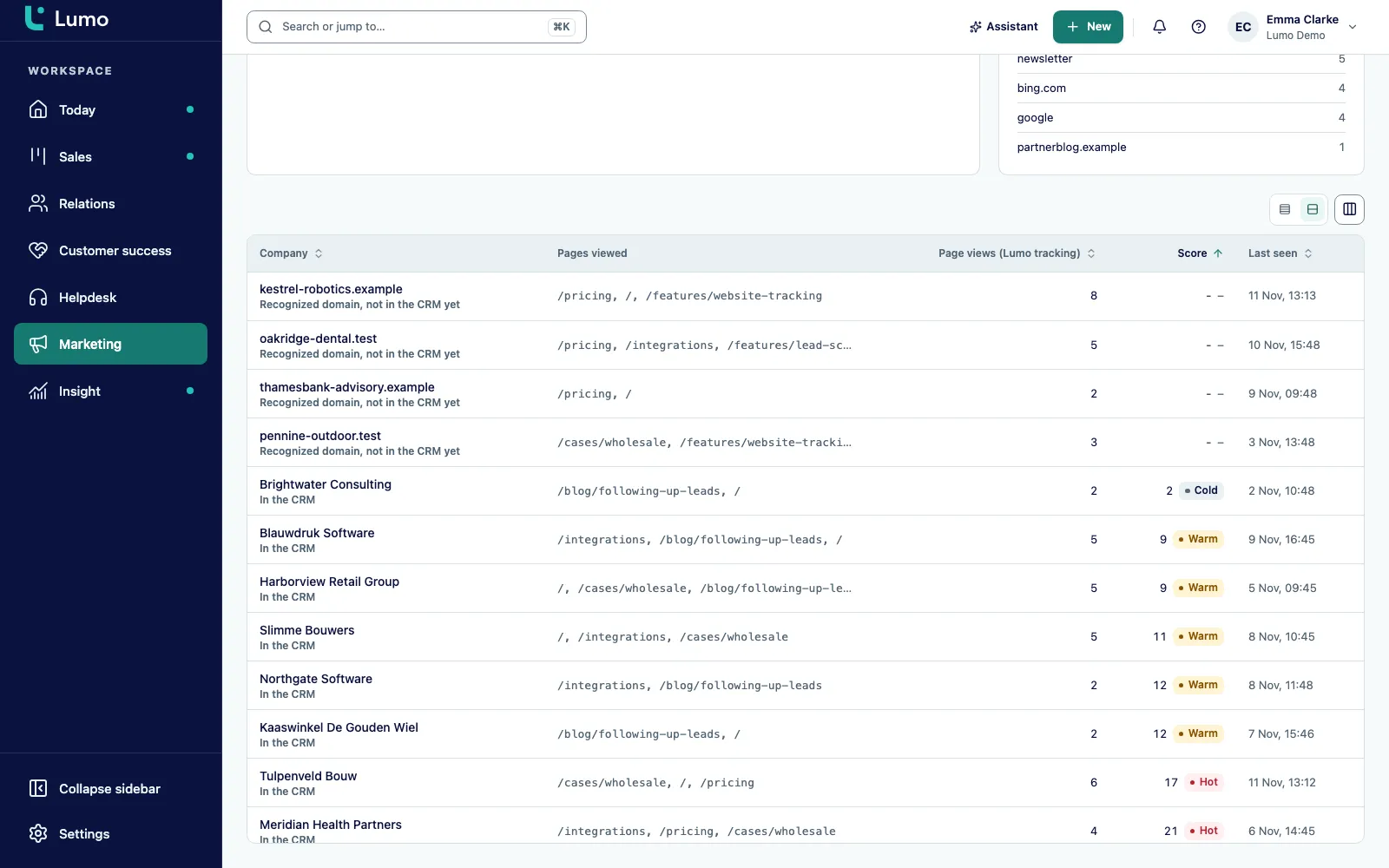
The Companies tab is where sales and marketing look most. For each company you see the number of pages viewed, the score, the temperature and when the company was last seen. Next to that is the status: In the CRM, or Recognized domain, not in the CRM yet.
The second one is worth your attention. It means Lumo recognized the company from its network, but you do not have it as an organization yet. That company already knows you, while you do not know it.
How does Lumo recognize a company? There are two routes. If a visitor identifies with an email address, Lumo links them to the contact and their organization. If not, Lumo looks up the network name behind the IP address (reverse DNS), derives a domain from it and finds the organization with that domain. Internet providers and hosting networks never count as a company. Someone browsing from home on a consumer connection will not show up as that provider in your list.
Want more detail on a recognized company? Connect your own Apollo account and fill in the gaps with data enrichment.
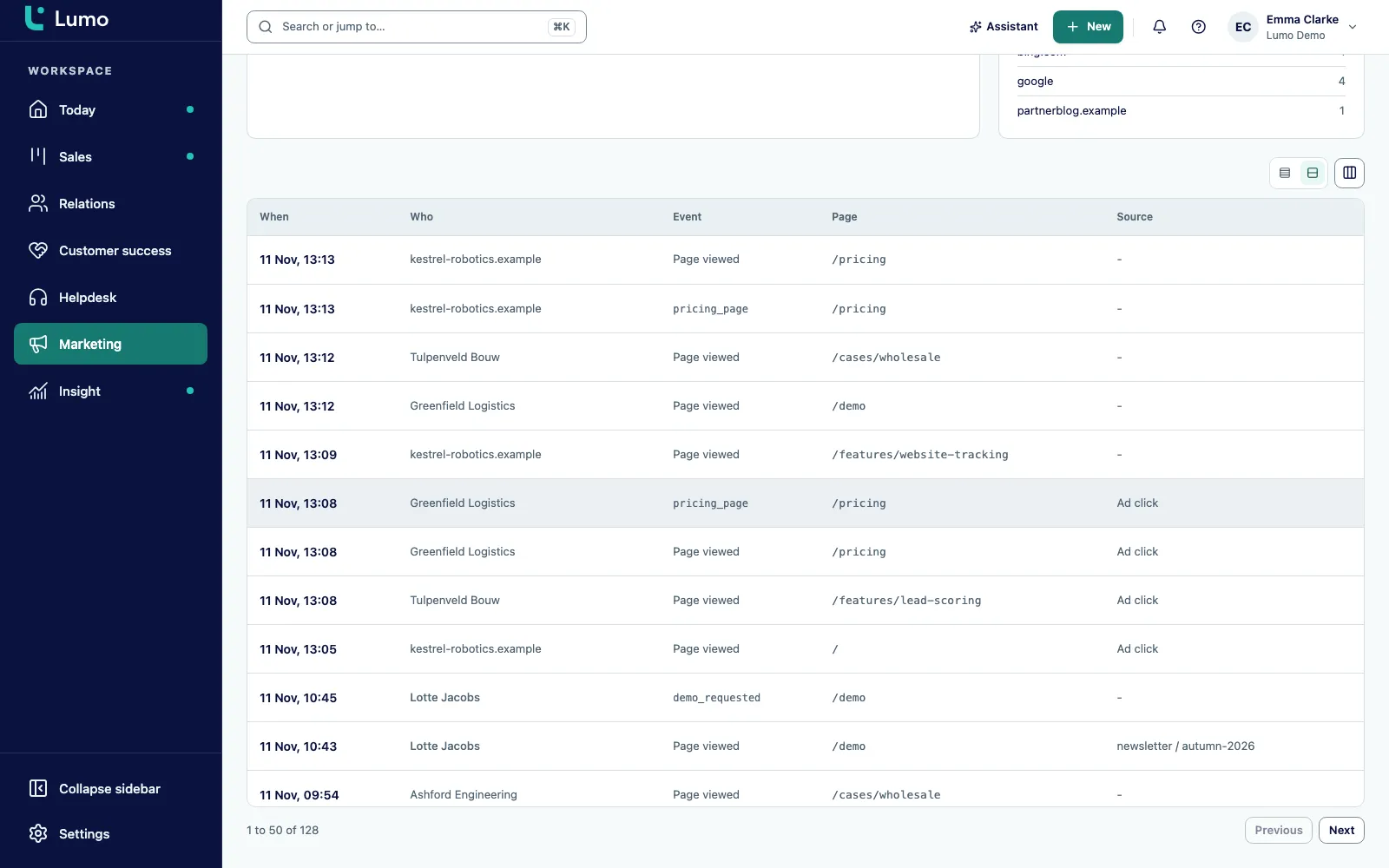
The Visits tab lists each visit separately. For every visit you see the page path and title, the referrer, and the utm_source, utm_medium and utm_campaign values if the link carried them. A visitor Lumo does not know is shown as Anonymous. A known visitor appears by name, and the visit is also on that contact in the CRM.
If someone arrived through an ad, the visit gets the Ad click label. Lumo spots this from a click id from Google, Meta, Microsoft, LinkedIn or TikTok in the URL, or from a paid utm_medium. That matters for lead scoring, where a rule can skip visits that came only from an ad click. Nobody gets a high score for tapping one ad.
Tracking also works on single-page apps. Navigation inside the app counts as a page view, and if your router does not report it on its own, lumo('page') tells Lumo a new page was shown.
The page view total at the top is the same number you get in reports and dashboards from the page view source. No arguing over which figure is right.
This is where precision matters, because you will want to explain it to whoever handles privacy at your company.
The script does not set or read cookies. For a new website, Wait for consent is on by default. The script then stores no visitor id until your site calls lumo('consent'). Without consent a visit is counted at company level only, under a daily key derived from the address. After consent the script stores a visitor id in localStorage and recognizes returning visitors. lumo('revoke') removes that id again.
If the browser sends Do Not Track or Global Privacy Control, the visit is always counted at company level only, even after consent. And Lumo ignores a lumo('identify') call made without consent.
Lumo never stores the raw IP address, only a salted SHA-256 hash per workspace. The address is used to look up the company, also without consent. That is why we do not say you need no consent at all. localStorage falls under the same rules as cookies, and your cookie banner should mention the tracking. Data is stored in London. More on that under security and privacy.
A page view is a start. What you really want to know is whether someone played the product video, used the ROI calculator or downloaded the buyer guide. That is what Events are for.
There are two kinds. Sent by the site is an event your site reports itself with lumo('track', 'key'). On a page is derived by Lumo from a visited path, so you add no code. On top of that there are three built in events: a page was viewed, a form was submitted, and a visitor identified themselves.
These events feed lead scoring. A rule for custom events awards points whenever someone triggers yours. That visitor's score is recalculated straight away, not at the next scheduled run. Turn on Create leads in Lead scoring, and Lumo creates a "Website visit" lead for a hot visitor, which you then work in lead management.
Visitors to a landing page linked to a campaign, and visits with a known utm_campaign, become campaign members automatically. That is how marketing campaigns and attribution shows which campaign brought which company to your site.
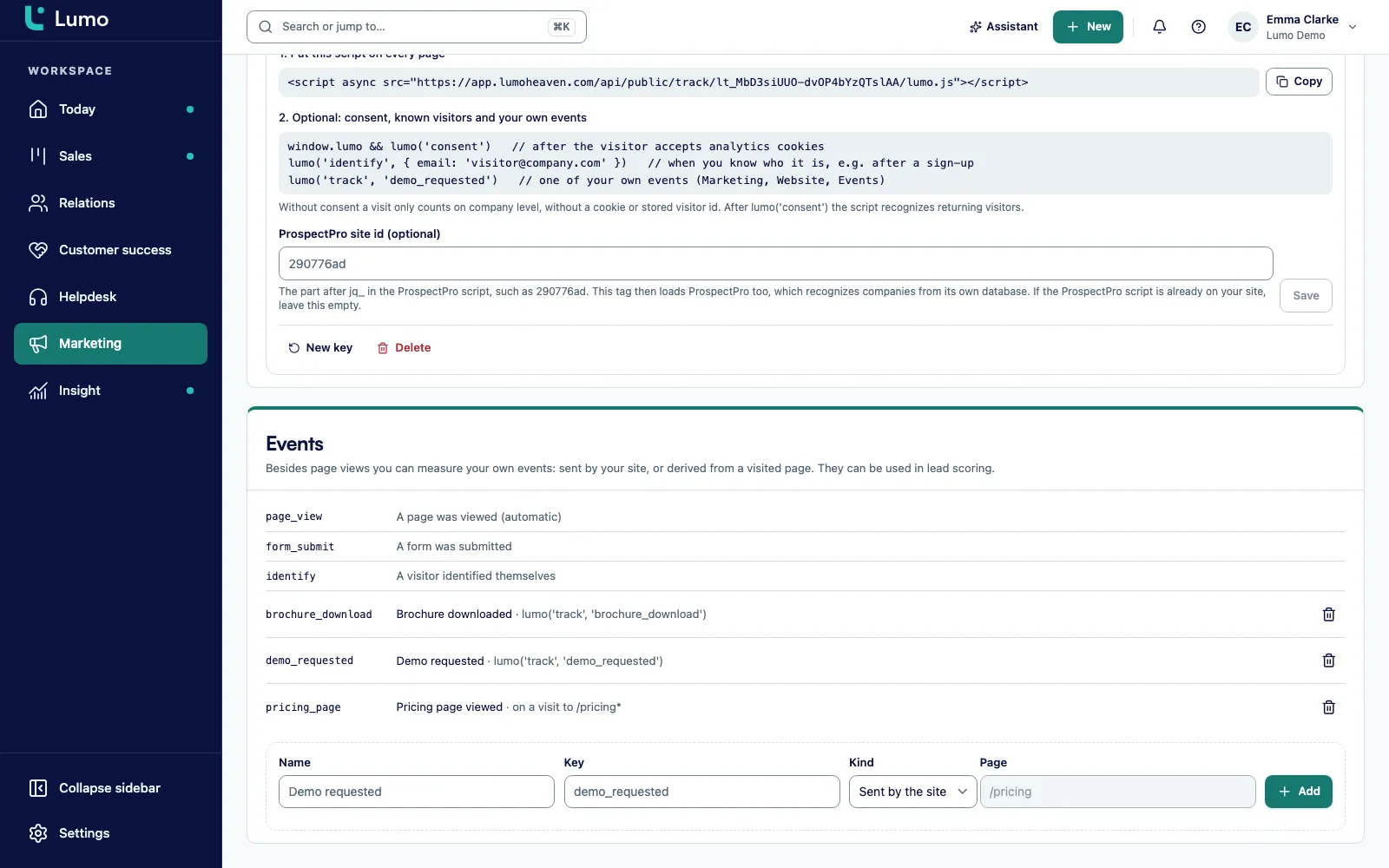
Every item below works this way in the app.
Each website gets its own script with its own public key. The Measure switch pauses a site. Only an owner or admin manages websites.
Want an old script to stop counting, for example after moving your site? Choose New key. The old script stops at once.
The script tracks on the domain and its subdomains. You can add extra origins. A request from any other origin gets a 403.
A click id in the URL or a paid utm_medium gives the visit the Ad click label. Lead scoring rules can skip those visits.
consent, revoke, track, identify and page. That is all you need for consent, custom events and known visitors.
Events are kept for 400 days. Visitors without events for 30 days. A daily job cleans up.
Only a salted SHA-256 hash per workspace. Internet providers and hosting networks never count as a company.
Deleting a website removes all its visits and events. Only an owner or admin can do it.
The same tracking, a different question for each team.
Which pages and campaigns bring companies that fit your ICP? You see it per company, not only as a total. More for marketers on Lumo for marketing.
Before a call, check on the organization what they read in the last few days. A recognized domain that is not in the CRM yet is a name for your list.
With Create leads, hot visitors become a "Website visit" lead. You can see whether the team follows them up, instead of hoping someone checks a list.
An existing customer reading the cancellation page or a page about a bigger plan shows up on that customer. Reason enough for a quick call.
One page view number in the hub and in Reports. Websites, keys and events can also be managed through the API.
Which campaigns brought companies that later became deals? You read it on the campaign, from the same data as the rest of the CRM.
Say a company selling warehouse software has five account executives and two marketers. Call it Shelfwise. This is a made up example to show how it works, not a customer story.
On Monday one of the marketers turns on the Website feature, adds the domain on the Set up tab and drops the script into the tag manager. The cookie banner calls lumo('consent') when someone accepts. Under Events she creates two custom events: "pricing calculator used", which the site sends itself, and "integrations page", which Lumo derives from the path /integrations. After a webinar signup the site calls lumo('identify', { email }).
In Lead scoring she starts from the basic set, which covers page views and return visits, and adds five points for the pricing calculator. Under Create leads she picks Hot only.
On Wednesday the Companies tab shows a food distributor with eleven pages viewed and the status Recognized domain, not in the CRM yet. Nobody at Shelfwise has heard of them. She creates the organization and enriches it with industry and headcount through Apollo.
On Thursday a visitor returns from a company that is already an organization in the CRM, with no open deal. He accepts the banner, signs up for the webinar, then uses the pricing calculator and reads the integrations page. His score jumps right away, he turns hot, and Lumo creates a "Website visit" lead. An account executive spots it in the lead list, opens the contact and sees which pages he read. She calls that afternoon and starts with the integration question he clearly had, not with a generic pitch.
A third visitor ignores the banner. That visit counts only for his company, with no visitor id. That is fine too. The company is in the list, the person stays anonymous.
Everything you see on screen above, an AI agent can also read through the Lumo MCP server or the REST API. The tools sit under the marketing:read and marketing:write scopes.
For reading there is get_website_stats for the headline numbers, list_visiting_companies for visiting companies and list_web_events for individual visits and events. list_tracking_sites returns the websites, and list_tracking_events, create_tracking_event and delete_tracking_event manage custom events.
Managing the websites themselves is locked down. create_tracking_site, update_tracking_site, rotate_tracking_site_key and delete_tracking_site only work with a key that has the workspace:admin scope. Every tool is also available as POST /api/v1/tools/<name>.
A typical agent job: every morning, fetch yesterday's visiting companies, match them against open deals and post a short list per account executive of who came back for another look. The agent works in the same data as your team. Keys, permissions and the server instructions are covered on headless CRM and AI agents. Turn the Website feature off and these tools disappear for the agent too.
This is what we go through for a first website.
Tracking does not stand alone. A page view, a return visit and a custom event are all sources for lead scoring. That is where you decide what something is worth and when someone turns warm or hot.
When a visitor turns hot, Lumo can create a "Website visit" lead, which you work in lead management like any other lead. A form on your site built with web forms is often what turns an anonymous visitor into a known contact.
Campaigns also draw members from website visits. If a landing page is linked to a campaign, or a visit's utm_campaign is a key on a campaign, the visitor becomes a member. That is how marketing campaigns and attribution shows which campaign touched which leads and deals.
In a Cadence the Website visit signal can start or stop steps, as described on calling campaigns and cadences. And for marketers who want the whole picture, there is Lumo for marketing.
Lumo recognizes a company by its network, through reverse DNS. That works for companies with their own network. Someone working from home or on the road through a consumer internet provider will not be recognized as a company. Lumo has no company database of its own. To get to know those visitors anyway, let them identify through a form or signup, and enrich the organization with your own Apollo account.
There is no cookie banner included. Your existing banner calls lumo('consent'). Lumo does not do session recordings, heatmaps or scroll depth. And "no cookies" does not mean "no consent needed": after consent the visitor id lives in localStorage, and the IP address is used to look up the company. So include the tracking in your cookie and privacy statements.
No. The script does not set or read cookies. After consent it stores a visitor id in localStorage. Without consent a visit is counted at company level only.
We do not say that. localStorage falls under the same consent rules as cookies. Have your banner call lumo('consent') and mention the tracking in your cookie and privacy statements.
Either a visitor identifies with an email address, or Lumo uses reverse DNS on the IP address to find a domain and then the organization with that domain. Internet providers and hosting networks never count as a company.
Not in raw form. Lumo only keeps a salted SHA-256 hash per workspace. The address is used to look up the company.
The visit is always counted at company level only, even if the visitor gave consent. No visitor id is stored.
The script tracks page views, custom events and identification. If you use another form tool, call lumo('identify', { email }) or lumo('track', 'key') after submit. Forms built in Lumo are already tied to the CRM.
Events for 400 days. Visitors without events for 30 days. Delete a website and all its visits and events go with it.
Yes. Navigation inside the app counts as a page view. If your router does not report it, call lumo('page') for each new page.
Only an owner or admin. Through the API that takes a key with the workspace:admin scope. Reading needs marketing:read.
In a demo we put the script on a test page, create a custom event and follow a visit onto an organization and into lead scoring. Lumo is built by Sales Surge, with more than 150 CRM implementations behind it.