
See a 1:1 with real numbers next to it
In a demo we plan a conversation together, fill in the seven blocks and show which CRM numbers count. Pricing depends on users and modules.
The weekly conversation between a manager and a team member, inside the CRM where the work happens. The team member prepares, the manager adds their part, and the week's calls, meetings, hours and deals won are already on the page. Built for sales managers, team leads and founders who want the hour to be about the work, not about whether the numbers are right.
Tuesday, 10am. Your weekly one-on-one with an account executive. The first fifteen minutes go to reconstructing last week. What did we agree? Was that the pricing follow up or the reference call? Someone scrolls through a shared doc with half finished headings. Then you ask how the week went and the answer is a feeling. "Busy." "Lots of calls." How many is anyone's guess, because those numbers live in another tool, or in a spreadsheet the manager meant to update on Friday.
Then the agreements. You end with three action items. They go into the manager's notebook, or nowhere. Next week the conversation starts from zero again. Nobody checks whether the items got done, because nobody remembers exactly what they were. A few months in, the one-on-one feels like a chore. Meetings get moved, then skipped.
That is rarely the fault of the manager or the rep. It is the format. A useful one-on-one needs three things: a structure that stays the same, agreements that come back, and numbers nobody has to argue about because they are already correct. In most teams none of those three live in the same place.
So we put the conversation inside Lumo. Lumo is a RevOps CRM with Marketing, Sales and Customer Success and Support under one roof, built to be used by people and by AI agents. The calls, the customer meetings, the hours and the deals won are already there. A 1:1 reads them directly for the week you are discussing. The team member prepares in seven fixed blocks. This week's agreements show up at the top of next week's conversation on their own.
This page walks through planning and preparing a conversation, the seven blocks, which numbers count and which do not, who can see what, and what we deliberately left out. If you manage a sales team and want the wider picture, read Lumo for sales managers as well.
The names below match what you see on screen.
Under Settings, Team, pick the manager for each team member in the Manager column. That person then appears under My team for their manager.
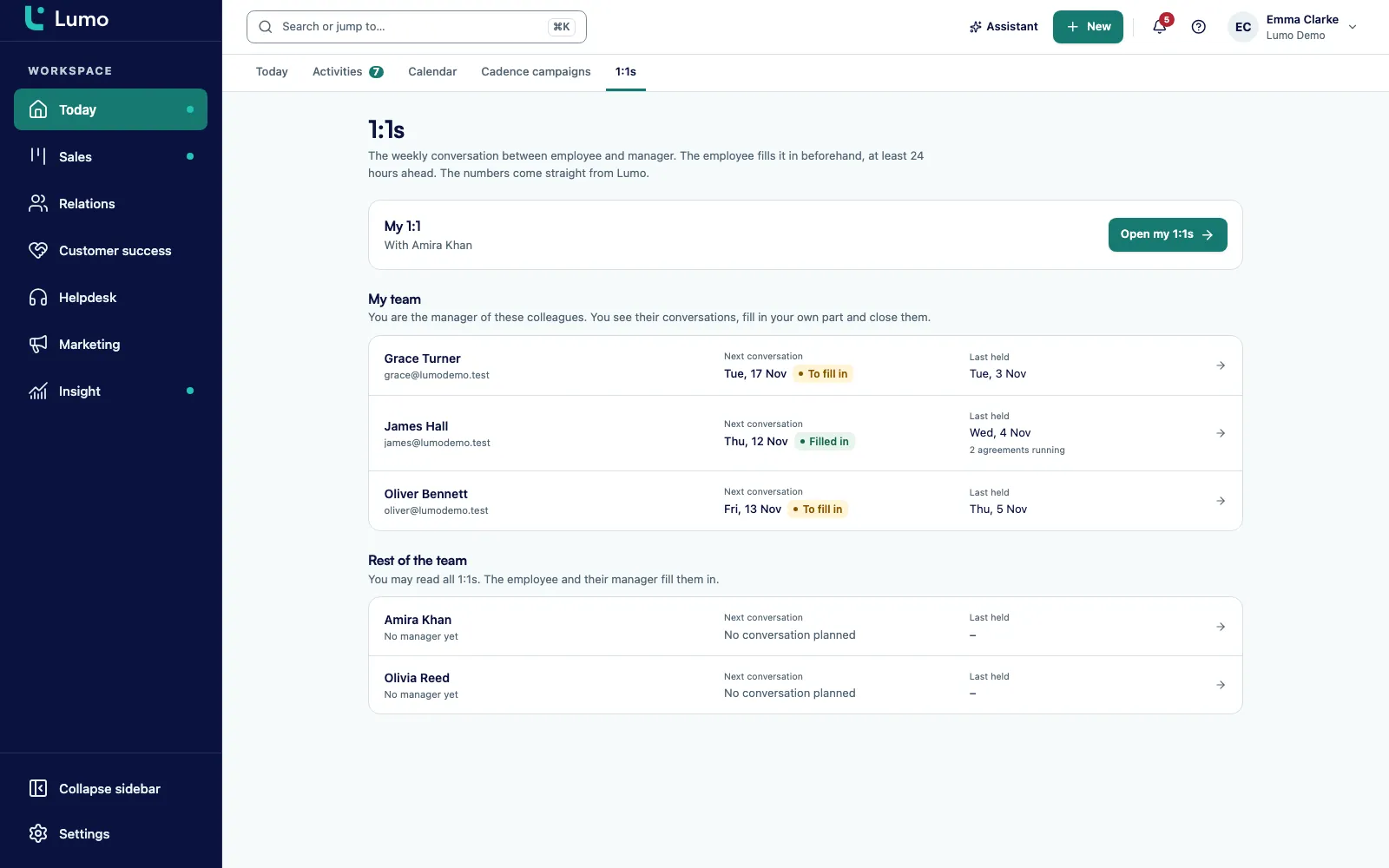
Open the 1:1s tab in the Today section, pick the team member and a date, and click Plan conversation. The type is Weekly, 45 minutes or Deep dive, 60 minutes. The team member gets a notification in the bell.
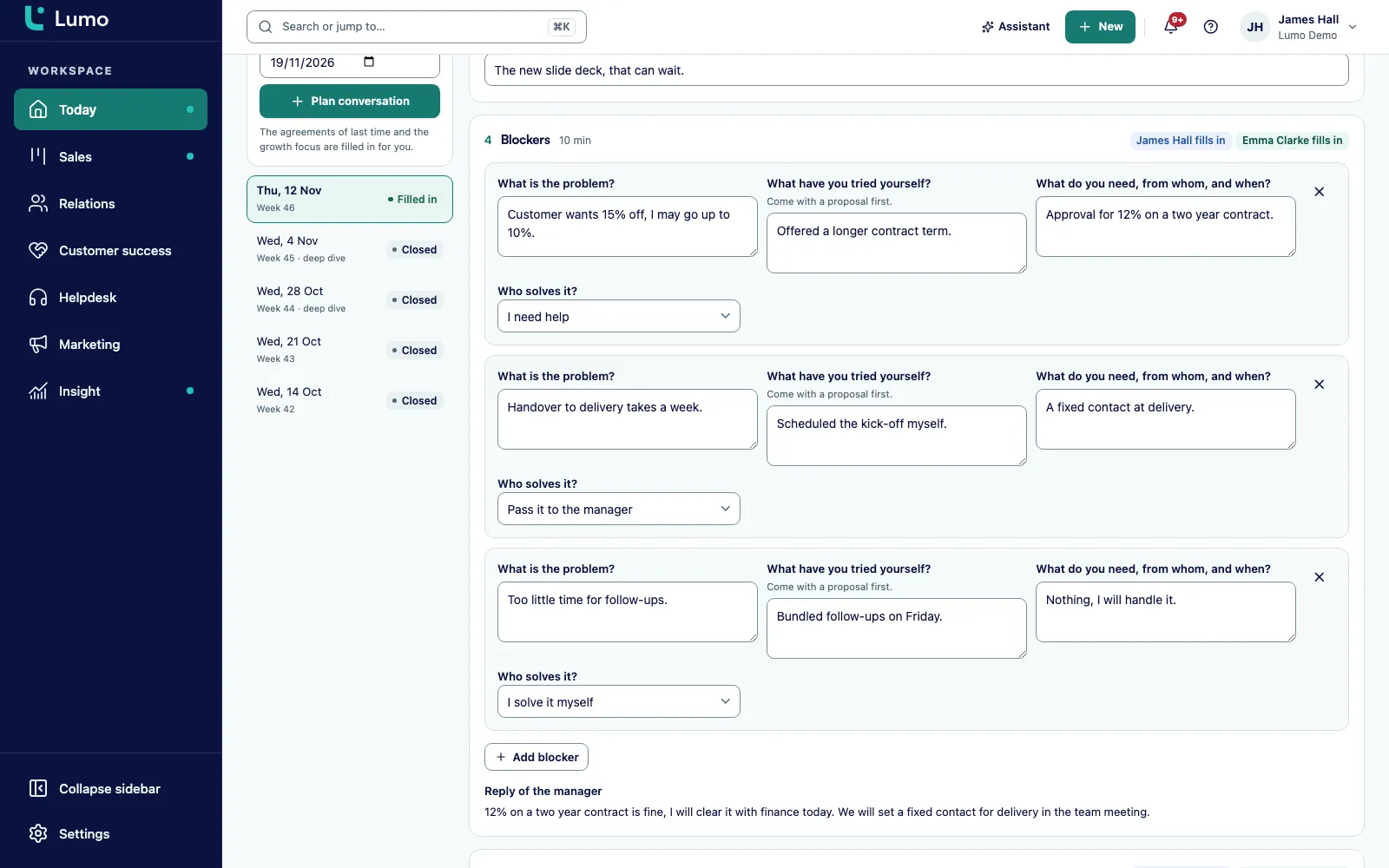
Seven blocks, from Check-in to Agreements. Everything saves as you type. When it is done, they click Ready for the conversation, no later than 24 hours before the meeting.
A response to each blocker and their own culture scores. The manager sees You are the manager at the top, the team member sees This is your 1:1, and anyone else with access sees Read only.
Go through Activities together with the week's numbers, then fill in Agreements. The manager clicks Close conversation. The conversation locks and that week's numbers are recorded.
The agreements appear in Review of the agreements in the next conversation, each marked done, partly done or not done. Need to change a closed conversation? Click Reopen.
A fixed structure sounds dull. In practice it is what a one-on-one needs most. Nobody has to decide where to start, and a missing piece is obvious. Every conversation in Lumo has the same seven blocks in the same order.
Check-in is a score from 1 to 10 for how things are going. Review of the agreements brings back last week's agreements, each marked done, partly done or not done. Activities puts the week's numbers on the page. Blockers lists what is in the way, and for each one the team member says who should solve it: they will handle it, they need help, or it moves to the manager. The manager writes a response.
Next comes the Culture check, a score from 1 to 5 per value with an example from the week, followed by the manager's own score. Getting better is about growth, not about targets. And Agreements is where the conversation lands.
The point is that the team member fills it in before the meeting. The manager walks in having read what is going on. The 45 minutes go to the two blockers that matter, not to catching up on what happened.
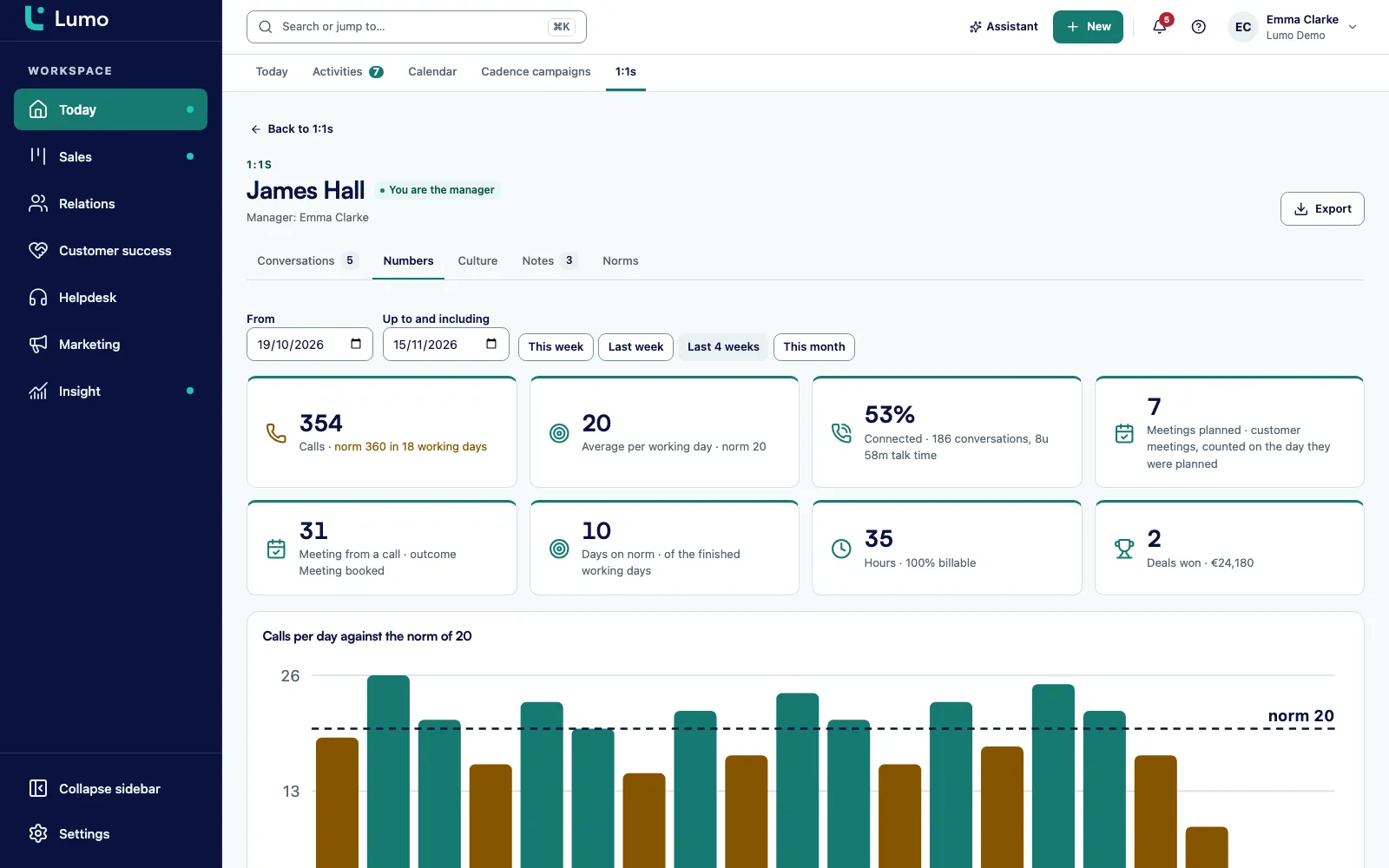
The Numbers tab reads straight from Lumo. Nobody retypes anything or builds an export. You pick a period: this week, last week, the last four weeks or this month.
You see the number of calls, the average per working day and how many days hit the norm. Next to that, how often the person connected, how many meetings were scheduled and how many of those came out of a call, meaning a call logged with the outcome that a meeting was made. Then hours with the billable percentage from time tracking, and deals won.
What counts as a meeting? Customer meetings someone schedules in Lumo as an activity, and bookings made through the booking page of the meeting scheduler. What does not count: events that only come in through the Google Calendar sync. An internal meeting in your calendar does not inflate the customer meeting count.
The difference with a standalone report is that the numbers belong to the conversation. When you close it, that week's numbers are frozen. Look back three months later and you see what was discussed and which numbers sat next to it. For a view across the whole team instead of one person, build it in reports and dashboards.
People say things in a one-on-one that are not meant for the whole company. That things are hard at home. That a colleague is making work difficult. So Lumo is strict about who can see and change what.
The team member and the manager see their own conversations. The right Read all 1:1s belongs by default to the Owner role only. An Admin does not get it automatically. If you want someone else to have it, you grant it under roles and permissions.
The team member and the manager cannot edit each other's part. That is not just a missing button, it is enforced in the database. A closed conversation stays locked until someone clicks Reopen.
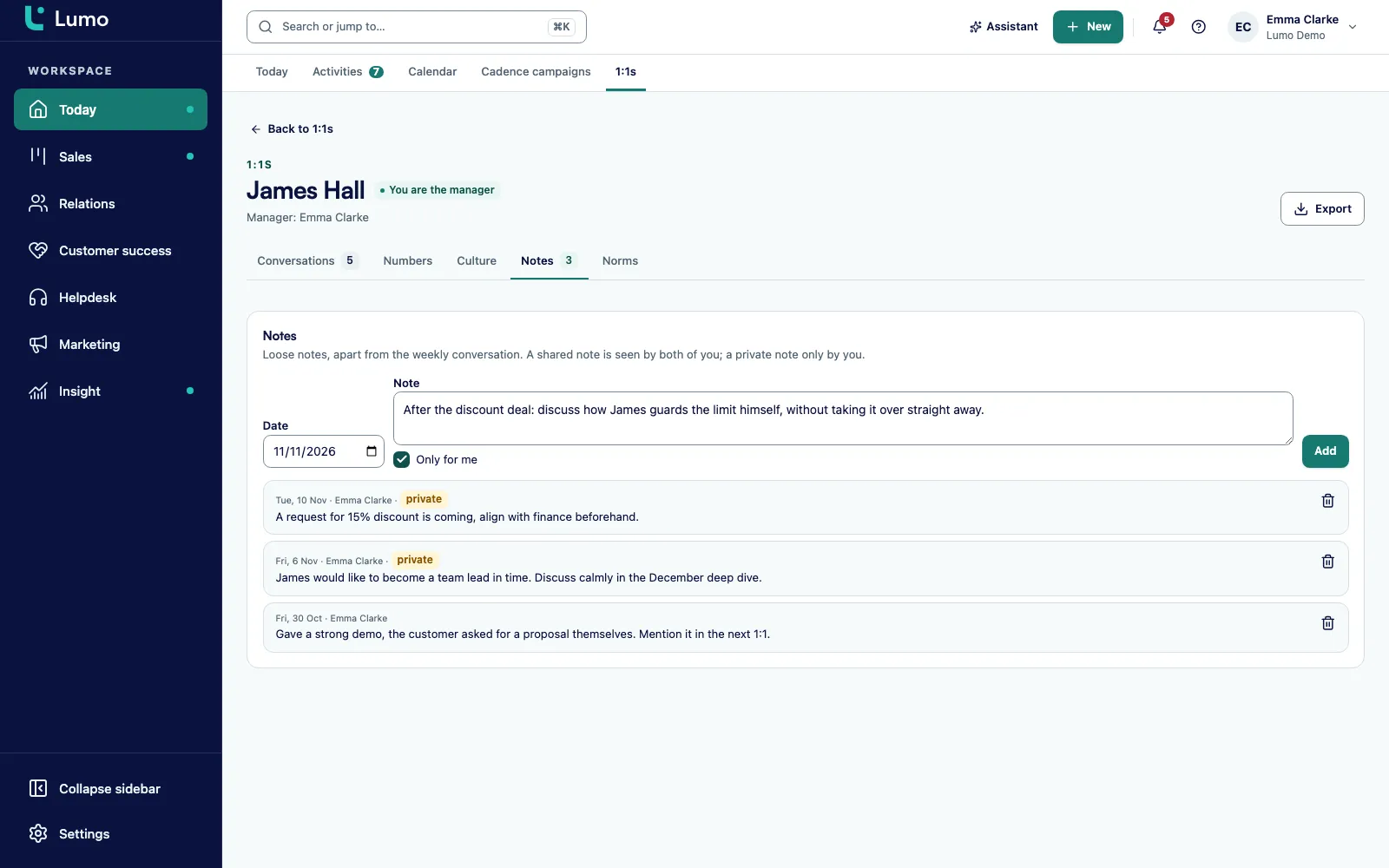
In the Notes tab you write either shared notes or private ones. A private note is visible to the writer only. Not even the workspace owner can read it. And by design, the audit log does not store the content of conversations.
Each item below works this way in the app.
Weekly at 45 minutes and deep dive at 60 minutes. Every fourth conversation becomes a deep dive on its own. You can change that number per person.
Each team member shows whether nothing is planned, preparation is still open, it was not ready in time, it is filled in, it is today, or it is closed.
Calls per working day, hours per week and a billable target in percent. Only the manager or whoever manages the team can change them.
The Culture tab plots the scores per value as lines across conversations, once there are two.
When a conversation is planned, filled in or closed. If the team member has not prepared a day ahead, a reminder follows.
Conversations, Numbers, Culture, Notes and Norms, with an Export button for the conversations.
Who can change what is set in the database, not only in the interface. A closed conversation is locked.
Planning, marking ready, closing, numbers, norms and notes work through the REST API with your own API key. There is deliberately no MCP tool.
You plan the conversations and close them. You walk in with a prepared conversation and the numbers next to it. Under My team you see at a glance who still has to prepare and who is late. You set norms per person, because a new SDR works differently from a senior account executive. For pipeline and team oversight beyond the 1:1, see Lumo for sales managers.
You prepare. It takes ten minutes and gets you a conversation about your blockers. You see the same numbers your manager sees, so there is no debate about how many calls you made. And the agreements are back next week without anyone digging for them.
If you work on client projects, hours and the billable percentage matter most. They come from time tracking, and the billable target is set per person.
You set it up. You decide who reports to whom, who manages the norms and whether anyone besides the owner can read every conversation. For team wide numbers instead of per person, use reports and dashboards.
Say a B2B services firm has a head of sales, Daniel, with four people reporting to him: two SDRs and two account executives. This is a made up example to show how it works, not a customer story.
Daniel sets himself as manager for all four under Settings, Team. He sets norms per person. The SDRs get 40 calls per working day. The account executives get 12, since they run longer discovery calls. Everyone is on 38 hours a week, and the account executives have no billable target because they do not work on client projects.
On Monday he plans a conversation for Thursday with each of them. Every fourth conversation will be an hour long deep dive without him having to remember. Each person gets a notification in the bell.
Priya, one of the SDRs, prepares on Tuesday afternoon. Check-in: 7. In the review, "Finish the webinar follow up list" is done and "Rewrite the opener for finance teams" is partly done. Under Blockers she writes that half the webinar leads came in without a phone number, and she moves it to the manager. She clicks Ready for the conversation well ahead of time.
Daniel reads it on Wednesday. In Activities he sees she averaged 36 calls per working day, hit the norm on two days, connected often and booked four meetings from calls. Under her blocker he writes that he will ask marketing to add a phone field to the webinar form, and that she can email those leads first in the meantime.
Thursday's conversation takes 30 minutes. They do not talk about how many calls she made, it is on the page. They talk about why finance teams push back on the opener. They agree on three things. Daniel clicks Close conversation. Next week those three are waiting at the top.
Lumo is built to be used by people and by AI agents. Almost anything you do in the app, an agent can also do through the MCP server and the API: update deals, schedule activities, log time. For one-on-ones we made a different choice, on purpose.
There are no MCP tools for 1:1s, and the AI assistant cannot read them either. The reason is simple. What someone says in a one-on-one is personal. How things are at home, what they are struggling with, what they think of a colleague. That should not end up in an agent that also writes emails and updates records, however well meant.
What does work: the REST API under `/api/crm/one-on-ones` accepts an API key that belongs to the user. With it you can plan a conversation, mark it ready, close it, fetch the numbers, and update norms, the manager and notes. That key acts as that one person, with the same permissions. A small script of your own that plans next week's conversations for your team every Monday is perfectly possible.
The numbers inside a 1:1 do come from the same data your agents work in: activities, deals and hours. That data is shared. The conversation itself stays between two people.
These are the steps we go through with a first team.
Notifications about 1:1s arrive in the bell inside Lumo, not by email and not in Slack. There is no card for them on the Today screen either. If you want to be sure nobody misses a conversation, put the meeting in the calendar as well and let the reminder a day ahead do its job.
The values in the culture check are set up in advance. Today you do not pick them yourself in a setting. If you want to work with your own values, raise it in a demo and we will look at what is possible together.
Events that only live in Google Calendar do not count as customer meetings. Log customer meetings as activities or let them be booked through the meeting scheduler. A connection with Outlook and Microsoft 365 is on the roadmap. Until then, 1:1s work the same for Microsoft users, because the numbers come from Lumo itself.
The manager or the team member. Open the 1:1s tab in the Today section, choose a date and click Plan conversation.
No. A private note is visible only to the person who wrote it. Not even the workspace owner can read it.
Not by default. The right Read all 1:1s belongs to the Owner role only. You can grant it to someone else under roles and permissions.
Calls, average per working day, days on norm, connected calls, meetings scheduled, meetings from calls, hours with billable percentage and deals won. All read directly from Lumo.
No. Customer meetings scheduled in Lumo as activities and bookings through the booking page count. Events that only come from the calendar sync do not.
They get a reminder in the bell a day before the conversation, and the manager sees in the list that it was not ready in time.
A closed conversation is locked. Click Reopen to open it again. The numbers for that week are recorded when it is closed.
No, by design. There are no MCP tools and the assistant has no access, because the content is personal. The REST API does work with your own API key.
Yes. Each team member's page has an Export button.
In a demo we plan a conversation together, fill in the seven blocks and show which CRM numbers count. Pricing depends on users and modules.