
See Lumo next to your own process
In the demo you see the product on your situation, ask your questions and hear honestly what works today and what is still on the roadmap.
Lumo, the RevOps CRM
Marketing, sales, customer success and support under one roof. Your team works in Lumo, your own AI agents work in the same data through the API and MCP. So on Monday morning nobody asks who is calling that customer back. It is already planned.

Customer data and agreements together, on the person, the organization and the deal.
Every deal has an owner and a concrete next action.
The context sits with the customer, so a colleague can take over the conversation.
Lumo in 90 seconds
In Lumo, the answer is already there. Watch your people and your agents work as one team, from the first lead to the last ticket.
A traditional CRM stores contacts and deals. Lumo brings together everything a revenue team does every day, for people and for agents, around one view of the customer.
A campaign as a record of its own with budget, channel and period. You book the spend yourself or let an agent book it, and see the leads, pipeline, won revenue, ROAS and cost per lead for each campaign. Campaigns and attribution. Next to that, website visits without cookies, lead scoring with rules you can read back, enrichment with Apollo, email campaigns to segments and web forms that create a lead straight away.
Pipelines and leads with an owner, and quotes the customer signs online. Calls run through CloudTalk and land on the deal with recording and summary. The meeting scheduler books into free time from Google Calendar, Cadence sets up the next step after every call and LinkedIn is a step in that same sequence. Pipeline management
A helpdesk with SLA and CSAT, live chat on your site, a customer portal with tasks and blockers, a knowledge base, and time and projects with the budget taken from the deal. All on the same customer that sales sees. Customer success
One-on-one meetings with the team member's numbers from the CRM next to them, roles and permissions with View and Edit per area, and reports and dashboards that click through to the records underneath.
Work that gets done overnight: a quiet deal gets a call, a new lead gets an owner. 37 triggers, 22 actions and flows with waits and branches. Automations
Say what you need. The assistant builds it, tests it and switches it on after your approval. AI assistant
Your own agents search, log and create leads through the API and an MCP server with 593 tools, with the permissions of their human and right where your team can see it. Agents
A few parts that were added recently, each with a page of its own that tells you what it does and what it does not.
Lumo also works when nobody opens the screen. Your own AI agents talk to the same people, organizations, deals, leads and activities as your team, through the REST API and the MCP server. An agent looks up an account, logs a call and creates a lead. What it does shows up on the customer's record straight away.
That is the difference with an agent that works in a corner of its own. Here there is one view of the customer. On Monday morning your rep sees what the agent set up overnight, and can pick up the phone. Every agent works with its own API key, with read or write rights and an expiry date, and you revoke any key with one click.
The MCP server has 593 tools in 24 domains, from deals and tickets to quotes, time and projects. See what works today on headless CRM and AI agents, or go straight to the API and integrations.
Type in plain words what should happen, for example: every night, if a deal has been quiet for seven days, plan a call back for the owner. The assistant builds the automation, shows in a dry run what would happen, and only switches it on when you press approve.
That is how you set up an agent that keeps working without clicking a single rule together yourself. The assistant works with your role and permissions, stays off per workspace until an admin switches it on, and anything outward-facing or irreversible waits for your approval.
Read more about what the assistant can do on AI assistant, and about the rules themselves on automations.
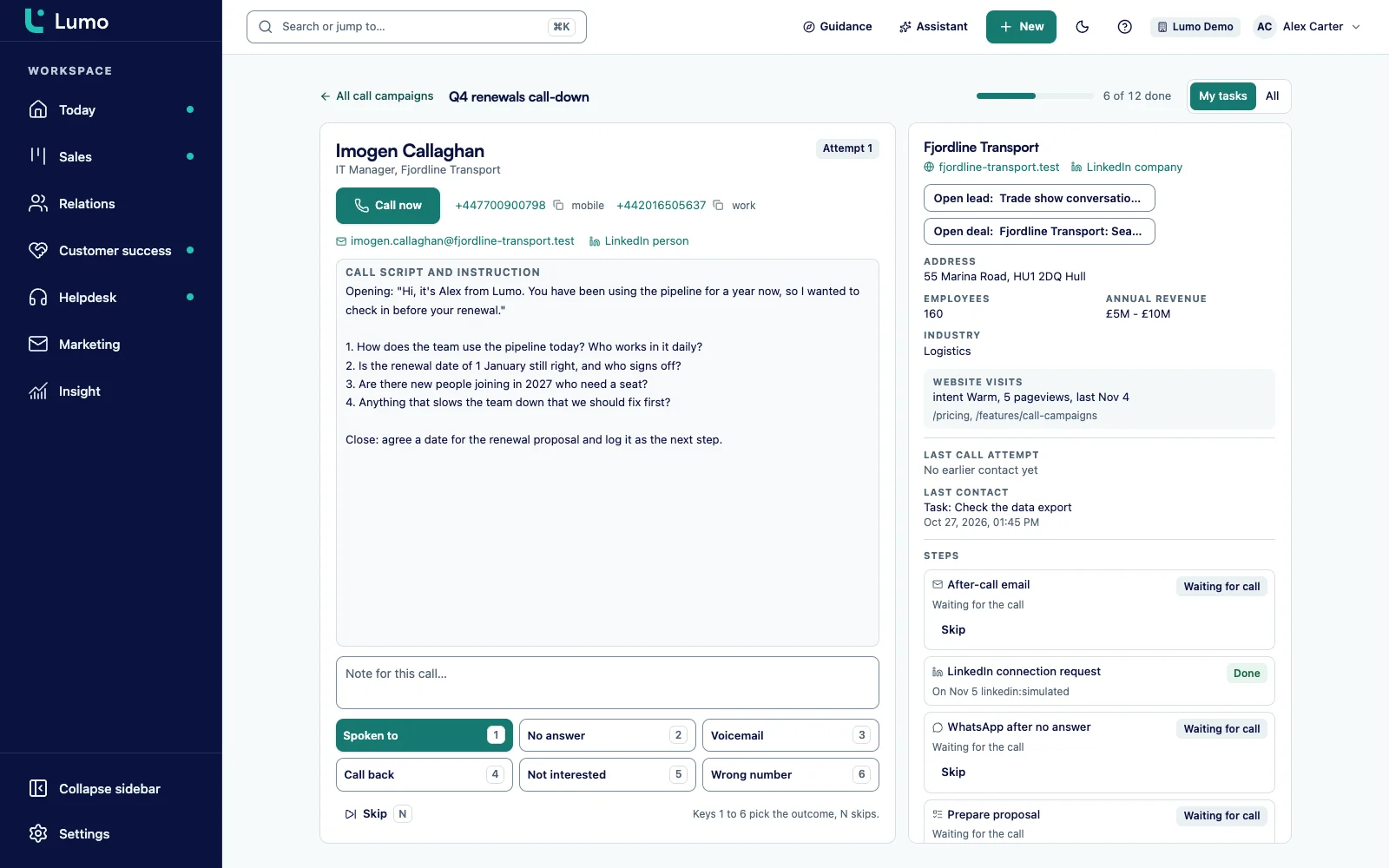
In call mode you work through a list with the prospect next to you: website, LinkedIn, last contact and an open lead or deal. You pick an outcome, and the cadence sets up the next step. An email after the call, a LinkedIn step, a message or a task.
Your people make the calls. Lumo makes sure the list, the context and the follow-up are already there when you start. Read on in calling campaigns and Cadence and LinkedIn outreach.
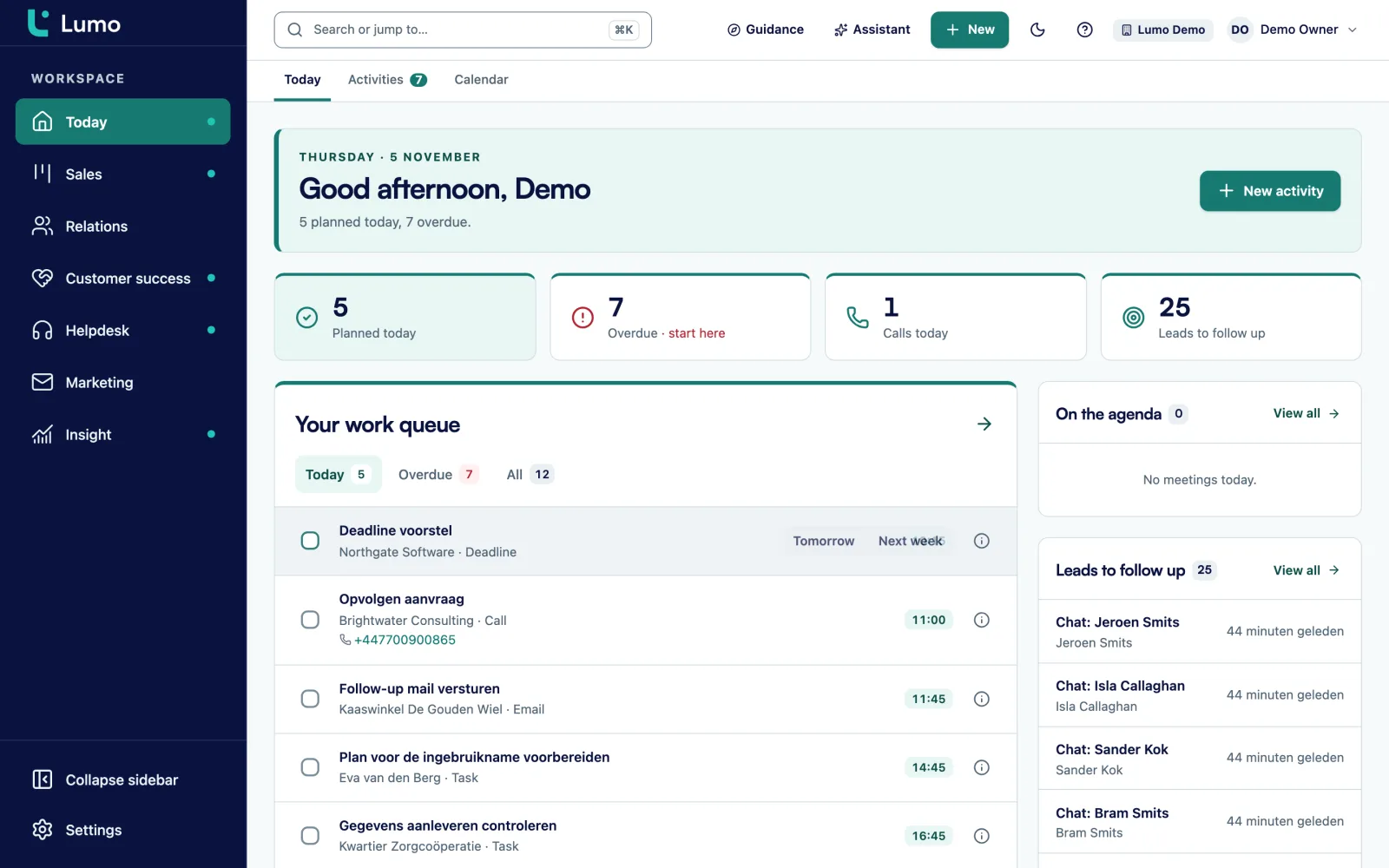
This is the promise of Lumo on one screen. You open Today and the calls are already there, planned by an automation or by an agent, for the right person and at the right time.
What you see comes from the rest of the system: quiet deals, new leads, tickets close to their deadline and campaigns that go out today. You do not have to go through five lists first. Read more about your day on activities and calendar.
You probably know this one. A customer calls about an invoice. The account manager looks them up in the CRM, sees an open upsell deal and calls back full of energy. What he does not see: there are three open tickets in the support tool, and the latest one has waited a week for an answer. Meanwhile marketing sends a newsletter from yet another tool asking "Ready for the next step?". The customer has dealt with your company three times, and never with the same company.
That is how most B2B teams we meet work. A CRM for sales, a helpdesk for service, an email tool for marketing and a spreadsheet that tries to stitch it all together on Monday morning. Every tool keeps its own version of the customer. Integrations are supposed to close the gaps, but they almost do what they should. An unsubscribe in one tool reaches the other hours later. A rep who leaves takes his inbox with him.
Lumo starts from one database. A person, an organization and a deal exist once. Email, activities, notes, quotes, tickets, chats, form submissions and campaigns hang off them. Open a customer and you see what sales, service and marketing are doing with that customer. Not because three systems sync well, but because there is only one.
We built Lumo because in more than 150 implementations we kept seeing the same glue. As a Pipedrive Platinum Partner we have set up CRMs for B2B teams for years, and the work was rarely in the CRM itself. It was in everything around it. That part is now in the product. This page walks through the whole system: what it is, what a working day looks like, and how you switch. For the short version, see the platform. Not sure you need a new CRM at all? Read how to choose a CRM first.
The Today screen is where your day starts. It shows your tasks and meetings for today, the leads waiting for follow-up, the deals that have sat in a stage too long, the tickets whose response time is nearly up and the campaigns that run or start today. You do not have to walk through five lists before you know where to begin.
Everything on Today comes from the rest of the system. A deal shows up because it has been in its stage longer than you set for that stage. A ticket shows up because 75 percent of its response target is used. An activity shows up because you or a colleague put it on today. If something does not belong there, click through to the record and fix it there.
If you do not use the helpdesk or campaigns, switch those modules off and they disappear from this screen as well.
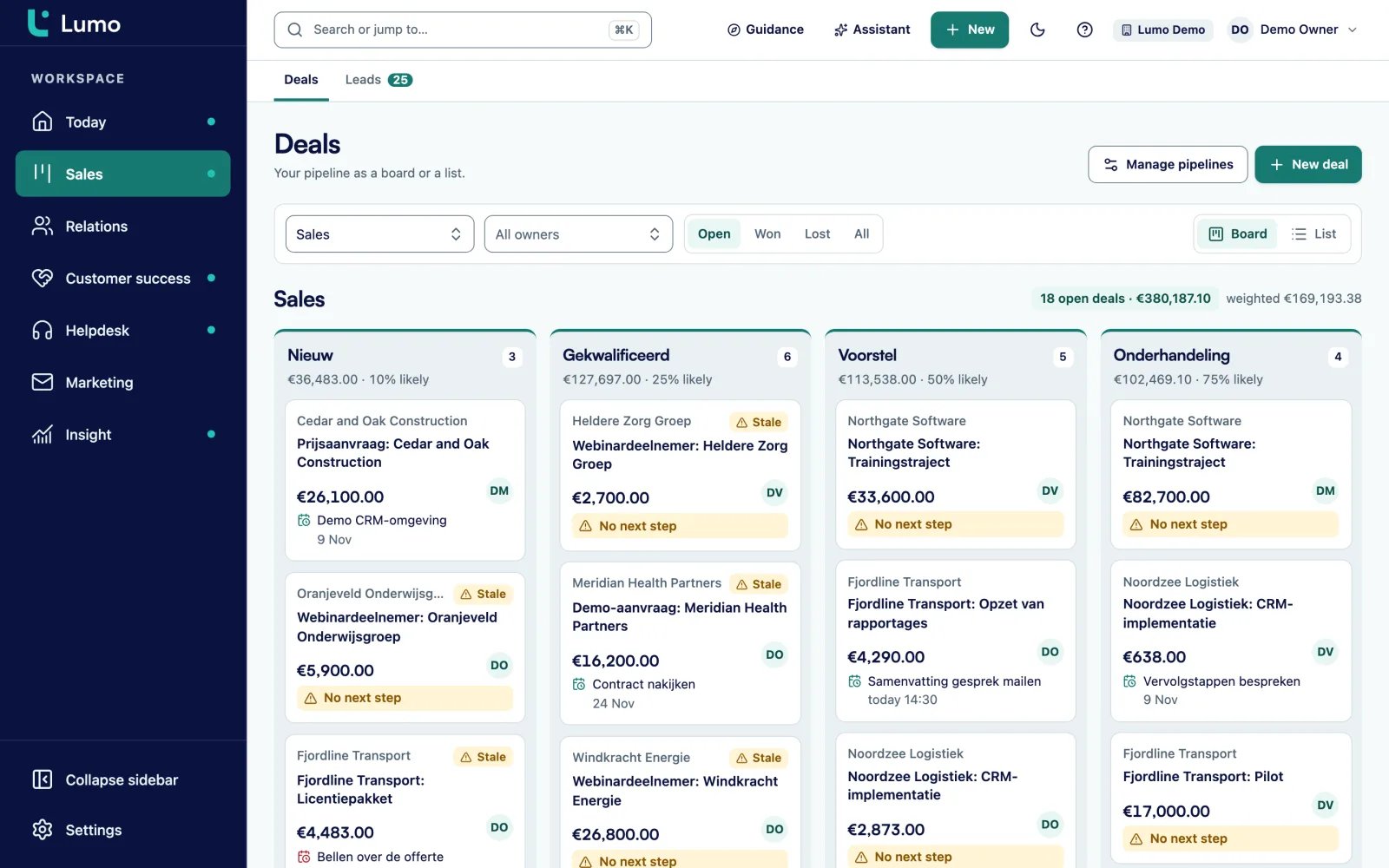
The deal board shows count, value and weighted value per stage. Every stage has its own win probability and its own number of days after which a deal is rotting. When a deal sits too long, the card tells you how many days it has been in the stage and how many days too long. Drag a deal to the next stage, or use Move to if you prefer the keyboard.
Products on a deal calculate the deal value. Each line has a quantity, a price, a discount and a billing frequency: one-time, weekly, monthly, quarterly, semi-annually or annually. Every stage change is stored with the time the deal spent in the previous stage. A lost deal asks for a lost reason, so later you see why you lose and not only how often.
Leads live in their own inbox, with statuses from New to Qualified. A lead converts to a deal exactly once. More on pipeline management and lead management.
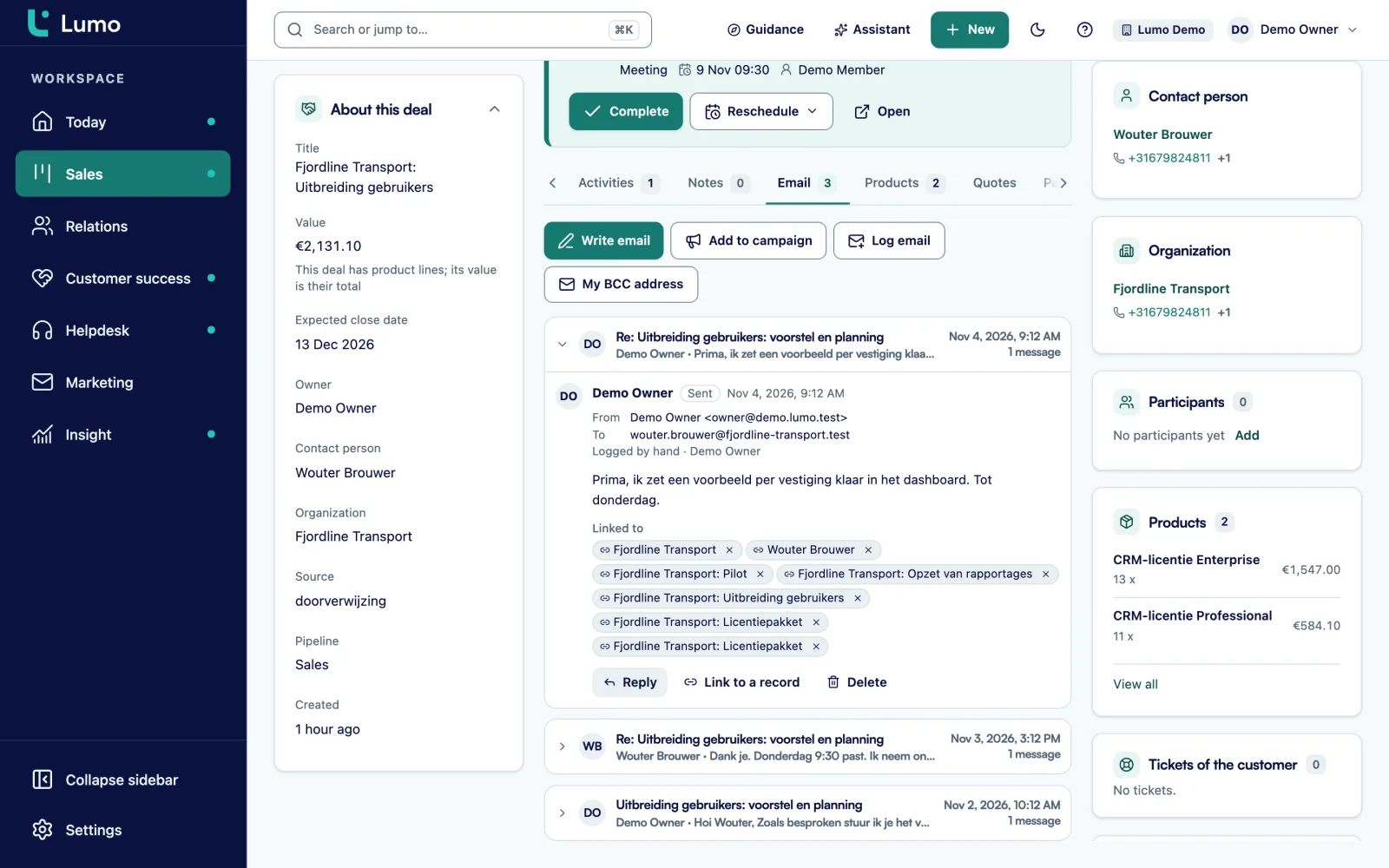
Connect Gmail and mail with known contacts lands on the person, the organization and the deal by itself. The first sync looks back 90 days by default. Mail with people who are not in the CRM is never stored, and its body is never even fetched. That keeps the CRM clean and your private mail private. Per connection you choose whether only you see the mail or your whole team.
You send from the deal out of your own mailbox, with the contact filled in. Fields such as first name and organization go in with one click, and a campaign template can be reused for a one-to-one mail. Google Calendar syncs both ways: meetings with known contacts become meetings in Lumo, and your own Lumo meetings go to your calendar.
On Outlook or Microsoft 365? You are welcome too. The Outlook and Microsoft 365 integration is on the roadmap. Today you use the personal BCC address, which works with any mail client, or you log a mail by hand. Everything about email is on email and Gmail.
You create a quote on the deal. Its lines are a snapshot of the deal products, so what you discussed is already in it. Lumo numbers quotes per workspace and per year, such as OFF-2026-0001, and adds VAT, an intro text, terms and a valid-until date. The PDF carries your logo and the customer's logo.
The quote leaves through your own Gmail with the PDF attached and a link to sign. The recipient gets a six-digit code by email, fills in the fields you placed on the PDF and types or draws their signature. They can also decline. Already have the quote as a PDF from Word? Upload it and send it through the same signing flow. After signing, the PDF gets an evidence page with time, IP address, device and a SHA-256 hash, and a note lands on the deal.
What you should know: the email and the signing page are in English or Dutch, you pick that when you send and the customer can switch. The quote PDF that Lumo generates and the evidence page are in Dutch. And it is a typed or drawn name plus an email code, not a qualified electronic signature. For most B2B quotes that is exactly enough. All about quotes and e-signatures.
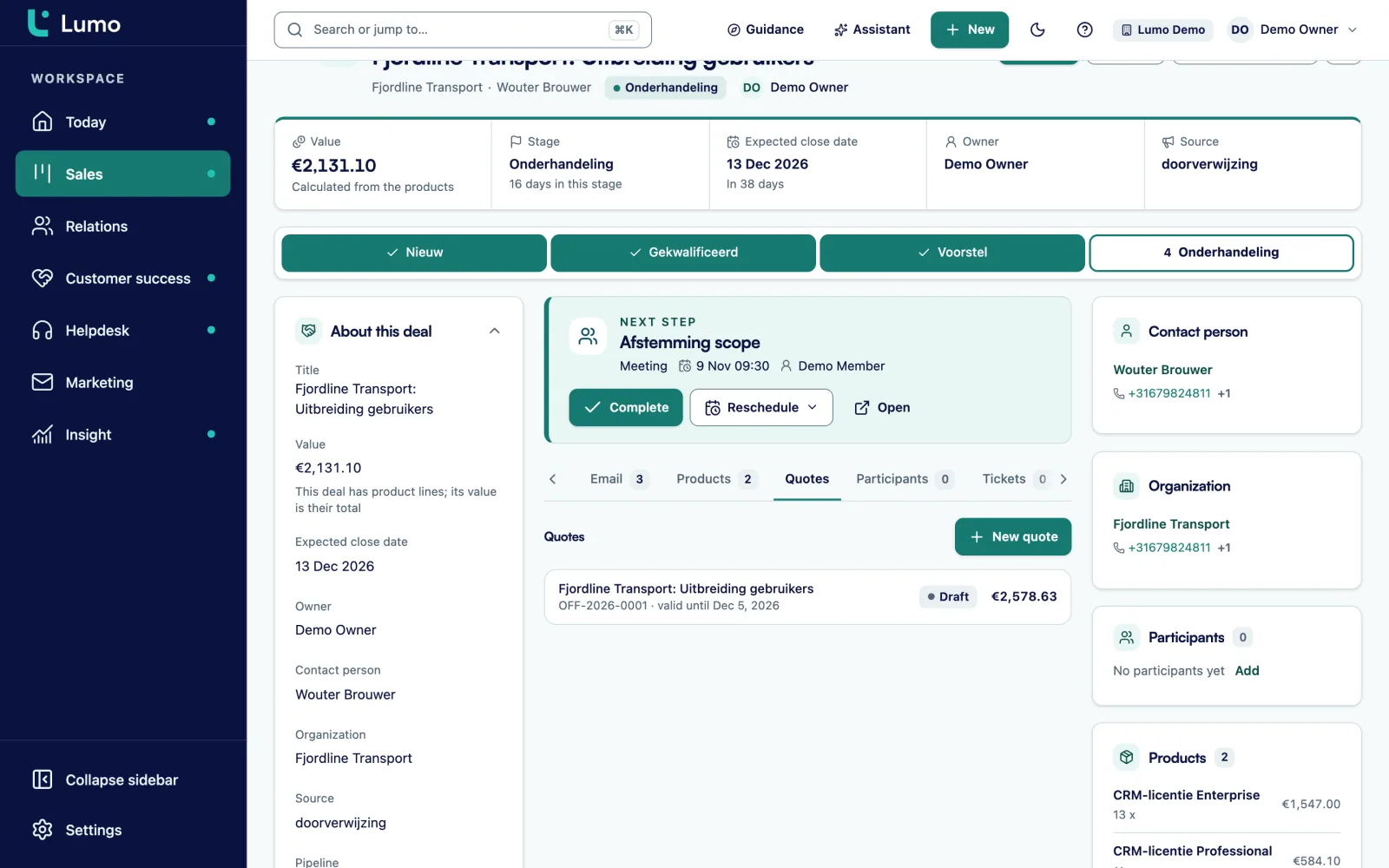
Tickets, the customer portal, the knowledge base and live chat sit in the same system as your deals. Tickets come in from a mailbox, the portal or a chat, or you create them yourself. They move through New, Open, Pending, On hold, Solved and Closed. Per priority you set a first-response and a resolution target, with business hours and holidays. After solving, the customer gets a short satisfaction survey.
Because it is one database, an account manager sees on the organization how the customer is doing. There is a customer health score from 0 to 100 per organization, based on the tickets of the last 90 days. On a deal you see the customer's open tickets. So nobody calls about an upsell while a complaint is still open.
Read more on helpdesk and ticketing and customer portal and knowledge base.
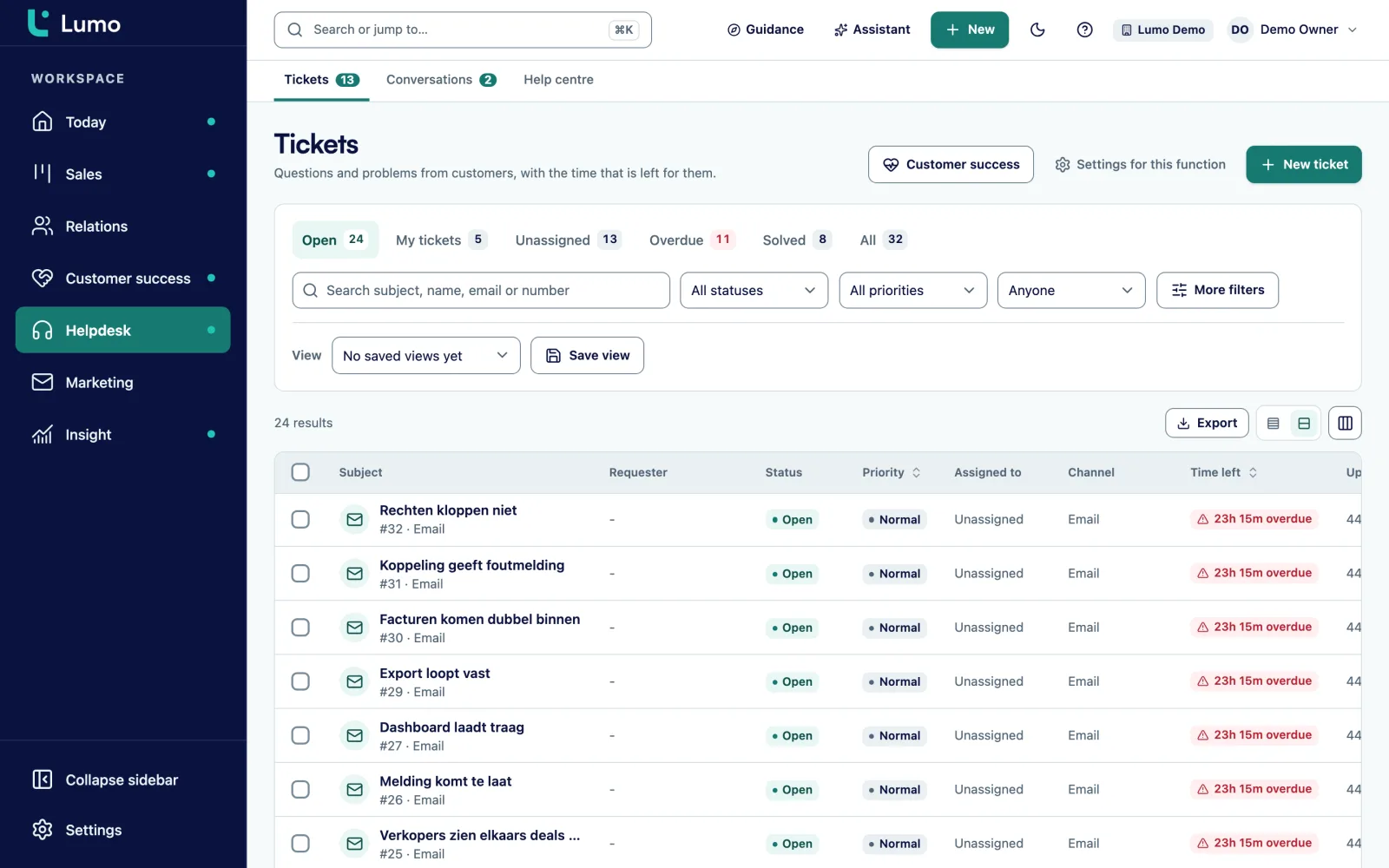
You build a report in a few choices: the source, the measure and the breakdown. Sources include deals, persons, organizations, leads, activities, stages and lost reasons. Pick from nine chart types, from a KPI tile to a funnel and a waterfall, with periods such as the fiscal year or a rolling range and a goal line. Click a bar and you see the deals behind it.
Keep dashboards private or share them with the team. For a weighted forecast you build a report that multiplies deal values by the win probability per stage. There is no separate forecast screen. With the AI assistant you can also ask for a report in one sentence and have it built for you.
More on reports and dashboards.
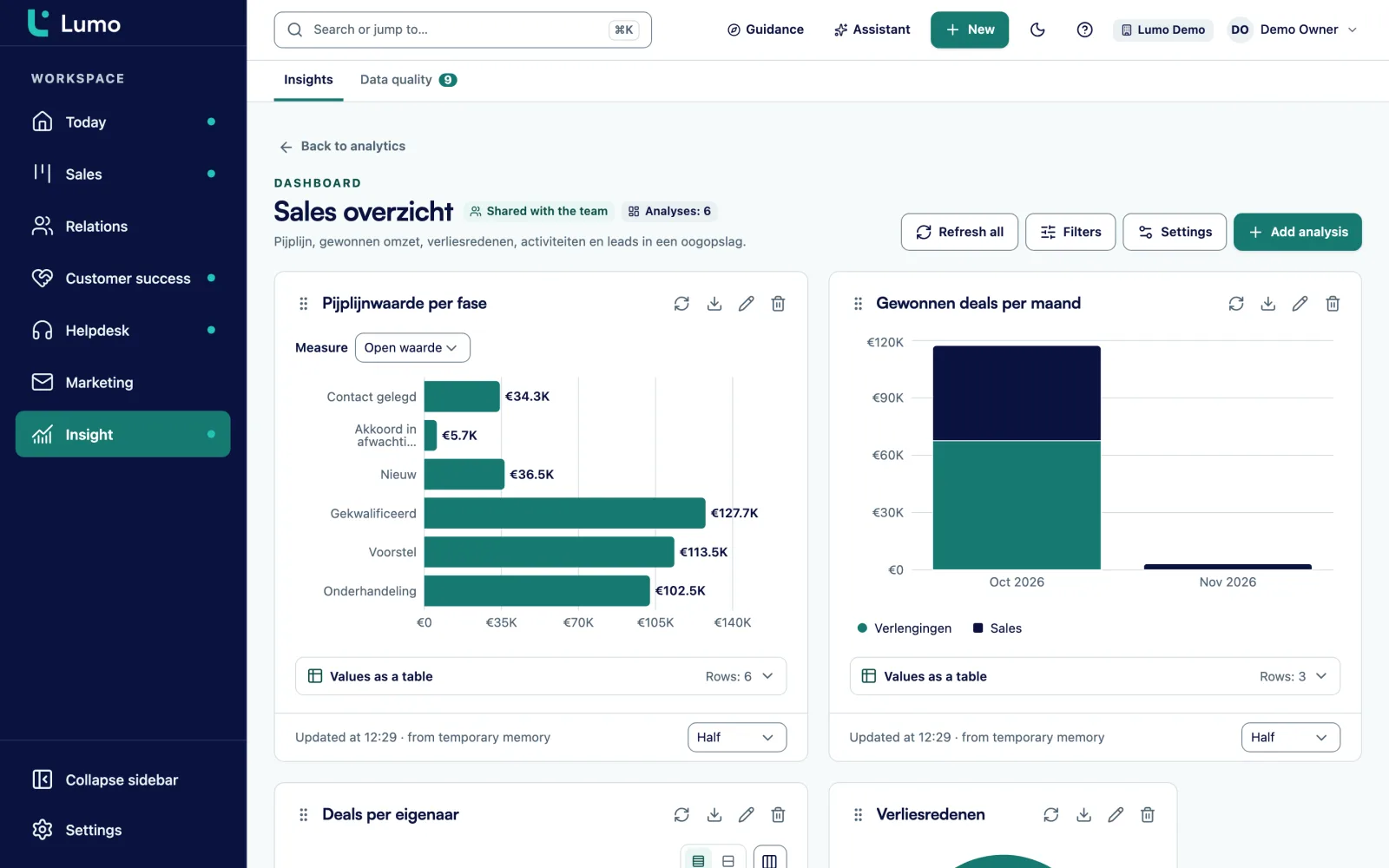
Lumo has fourteen modules you switch on or off per workspace. Start with sales and turn on the rest when you are ready.
A four-step wizard, segments from your own contacts and consent checked again at the moment of sending. An unsubscribe applies to the whole workspace. Campaigns
A submission finds or creates a person by email and creates a lead, with source and consent. Hidden fields pick up your utm_source. Forms
Off until an admin switches it on. It works with your role and permissions, and anything outward-facing waits for your approval. AI assistant
When a deal changes stage, create an activity, set a field or assign an owner. With a dry run and a run log. Automations
A queue of pairs with a score, a field-by-field compare and a merge. Every merge can be undone. Duplicates
Tours, checklists and data quality rules with severity tip, warn or block, plus an adoption score. Adoption
A REST API with 56 routes and scoped keys, signed outgoing webhooks and an MCP server with 593 tools. API
Owner, Admin, Member and Viewer roles plus custom roles, 2FA with an authenticator app and an append-only audit log. Security
An example, not a customer story. Say Sam is an account manager at a distributor of office furniture with eight reps and a support team of three. Sam works in Gmail and Google Calendar.
8.30 am. Sam opens Today. At the top are two activities that went overdue yesterday: a callback and a quote to chase. Below them, three leads with status New that came in through the website form, and a deal that has been in the Proposal stage for 21 days while that stage is set to rot after fourteen. Under tickets, a regular customer has a question whose response time is nearly up. The ticket is not Sam's, but Sam can see it.
9.00 am. Sam starts with the leads. The first one is clearly not a fit, so Sam picks Disqualify and adds a reason. The second one gets a call that goes well. Sam sets the lead to Qualified and clicks Convert to deal. The deal lands in the first stage of the New business pipeline, with the person and organization already linked.
10.15 am. Sam opens the stalled deal. The timeline shows that the last email, synced from Gmail, is two weeks old. Sam writes a short follow-up from the deal out of Gmail, with the customer's first name as a field, and plans a call for Thursday right away. A minute later that call is also in Google Calendar.
1.30 pm. After lunch there is a meeting Sam booked in Google Calendar. Because the customer is a known person, the meeting is already an activity on the person, the organization and the most recent open deal. After the meeting Sam updates the product lines: twelve workstations with a ten percent discount and a quarterly service contract. The deal value updates by itself.
3.00 pm. Sam creates the quote. The lines come from the deal and the number follows this year's sequence. It goes out through Gmail. At 4.40 pm a note appears on the deal: the customer signed, with the signed PDF attached. Sam marks the deal Won.
5.00 pm. One task is left on Today. Meanwhile the sales manager sees on the shared dashboard that the pipeline grew by three deals this week. Nobody had to update a spreadsheet for that.
What changes when sales, service and marketing see the same customer.
| Topic | Separate tools | Lumo |
|---|---|---|
| Customer view | Every tool has its own version of the customer | One person and one organization, with everything attached |
| Mail sits in one rep's inbox | Mail with known contacts sits on the record | |
| Consent | Unsubscribes need syncing between tools | An unsubscribe applies to the whole workspace at once |
| Service on the deal | Sales does not see the customer's tickets | Open tickets show on the deal and the organization |
| Reporting | Export and merge in a spreadsheet | Reports on your own data, with drill-down |
| Admin | Permissions, integrations and invoices per tool | One set of roles, one audit log |
| GDPR request | Search every tool for what you hold on someone | One export or erasure with a check afterwards |
If you use a specialist tool you want to keep, it stays next to Lumo. Connect it through the API and webhooks.
Changing CRM is mostly work on your data and your agreements. We do that together, at your pace.
In the demo we show Lumo next to your own process. We look at where you get stuck today and which modules you need first. Book a demo
Want to click around yourself? We set up a trial workspace for you. There is no self-signup, we create the workspace. Request a trial
The import wizard brings over owners, pipelines and stages, organizations, persons, deals with product lines, leads, activities and notes. A dry run first, then for real. After that a delta sync runs via webhooks with a check every fifteen minutes. Switch from Pipedrive
Stages, fields, roles and data quality rules. Sales Surge sets it up or you do it yourself. Coming from another CRM or from spreadsheets, we move the data by hand. Implementation
In-app tours, checklists per role and an adoption score show who really uses the CRM and where it still rubs. CRM adoption
Teams coming from Pipedrive have a second option. In pipedrive_mirror mode, Pipedrive stays the source. Lumo reads everything in, and changes you make in Lumo to activities, notes, deals and leads are written back to Pipedrive. So part of the team can start while the rest still works in Pipedrive. In native mode Lumo is the source and you have switched.
The import is idempotent and resumable. If it stops halfway, you run it again without creating duplicates. After the import you find any remaining duplicates in the duplicates queue.
What you should know: there is an import wizard for Pipedrive only. CSV import is not in the product yet. Coming from HubSpot, another CRM or a spreadsheet, we move the data for you as part of the migration service. That is more manual work on our side, not on yours.
Lumo is a web app. There is no iOS or Android app, you use Lumo in the browser, on a phone as well. Mail and calendar sync with Gmail and Google Calendar today. The Outlook and Microsoft 365 integration is on the roadmap. On Outlook, you log mail with your personal BCC address or by hand, and pipeline, quotes, helpdesk, campaigns and reports work exactly the same. The data is hosted in London, in the United Kingdom. Sign-in is email and password plus 2FA, without SSO. We go through all of this in the demo, so you know what you are getting into.
Lumo is a RevOps CRM for B2B teams, made by Sales Surge. Marketing, sales, customer success and support work in one system: deals and leads, contacts, email through Gmail, calling with CloudTalk, quotes with e-signatures, campaigns, website tracking, lead scoring, a helpdesk, time on projects and reports. Your team works in the app, your AI agents through the API and MCP. The platform
For B2B teams with a sales process that fits a pipeline and that want sales, service and marketing on one customer view. Think software companies, agencies, professional services and wholesalers. By industry
The price depends on the number of users and the modules you switch on. In the demo you get a price for your situation. About pricing
Yes. You request a trial workspace and we set it up for you. There is no self-signup. Request a trial
Yes. The import wizard brings over owners, pipelines, organizations, persons, deals with products, leads, activities and notes, with a dry run first. From other CRMs we move the data by hand.
The Outlook and Microsoft 365 integration is on the roadmap. Today the personal BCC address works with any mail client, Outlook included: put the address in Bcc or forward a mail to it and it lands on the right person, organization and deal. You can also log mail by hand. The rest of Lumo does not depend on your mail client.
In a database in London, with data separated per workspace at database level and a daily backup. Security and privacy
No. Lumo is a web app you use in the browser, on a phone or tablet as well.
The app is in Dutch and English, with a language setting per user and per workspace. The quote email and signing page are in English or Dutch, the quote PDF that Lumo generates is in Dutch. Quotes
The assistant is off per workspace until an owner or admin switches it on. It runs on Anthropic's Claude API or Google's paid Gemini API, with your role and permissions, and asks for approval before anything irreversible or outward-facing. AI assistant
In the demo you see the product on your situation, ask your questions and hear honestly what works today and what is still on the roadmap.